
A 75-inch TV needs a mount that matches its weight and VESA hole pattern—not just its screen size. The options below all support TVs in the 75-inch range, but they differ in how far they extend, how much they swivel, and the load they’re designed to hold. Check your TV’s manual for its weight and VESA pattern before choosing, and mount the bracket to suitable wall framing or masonry rather than drywall alone.
Table of Contents
Quick Comparison
| Mount | TV size range | Weight capacity | Extension | Swivel | Best for |
|---|---|---|---|---|---|
| USX MOUNT Full Motion TV Wall Mount | 42–90 in. | 132 lb | 16.49 in. | Up to ±45° | Versatile all-around use |
| USX MOUNT Dual-Arm TV Wall Mount | 37–84 in. | 120 lb | 15.16 in. | Up to ±45° | Value-focused full motion |
| Perlegear Long-Arm Corner TV Wall Mount | 37–75 in. | 100 lb | 32.37 in. | Up to ±90° | Corner placement and wide movement |
| Pipishell Full Motion TV Wall Mount | 37–84 in. | 132 lb | 14.84 in. | Up to ±45° | Heavy TVs and shorter reach |
| MOUNTUP Full Motion TV Wall Mount | 40–85 in. | 110 lb | 13.8 in. | Left and right; maximum depends on TV | A low-profile position when retracted |
Specifications are based on the supplied product information. Actual fit and swivel range depend on your TV’s weight, dimensions, VESA pattern, and installation location.
Our Picks: Best Swivel Tv Wall Mount 75 Inch reviews
1. USX MOUNT Full Motion TV Wall Mount: Best All-Around Choice

This dual-arm mount covers a broad range of TV sizes, including 75-inch models, and supports a listed maximum load of 132 pounds. Its VESA compatibility runs from 200 x 100 mm to 600 x 400 mm, so check your TV’s mounting-hole pattern before ordering.
The arms extend up to 16.49 inches and retract to 2.40 inches from the wall. That balance makes it useful when you want to angle the screen toward different seats but still want it to sit close to the wall when put away. The mount tilts from +5° to -15°, swivels up to ±45°, and offers ±3° post-installation leveling. The actual swivel angle can be less depending on the TV’s size and position.
The package includes labeled hardware, a bubble level, and cable ties. Concrete anchors are not included, so plan ahead if you’re mounting to concrete. Its reach and capacity make it a strong general-purpose pick, though the Perlegear is a better fit when you need a much longer arm for a corner.
Pros:
- Supports TVs up to 90 inches and 132 pounds.
- Extends farther than most of the other mounts here.
- Offers tilt, swivel, and post-installation leveling.
- Includes a bubble level and cable ties.
Cons:
- Concrete anchors are not included.
- Maximum swivel depends on the TV and its placement.
Verdict: Choose this USX MOUNT if you want a versatile dual-arm mount with a high stated capacity and a useful mix of reach and low-profile retraction.
2. USX MOUNT Dual-Arm TV Wall Mount: A Practical Value Option

This USX MOUNT model supports most flat-screen TVs from 37 to 84 inches, with a listed capacity of 120 pounds and VESA patterns from 200 x 100 mm to 600 x 400 mm. A 75-inch TV falls within its stated size range, but you should still verify the TV’s weight and mounting pattern.
Its dual articulating arms extend up to 15.16 inches and retract to 2.74 inches. The mount tilts from +5° to -15°, swivels up to ±45°, and includes ±4° of leveling adjustment after installation. Those settings suit rooms where you need to reduce glare or turn the screen toward another seat, though the TV’s size can limit its movement.
It’s designed for wood studs or concrete, and the package includes labeled hardware, a bubble level, and cable ties. Concrete anchors are not included. Compared with the first USX MOUNT pick, this model has a slightly lower weight limit and less extension, but it still provides the key adjustments many living rooms need.
Pros:
- Fits TVs up to 84 inches and supports up to 120 pounds.
- Offers tilt, swivel, and leveling adjustments.
- Retracts to less than 3 inches from the wall.
- Includes a bubble level and cable ties.
Cons:
- Concrete anchors are not included.
- Has less reach and a lower stated capacity than the first USX MOUNT option.
Verdict: This is a sensible choice if your 75-inch TV fits its weight and VESA limits and you want full-motion adjustment without needing an extra-long arm.
3. Perlegear Long-Arm Corner Mount: Best for a Corner Setup

The Perlegear is the standout option when a standard short-reach mount won’t bring the screen far enough into the room. It fits TVs from 37 to 75 inches and supports up to 100 pounds, with VESA compatibility from 200 x 100 mm to 600 x 400 mm. Since 75 inches is the top of its stated size range, carefully confirm your TV meets the weight and VESA limits.
Its arm extends up to 32.37 inches and retracts to 3.12 inches. The mount is listed with up to ±90° swivel and tilt from -15° to +5°, plus ±4° of leveling adjustment. This reach and movement are especially useful for corner installations or rooms where people watch from several angles. The full swivel range may not be possible with every TV or wall position.
The mount is listed for wood studs, concrete, or brick, but not drywall alone. Its stated 100-pound capacity is lower than the two USX MOUNT picks and the Pipishell, so it isn’t the best choice for a heavier set. In return, it offers much more extension and the widest specified swivel range in this group.
Pros:
- Extends up to 32.37 inches for corner and wide-room placement.
- Offers up to ±90° swivel.
- Supports a range of VESA patterns up to 600 x 400 mm.
- Includes hardware and a user-friendly installation guide.
Cons:
- Its 100-pound capacity is lower than several alternatives.
- 75 inches is the maximum stated TV size.
Verdict: Pick the Perlegear if extra reach and broad swivel movement matter more than a higher weight rating, especially for a corner installation.
4. Pipishell Full Motion Mount: Best for a Heavier TV

Pipishell’s dual-arm mount is designed for TVs from 37 to 84 inches and lists a maximum capacity of 132 pounds. It supports VESA patterns from 200 x 100 mm to 600 x 400 mm. That higher stated load capacity makes it worth considering if your 75-inch TV is heavier than average, provided it remains within the mount’s limits.
The arm extends up to 14.84 inches and retracts to 3 inches from the wall. It tilts from +5° to -15° and swivels up to ±45°, with ±3° of post-installation leveling to help fine-tune the screen. Its reach is shorter than either USX MOUNT option, so it may not suit a deep corner or a room where the screen must travel far from the wall.
The product information lists installation on 12- or 16-inch wood studs, concrete, and brick, and says not to mount it on drywall alone. A mounting template, bubble level, instructions, and mounting hardware are included. Compared with the other picks, Pipishell combines a high weight limit with a more compact range of movement.
Pros:
- Supports TVs up to 84 inches and 132 pounds.
- Fits 12- and 16-inch wood stud spacing, as well as concrete and brick walls.
- Includes a mounting template and bubble level.
- Offers tilt, swivel, and leveling adjustments.
Cons:
- Has less extension than the USX MOUNT models.
- Swivel is limited to up to ±45°, depending on the TV.
Verdict: Consider Pipishell if your TV is within its fit requirements and you value a higher listed capacity more than long reach.
5. MOUNTUP Full Motion TV Wall Mount: Best for a Close-to-Wall Fit
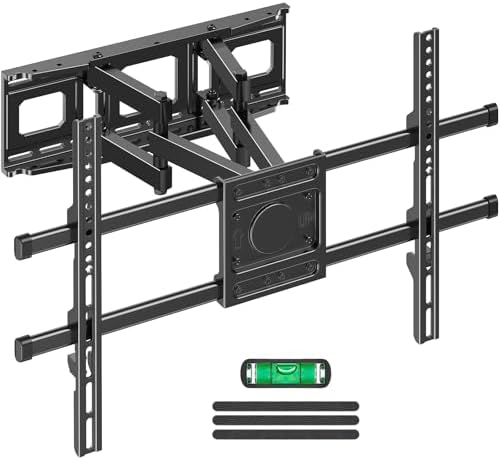
MOUNTUP’s dual-arm bracket fits most flat or curved TVs from 40 to 85 inches, with a listed maximum weight of 110 pounds. Its VESA range is 200 x 100 mm to 600 x 400 mm, making it compatible with many 75-inch TVs if the weight and mounting pattern also match.
The mount extends up to 13.8 inches and retracts to 2.36 inches, the shortest retracted distance in this comparison. It tilts up 7° and down 8°, and the screen can be adjusted left or right; the maximum swivel depends on TV size. A ±3° leveling adjustment can help correct alignment after installation.
The mount is listed for 12- or 16-inch wood studs, brick, and concrete. The package includes a paper template, bubble level, cable ties, concrete anchors, and mounting hardware. Its reach is shorter than several dual-arm alternatives, but the close retracted position and included cable ties may suit a room where a tidy, compact setup is the priority.
Pros:
- Retracts to 2.36 inches from the wall.
- Fits flat and curved TVs within its stated size and weight limits.
- Includes a mounting template, bubble level, cable ties, and concrete anchors.
- Offers tilt and post-installation leveling adjustments.
Cons:
- Has less extension than the other listed full-motion options.
- Maximum swivel angle depends on the TV.
Verdict: Choose MOUNTUP if you want a mount that retracts close to the wall and your TV is within its 110-pound capacity.
How to Choose a Swivel TV Wall Mount for a 75-Inch TV
Check the TV’s weight, not just its screen size
A 75-inch screen does not tell you how heavy the TV is. Check the weight without the stand in your TV’s manual or specifications, then compare it with the mount’s stated maximum capacity. Leave a safety margin when possible, and do not rely on a mount’s screen-size range as proof that it can carry your specific TV.
Match the VESA pattern
VESA is the spacing between the mounting holes on the back of the TV. Measure the horizontal and vertical distance between those holes in millimeters, or look up the pattern in your TV’s manual. The five mounts here list support for patterns within a range, but you still need to confirm that your particular pattern is included.
Choose an arm length for your room
A shorter arm can be enough if you only need to turn the screen slightly or pull it forward for access. A longer arm can help when the TV needs to reach around a corner or face seats spread across a room. The Perlegear extends the farthest in this group; remember that the TV’s size and position can affect how far it can actually move.
Consider swivel and tilt separately
Swivel moves the screen left and right, while tilt angles it up or down. Swivel is helpful when seating is off to one side; tilt can help position the screen or reduce glare. Manufacturer-listed swivel ranges are not a guarantee of the same movement with every 75-inch TV, since the screen can hit a wall or its own mount before reaching the stated limit.
Confirm your wall and stud layout
These mounts are designed for secure attachment to suitable wood framing or masonry, not drywall alone. Check whether your wall uses 12- or 16-inch stud spacing and whether the mount’s wall plate can line up with it. For concrete or brick, use the correct anchors for the wall and follow the product instructions; two of the listed mounts do not include concrete anchors.
Plan for cables and installation access
Look at where the TV’s power and input ports sit before mounting. An articulating arm can make it easier to reach connections, but the TV must still have enough room to move without pulling or pinching cables. A mounting template and level can help with positioning, but mounting a large TV is often easier and safer with another person assisting.
Frequently Asked Questions
Can these mounts hold any 75-inch TV?
No. A mount may list support for 75-inch TVs and still be incompatible with a particular model. Check the TV’s weight, VESA pattern, and the mount’s installation requirements before buying.
Which of these mounts has the longest reach?
The Perlegear extends up to 32.37 inches, substantially farther than the other options. That extra reach can help with corner placement, but it has a lower listed capacity than several alternatives.
Will a swivel mount let my TV turn a full 90 degrees?
Not always. The Perlegear lists up to ±90° swivel, while several others list up to ±45°. The actual angle depends on the TV’s size, its distance from the wall, and the room layout.
Can I install a TV wall mount directly on drywall?
These mounts should not be installed on drywall alone. Attach the mount to suitable wall framing or to an appropriate masonry surface using the hardware and instructions intended for that surface.
Do all of these mounts include concrete anchors?
No. The two USX MOUNT models state that concrete anchors are not included. MOUNTUP lists concrete anchors in the package; check the supplied instructions and hardware for the other options before starting installation.
Is a dual-arm mount a good choice for a large TV?
A dual-arm design can let you extend, swivel, and retract the screen, but the design alone does not confirm that the mount fits your TV. Match the mount’s capacity and VESA range to your TV, and make sure the wall can support the installation.
Final Recommendation
For most shoppers seeking a versatile swivel mount for a 75-inch TV, the first USX MOUNT model stands out for its 132-pound listed capacity, useful extension, and tilt and swivel adjustments. If you need to place the TV well away from the wall or around a corner, the Perlegear offers the longest reach, while MOUNTUP is a strong alternative when retracting close to the wall matters most. Before ordering, verify your TV’s weight and VESA pattern and confirm that your wall supports the installation.
