
Choosing the best digital angle finder for woodworking depends on how you measure. A hinged ruler-style protractor is useful for transferring angles and laying out trim, while a compact magnetic gauge can help you check a saw blade or another metal surface. Below, we compare five options by their features, design, and practical fit for common shop tasks.
Table of Contents
Quick Comparison: Best Digital Angle Finders For Woodworking
| Product | Best suited for | Standout features | Availability |
|---|---|---|---|
| Klein Tools 935DGGP Digital Angle Finder | Checking angles on metal surfaces and setting slopes | Magnetic base, V-groove, multiple unit formats | Available |
| WORKPRO 7-Inch Digital Angle Finder | Transferring angles and measuring length | Lock and hold functions, 400 mm ruler length, ±0.3° accuracy | Available |
| General Tools Digital Angle Finder Ruler #822 | Compact woodworking layout and trim work | 5-inch stainless steel ruler, lock feature, reverse angle function | Available |
| S&F STEAD & FAST Digital Angle Finder | Miter and bevel calculations | Miter button, ±0.2° accuracy, IP54-rated body | Available |
| Neoteck 12-Inch Digital Angle Finder | Longer reach for angle and length measurements | 12-inch ruler, data hold, relative and absolute measurement | Listed as unavailable |
Our Picks: Best Digital Angle Finders For Woodworking reviews
1. Klein Tools 935DGGP: Best Magnetic Gauge for Metal Surfaces
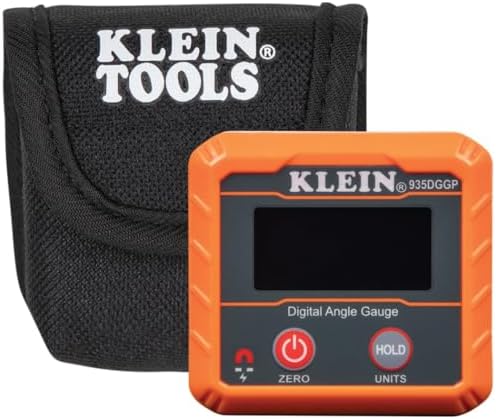
The Klein Tools 935DGGP is a compact digital gauge rather than a hinged ruler-style protractor. Its magnetic base is designed to attach to ferromagnetic surfaces, including saw blades, conduit, pipes, vents, and ducts. That makes it a practical choice when you want to check an angle or use the tool as a digital level without holding it in place by hand.
It can display measurements in degrees, percent grade, millimeters per meter, or inches per foot. The high-contrast screen is intended to improve readability in dim work areas, and V-groove edges help the tool sit against round surfaces such as conduit and pipe. For woodworking, its magnetic base may be especially useful when setting or checking a compatible metal saw blade.
Its main limitation is its form. It does not have long hinged arms for reaching across a corner or transferring an angle from a workpiece. The magnetic base also only helps on surfaces that attract magnets, so it is not a universal solution for wood, plastic, or nonmagnetic metal. Compared with the other picks, this one is the better fit for surface checks, not general-purpose layout.
Pros:
- Magnetic base supports hands-free checks on compatible surfaces.
- Reads degrees, percent grade, mm/m, and in/ft.
- V-groove edges help align the tool on pipes and conduit.
- High-contrast display is designed for improved visibility.
Cons:
- Does not have hinged ruler arms for transferring angles across a corner.
- Magnetic attachment is useful only on ferromagnetic surfaces.
Verdict: Choose the Klein Tools gauge if magnetic attachment and multiple slope formats matter more to you than a folding ruler design.
2. WORKPRO 7-Inch Digital Angle Finder: Best for Locking and Transferring Angles

The WORKPRO combines a digital angle display with two stainless steel ruler arms. It measures inside and outside angles through a full 360-degree range, and the arms extend to 400 mm when unfolded for basic measuring and marking. This two-in-one layout can save time when you need to measure an angle and then transfer it to a board or workpiece.
The tool is specified at ±0.3° accuracy with 0.05° display resolution. Its lock function holds an arm at a chosen angle, while the hold function freezes the displayed reading so you can record it without moving the tool. The screen switches between decimal degrees and degrees and minutes. Etched scales are intended to remain visible with use, and the package includes a pre-installed battery, a spare battery, and a storage pouch.
For furniture, trim, or general shop layout, the locking arms make this a more versatile choice than a magnetic gauge. The trade-off is that it is a manual hinged tool, so you need to keep the arms aligned with the surfaces you are measuring. Its 400 mm extension also makes it less compact than a short ruler-style option. The five-minute auto shutoff is useful for battery life, but remember to note a measurement before the tool powers down.
Pros:
- Measures inside and outside angles across a 360-degree range.
- Lock and hold functions help with transferring and recording readings.
- Extends to 400 mm for basic measuring and marking.
- Includes a spare battery and Oxford storage pouch.
Cons:
- Its extended ruler form takes more room to store than a compact gauge.
- Accurate use depends on keeping the arms flush against the surfaces being measured.
Verdict: The WORKPRO is a strong all-around option if you want one tool for measuring, holding, and transferring angles as well as basic length checks.
3. General Tools #822: Best Compact Ruler-Style Pick for Woodworking

The General Tools #822 pairs a 5-inch stainless steel ruler with a digital angle finder. Its compact arms make it convenient for measuring corners, checking angles in tight spots, and marking out cuts. The built-in LCD provides a digital reading, while a center check notch helps position the ruler for marking.
A lock feature helps keep the measured angle in place while you transfer it to a workpiece. The tool also includes a reverse angle function, which can be helpful when working out a corresponding angle for a cut. The product is described for tasks such as custom cuts, crown molding, framing, furniture building, and flooring.
The shorter ruler is easier to handle in small spaces, but it offers less reach than the WORKPRO or Neoteck. The supplied information does not state a specific accuracy figure, so this is not the pick for shoppers who want to compare a published tolerance. It is a straightforward choice if you value compact size and basic layout functions over extra measurement formats or advanced calculation features.
Pros:
- Compact 5-inch stainless steel ruler is suited to tight work areas.
- Lock feature helps hold a measurement during transfer.
- Center check notch supports ruler placement for marking.
- Reverse angle function adds flexibility for layout work.
Cons:
- Shorter ruler arms provide less reach than longer models.
- A stated accuracy figure is not provided in the supplied product details.
Verdict: Pick the General Tools #822 if you want a compact digital protractor for everyday woodworking layout and do not need long arms or a published accuracy specification.
4. S&F STEAD & FAST: Best for Miter and Bevel Calculations

This S&F STEAD & FAST model is designed with saw setup and compound cuts in mind. Its miter button is intended to calculate miter and bevel angles for work such as crown molding, picture frames, baseboards, and custom joints. It measures inside, outside, supplementary, and relative angles across a 0–360° range.
The product specifies ±0.2° accuracy and 0.1° resolution. Its large, high-contrast display is paired with etched inch and metric markings. The description calls it a 7-inch tool and says the etched rulers can serve as a 15.5-inch/400 mm ruler when extended. Stainless steel arms, a locking knob, and an IP54-rated body are listed as part of its construction. It comes with an AAA battery, screwdriver, and manual, and has a low-battery alert and three-minute auto shutoff.
The miter calculation feature sets it apart from more basic digital protractors, especially if you regularly work with trim or compound joints. The tool’s longer ruler reach can also help with layout, though it may be more than you need for quick checks in a small workspace. The supplied details do not explain how the miter calculation handles every saw setup, so confirm the tool’s instructions and your saw’s settings before making a final cut.
Pros:
- Miter button is designed to calculate miter and bevel angles.
- Measures several angle types across a full 0–360° range.
- Specified ±0.2° accuracy and 0.1° resolution.
- Includes an IP54-rated body, etched ruler markings, and low-battery alert.
Cons:
- More feature-rich than necessary for simple angle checks.
- Use the included instructions to confirm calculation and saw setup before cutting.
Verdict: Choose the S&F model if miter and bevel calculations are a priority and you want a digital angle finder with a longer ruler-style reach.
5. Neoteck 12-Inch Digital Angle Finder: Best for Longer Reach

The Neoteck combines a 12-inch stainless steel ruler with a digital angle sensor. Its longer arms can be useful when you need more reach than a compact protractor provides. It measures relative and absolute angles, and the hinge moves through a full 360 degrees for inside and outside measurements.
The tool specifies ±0.3° accuracy and 0.05° resolution. A data hold button freezes the displayed reading, and the zero function lets you reset the measurement at an angle. It runs on a CR2032 battery and is described as shutting down automatically after six minutes of inactivity.
The longer ruler may suit larger panels and wider layout tasks, but it is less compact than the General Tools model. The supplied product data marks this item as unavailable, so shoppers may not be able to purchase it through the listing at the time they check. If it is not available, the WORKPRO offers another ruler-style option with locking and holding functions.
Pros:
- 12-inch ruler provides more reach than shorter models.
- Measures relative and absolute angles, including inside and outside angles.
- Data hold and zero functions support angle measurement and transfer.
- Digital display has 0.05° resolution and specified ±0.3° accuracy.
Cons:
- Longer arms are less compact for storage and close-quarters use.
- The supplied listing data indicates that the product is unavailable.
Verdict: The Neoteck is worth considering if you need a 12-inch ruler-style tool, but check availability first and compare it with the WORKPRO if you need a readily available alternative.
How to Choose a Digital Angle Finder for Woodworking
Choose the right tool shape for your tasks
Digital angle finders come in different forms. A hinged ruler-style protractor is useful for measuring a corner, transferring an angle to a board, or marking a layout line. A compact digital gauge is better for checking a flat surface or setting a compatible saw blade, but it will not reach around a corner like a pair of hinged arms. Start with the work you do most often rather than choosing by feature count alone.
Consider ruler length and reach
Short arms are easier to handle and store, especially when working in a tight space. Longer arms can reach across wider surfaces and may double as a basic ruler. The products here range from a compact 5-inch design to a 12-inch model, with some descriptions also giving an extended ruler length. Think about the size of your typical workpieces and whether length measurement is important to your workflow.
Compare accuracy and resolution carefully
Accuracy and resolution describe different things. Accuracy is the stated closeness of a measurement to the true value, while resolution describes the smallest displayed increment. For example, a screen that changes in 0.05° steps does not by itself mean the tool is accurate to 0.05°. Compare both figures when they are supplied, and avoid treating more digits on the display as proof of greater accuracy.
Look for functions that match your workflow
A lock can help keep a hinged tool at a measured angle while you transfer it to a workpiece. A hold function freezes the display so you can read or record a value after moving the tool. Relative measurement and zeroing can help when you want to compare one surface to another. If you cut compound joints, a dedicated miter or bevel calculation button may save extra math, but it is not essential for every woodworking project.
Check the display, markings, and controls
A readable screen matters when you work under shop lighting or need to view the display from an awkward position. Etched ruler markings are designed to stay visible with use, while a high-contrast display can make digital readings easier to see. Consider whether you want measurements in degrees alone or additional formats such as percent grade and inches per foot. Simple controls can also make it easier to avoid changing modes by mistake.
Think about materials, attachment, and protection
Stainless steel ruler arms provide a rigid measuring surface, but they still need careful handling to stay aligned. A magnetic base can hold a gauge in place on ferromagnetic metal, though it will not attach to wood or every type of metal. If you work in a garage or on a jobsite, details such as an IP54 rating may matter. Check the product specifications for the type of protection stated rather than assuming a tool is waterproof or suited to every environment.
Account for batteries and storage
Digital angle finders need power, so note the battery type, whether a battery is included, and whether the product has an auto-shutoff feature. A spare battery or storage pouch can be helpful if you move between the shop and jobsite. For an item listed as unavailable, check the listing before planning around it and compare similar models with features that fit your needs.
Frequently Asked Questions
What is a digital angle finder used for in woodworking?
It measures angles so you can set up cuts, transfer an angle to a workpiece, or check the relationship between two surfaces. Depending on its design, it may also measure length, act as a digital level, or calculate miter and bevel settings.
Is a hinged ruler-style angle finder better than a magnetic gauge?
Neither style is best for every job. A hinged ruler-style tool is useful for corners, layout, and transferring angles. A magnetic gauge is more convenient for checking a compatible metal surface without holding the tool in place. Choose based on what you need to measure.
What does a hold function do?
A hold function freezes the displayed measurement so you can read or record it without keeping the tool in the same position. It is helpful when the screen is hard to see during a measurement.
Can a digital angle finder replace a miter saw gauge?
Some models include a miter or bevel calculation feature, but a digital angle finder is not automatically a replacement for every saw’s setup method. Follow the tool’s instructions and confirm your saw settings before cutting, especially for compound joints.
Does 0.05° resolution mean a tool is accurate to 0.05°?
No. Resolution refers to the size of the displayed increments. Accuracy is a separate specification describing how close the measurement is expected to be to the true angle. Look for both figures when comparing tools.
Which digital angle finder is the best choice for general woodworking?
The WORKPRO is a versatile choice for general layout because it combines hinged ruler arms with lock and hold functions. If you mainly need to check a saw blade or another compatible metal surface, the Klein Tools gauge may be a better fit. For miter calculations, consider the S&F model.
Final Recommendation
For a versatile woodworking layout tool, the WORKPRO stands out for its hinged ruler arms, lock and hold functions, and added length-measuring capability. The General Tools #822 is a simpler compact option, while the S&F STEAD & FAST is aimed at woodworkers who want miter and bevel calculations. Choose the Klein Tools gauge for magnetic checks on compatible surfaces, and consider the longer Neoteck only after confirming that it is available. Match the tool to your work, and verify important measurements before making a final cut.
