
The best smart dimmer switch for LED lights should work with your bulb type, fit your home’s wiring, and offer controls you’ll actually use. The options below range from a simple Alexa-only switch to dimmers with app control, schedules, and broader smart-home compatibility. Before you buy, check whether your bulbs are dimmable and whether your wall box has a neutral wire—the wiring requirement rules out some switches for some homes.
Table of Contents
Quick Comparison
| Smart dimmer | Best for | Key details |
|---|---|---|
| Kasa Smart Dimmer Switch HS220P3 | Everyday app and voice control | Single-pole; neutral wire and 2.4 GHz Wi-Fi required |
| Leviton Decora Smart Dimmer D36HD-1RW | LED adjustment options and Matter support | Wi-Fi; adjustable bulb type, minimum dim, and maximum brightness settings |
| Amazon Basics Smart Dimmer Switch | Alexa-focused homes | Single-pole; neutral wire and 2.4 GHz Wi-Fi required |
| Tapo Smart Dimmer Switch S500D, 4-Pack | Several single-pole lighting circuits | Four switches; neutral wire and 2.4 GHz Wi-Fi required |
| TREATLIFE Smart Dimmer Switch, 4-Pack | Multiple compatible circuits with Alexa or Google | For dimmable, non-smart bulbs; single-pole and neutral wire required |
Our Picks: Best Smart Dimmer Switch For Led Lights reviews
1. Kasa Smart Dimmer Switch HS220P3: A Flexible Everyday Pick

The Kasa HS220P3 is a single-pole Wi-Fi dimmer for controlling compatible lights from the wall or through the Kasa app. It offers brightness adjustment from 0% to 100%, scheduling, and voice control with Amazon Alexa or Google Assistant. You can also check and control the lights remotely through the app.
Its familiar wall-switch format makes it a practical choice if you want both physical controls and smart features. The switch does not need a separate hub, but it does need a neutral wire and a 2.4 GHz Wi-Fi network. The listed dimensions are worth checking against your wall box and existing setup before installation.
For day-to-day use, schedules can help set a regular lighting routine, while the fade-off function is useful when you want lights to dim out rather than switch off abruptly. This model is a well-rounded option for a single-pole circuit, though it is not the right pick if you lack neutral wiring or need a wired 3-way dimmer.
Pros:
- Provides app, wall, and voice control.
- Supports brightness adjustment from 0% to 100%.
- Offers schedules and a fade-off action.
- Does not require a separate smart-home hub.
Cons:
- Requires a neutral wire and 2.4 GHz Wi-Fi.
- Designed for single-pole use, not a wired 3-way setup.
Verdict: Choose the Kasa HS220P3 if you want app and voice control, flexible dimming, and scheduling on a compatible single-pole circuit.
2. Leviton Decora Smart Dimmer: Fine-Tune LED Brightness
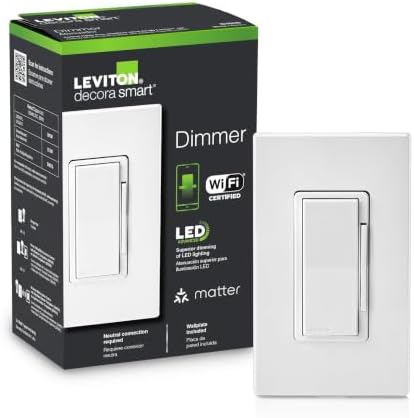
The Leviton Decora Smart Dimmer is a Wi-Fi model with support for Matter, My Leviton, Alexa, and Google. Its standout feature for LED lighting is the ability to adjust the bulb type, minimum dim level, and maximum brightness. Those settings can help you tailor the dimmer’s range to your lighting rather than relying only on a fixed brightness response.
You can also set fade rates and preset light levels, and use My Leviton Night Settings for softer lighting at night. Remote control lets you check the light status and adjust it from away from home. These options make the Leviton a strong fit if you want more control over how lights behave at different brightness levels.
The product details do not specify wiring requirements or whether this model supports a particular circuit configuration. Check the manufacturer’s installation information and your home’s wiring before purchasing. It may be a less straightforward choice if you want a switch with clearly stated single-pole requirements and a simple setup path.
Pros:
- Works with Matter, My Leviton, Alexa, and Google.
- Offers adjustable bulb type, minimum dim, and maximum brightness settings.
- Includes customizable fade rates and preset light levels.
- Has a night-lighting setting through My Leviton.
Cons:
- Wiring and circuit requirements should be confirmed before buying.
- Its range of settings may be more than you need for a basic dimmer.
Verdict: Consider the Leviton if you value LED dimming adjustments and Matter compatibility, and have confirmed that its wiring requirements match your setup.
3. Amazon Basics Smart Dimmer: Straightforward Alexa Control

This Amazon Basics dimmer is a single-pole switch built around Alexa. It connects over 2.4 GHz Wi-Fi and does not require a separate smart-home hub or additional smart devices. You can use Alexa voice control, schedules, and the Alexa app to control the lighting remotely.
The Alexa-only approach keeps the setup focused if your household already uses Alexa. The product includes a guided installation video, along with a user manual and troubleshooting guide. As with the other neutral-wire models, confirm that your wall box has a neutral wire and that your circuit is single-pole before planning an installation.
Its main limitation is platform choice: it works exclusively with Alexa, so it is not a fit if you want Google Assistant or a broader app ecosystem. The product information also does not give a specific LED wattage limit, so check bulb and switch compatibility rather than assuming it will suit every LED load.
Pros:
- Designed for Alexa voice control and routines.
- Allows remote control through the Alexa app.
- Does not need a separate hub.
- Includes guided installation resources.
Cons:
- Works exclusively with Alexa.
- Requires a neutral wire, 2.4 GHz Wi-Fi, and a single-pole setup.
Verdict: Pick this switch for a compatible single-pole circuit if Alexa is your preferred smart-home platform and you do not need support for other assistants.
4. Tapo S500D Four-Pack: Dimming for Several Single-Pole Circuits

This Tapo package includes four S500D single-pole dimmer switches, making it a practical option when you want to update several compatible lighting circuits. The switches work with dimmable LED lights and support control through the wall switch, Tapo app, Amazon Alexa, or Google Assistant. Standard Wi-Fi control does not require a hub.
The listed dimming method is leading-edge TRIAC, with a maximum load of 150W for dimmable LED or 300W for incandescent or halogen lighting at 120V and 60Hz. Check the bulb maker’s dimming guidance as well as the switch’s load limits. Tapo also offers schedules, timers, fade-on and fade-off transitions, and Away Mode.
Installation calls for a neutral wire, 2.4 GHz Wi-Fi, and a wall box at least two inches deep. These are single-pole switches, not wired 3-way dimmers. Optional automation with compatible Tapo sensors or smart buttons requires a separate Tapo hub and accessories, but those are not needed for standard app control.
Pros:
- Includes four dimmers for multiple compatible circuits.
- Works with dimmable LED lights within the listed load limit.
- Supports app and voice control without a hub for standard Wi-Fi use.
- Offers schedules, timers, Away Mode, and fade transitions.
Cons:
- Requires a neutral wire, 2.4 GHz Wi-Fi, and a wall box at least two inches deep.
- Does not support wired 3-way installation.
Verdict: Choose the Tapo four-pack if you need several dimmers for compatible single-pole circuits and want scheduling and voice control in the Tapo app ecosystem.
5. TREATLIFE Smart Dimmer Four-Pack: A Multi-Room Option

The TREATLIFE package includes four single-pole dimmers for dimmable, non-smart bulbs. It supports LED and CFL loads up to 150W, as well as incandescent loads up to 400W. Brightness adjusts from 1% to 100% through the switch, app, or voice control, and the switch remembers its last setting after power-offs.
It works with Alexa and Google Assistant over 2.4 GHz Wi-Fi and does not require a hub. Scheduling, group control, and shared app access can make the four-pack useful for coordinating compatible lights around the home. A wall plate cover is included, and the listed switch dimensions are provided for checking fit.
There are important limits to keep in mind: this dimmer is not compatible with smart bulbs, non-dimmable bulbs, Apple HomeKit, or 3-way and multi-way circuits. It also requires a neutral wire. If you are replacing only one switch, a multi-pack may be more than you need; if you are outfitting several rooms with compatible bulbs, the package may be more suitable.
Pros:
- Includes four switches for multiple single-pole locations.
- Offers 1%–100% dimming and remembers the last setting.
- Works with Alexa and Google Assistant without a hub.
- Supports schedules, group control, and app sharing.
Cons:
- Not compatible with smart bulbs, non-dimmable bulbs, or Apple HomeKit.
- Requires a neutral wire and does not support 3-way or multi-way circuits.
Verdict: Consider the TREATLIFE four-pack if you have several single-pole locations with compatible dimmable bulbs and use Alexa or Google Assistant.
How to Choose a Smart Dimmer Switch for LED Lights
Check that your bulbs are dimmable
A smart dimmer does not make a non-dimmable bulb dimmable. Check the bulb packaging or manufacturer information for dimming support before buying. For the TREATLIFE model, the supplied details specify dimmable, non-smart bulbs and list separate load limits for LED/CFL and incandescent bulbs. The Tapo S500D also lists a specific LED load limit. For other models, confirm the switch and bulb specifications together.
Confirm the wiring and circuit type
Several options here require a neutral wire, including the Kasa, Amazon Basics, Tapo, and TREATLIFE switches. If you are unsure whether your wall box has one, check the installation instructions or ask a qualified electrician. Also confirm whether your light is controlled from one location or multiple locations. The Kasa, Amazon Basics, Tapo, and TREATLIFE models are identified as single-pole switches; the Tapo and TREATLIFE listings specifically say they do not support wired 3-way setups.
Match the dimmer to your smart-home setup
Choose a switch that works with the assistant or system you already use. The Amazon Basics model is Alexa-only. Kasa and Tapo list support for Alexa and Google Assistant, while TREATLIFE lists Alexa and Google Assistant and excludes Apple HomeKit. Leviton lists Matter, My Leviton, Alexa, and Google compatibility. Check the product’s current setup instructions for any platform-specific requirements before making your choice.
Consider the dimming controls you will use
Think about whether you mainly want an easy wall control or also want schedules, remote access, fade transitions, or preset brightness. Kasa offers app adjustment and scheduling; Tapo includes schedules, timers, and fade transitions; TREATLIFE offers app and voice adjustment plus group control. Leviton stands out for its adjustable bulb type, minimum dim level, and maximum brightness settings, which may be helpful when you want to tune how the LED lights respond.
Choose a pack size that fits your project
The Tapo and TREATLIFE options listed here come as four-packs, so they may suit a project that involves several compatible circuits. If you only need to replace one switch, compare the package size with your needs. Before installing multiple dimmers, make sure each circuit, bulb load, and wall box is compatible with the specific switch.
Check physical fit and installation requirements
Smart dimmers can take up more space in a wall box than a basic switch. The Tapo listing calls for a wall box at least two inches deep, and the Kasa and TREATLIFE listings provide switch dimensions. Check those measurements against your existing box and wiring. If you are not familiar with electrical work, follow the manufacturer’s instructions and consult an electrician.
Frequently Asked Questions
Do smart dimmer switches work with every LED bulb?
No. The LED bulb must be dimmable and compatible with the specific switch. Check the bulb’s specifications and the dimmer’s load and compatibility information before installing it.
Why does a smart dimmer need a neutral wire?
Some smart switches, including several options in this guide, require a neutral wire for installation. Check the wiring requirements for the exact model and confirm what is present in your wall box before buying. If you are unsure, consult an electrician.
Can I use a smart dimmer with a smart bulb?
Compatibility depends on the switch and bulb. The TREATLIFE product details specifically say it is not compatible with smart bulbs. Check the instructions for any other combination before connecting a smart bulb to a wall dimmer.
Can I install these dimmers on a 3-way circuit?
Do not assume that a single-pole dimmer will work on a 3-way circuit. The Tapo S500D and TREATLIFE listings specify that they do not support wired 3-way installation, and the Kasa and Amazon Basics models are identified as single-pole. Confirm the circuit support for your chosen model before buying.
Do these switches need a separate hub?
Kasa, Amazon Basics, Tapo, and TREATLIFE list Wi-Fi control without a separate hub for their standard functions. Tapo notes that optional automation with compatible sensors or smart buttons requires a Tapo hub and separately sold accessories. Check each product’s requirements for the features you plan to use.
What is the difference between Alexa-only and multi-platform dimmers?
An Alexa-only model, such as the Amazon Basics switch, is intended to work with Alexa rather than a range of voice assistants. Other options in this guide list support for Google Assistant, Matter, or their own app as well. Match the switch to the system you want to use, and verify compatibility before purchase.
Can I install a smart dimmer myself?
Installation depends on your wiring, circuit, wall box, and comfort with electrical work. Follow the product’s installation guide, turn off power as directed, and consult an electrician if you are unfamiliar with wiring. Do not proceed if you cannot confirm that the switch matches your setup.
Final Recommendation
For a balanced mix of app control, voice commands, scheduling, and full-range dimming, the Kasa HS220P3 is a strong choice for a compatible single-pole circuit with a neutral wire. Choose the Leviton if LED adjustment settings and Matter support matter most, or the Amazon Basics switch if you want Alexa-only control. For several circuits, compare the Tapo and TREATLIFE four-packs carefully against your bulb, wiring, and circuit requirements.
