
The best surge protector for a home office gives your computer, monitor, chargers, and desk accessories enough room to plug in without creating a tangle of blocked outlets. These five options vary in outlet count, cord length, USB charging, and stated surge capacity, so the right choice depends on your setup and how much equipment you need to power.
Table of Contents
Quick Comparison
| Product | AC Outlets | USB Ports | Cord Length | Stated Surge Capacity |
|---|---|---|---|---|
| Belkin 12-Outlet Surge Protector | 12 | None listed | 8 ft | 3,940 joules |
| SUPERDANNY 12-in-1 Power Strip | 8 | 2 USB-A, 2 USB-C | 10 ft | 1,050 joules |
| Anker 351 Power Strip | 12 | 1 USB-C, 2 USB-A | 5 ft | 2,100 joules |
| Amazon Basics 12-Outlet Surge Protector | 12 | None listed | 8 ft | 4,000 joules |
| HANYCONY 12-in-1 Power Strip | 8 | 2 USB-A, 2 USB-C | 5 ft | 1,080 joules |
Our Picks: Best Surge Protector For Home Office reviews
Belkin 12-Outlet Surge Protector: Best for a Busy Desk

The Belkin is a straightforward pick for a desk with several devices. It has 12 AC outlets, a long 8-foot cord, and a stated surge capacity of 3,940 joules. That combination can suit a workstation with a computer, monitors, printer, speakers, and other equipment that uses standard plugs.
Its widely spaced outlets are useful when bulky adapters would otherwise cover neighboring sockets. The flat, angled three-prong plug can help the cord fit close to a wall, while the safety indicator light provides a quick way to check its protection status. Belkin says the strip is UL-listed and includes a two-year limited warranty and a connected-equipment warranty.
Unlike the SUPERDANNY, Anker, and HANYCONY options, this model does not list USB charging ports. You’ll need separate chargers for phones and tablets. Its 12 outlets and long cord make it a strong fit when AC connections matter more than built-in USB.
Pros:
- 12 AC outlets with extra room for larger plugs
- 8-foot cord and low-profile angled plug
- 3,940-joule stated surge capacity
- UL-listed, with a protection indicator light
Cons:
- No USB-A or USB-C ports are listed
- May be more outlets than a compact desk setup needs
Verdict: Choose the Belkin if your home office needs many AC outlets, a long reach, and a clear indicator for surge protection status.
SUPERDANNY 12-in-1 Power Strip: Best for a Long Reach and USB Charging
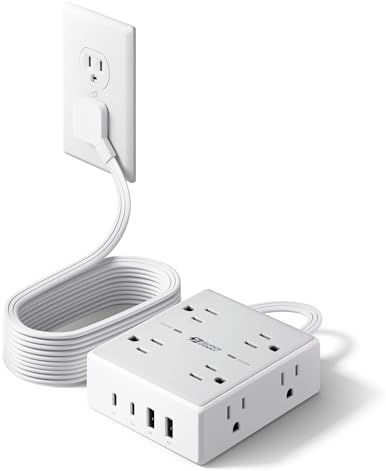
The SUPERDANNY combines eight AC outlets with two USB-A and two USB-C ports. Its 10-foot cord gives you more flexibility if the wall outlet is far from your desk, and the flat, angled plug is designed to fit behind furniture or in a tight space.
The four-sided outlet layout and stated 1.65-inch spacing are intended to reduce plug crowding. It also has mounting holes for desk or wall installation. The USB ports share a maximum output of 15W, so they offer a convenient way to charge small devices, but they are not a replacement for a higher-output charger when fast charging is important.
Its stated surge capacity is 1,050 joules, lower than the Belkin and Amazon Basics models in this group. The SUPERDANNY may make more sense when cord reach and built-in USB ports are higher priorities than the highest stated joule capacity.
Pros:
- 10-foot cord for flexible placement
- Eight AC outlets and four USB charging ports
- Spaced outlets and a four-sided layout
- Flat plug and mounting holes for tidy installation
Cons:
- 1,050-joule stated surge capacity is lower than some alternatives here
- USB output is shared and capped at 15W total
Verdict: Pick the SUPERDANNY if you want a long cord, mounting options, and built-in USB ports for a mixed-device workstation.
Anker 351 Power Strip: Best for a Desk with Mixed Devices

The Anker 351 offers 12 AC outlets along with one USB-C port and two USB-A ports. Its stated surge capacity is 2,100 joules, and the five-foot cord is sized for a desk or table that sits fairly close to the wall outlet.
Extra space between outlets helps accommodate larger plugs, which is handy when a desk setup includes a mix of chargers and standard power cords. The USB-C port is listed at 20W, while the total output shared across all USB ports is up to 15W. That difference is worth checking against the devices you plan to charge.
Compared with the Belkin and Amazon Basics strips, the Anker has fewer cord-length options in this lineup and a lower stated joule capacity than those two. In return, it adds USB ports without giving up the 12 AC outlets. Its included mounting screws may also help with a fixed desk setup.
Pros:
- 12 AC outlets plus USB-C and USB-A ports
- Extra outlet spacing for bulky plugs
- 2,100-joule stated surge capacity
- Includes mounting screws and a five-foot cord
Cons:
- Five-foot cord may be short for desks far from a wall outlet
- Total USB output is shared across the USB ports
Verdict: The Anker is a practical middle ground if you want plenty of AC outlets plus USB charging in a desk setup near the wall.
Amazon Basics 12-Outlet Surge Protector: Best for High Stated Surge Capacity

This Amazon Basics model keeps the design focused on AC power: it has 12 outlets, an 8-foot cord, and a stated surge capacity of 4,000 joules. That makes it a straightforward option for a home office with several plug-in devices and no need for built-in USB charging.
Safety shutters help prevent incorrect use of the outlets, and the strip includes a 15-amp circuit breaker and a power switch. Keyhole mounting points on the back allow it to be installed on a wall or another suitable surface. Its listed surge capacity is slightly higher than the Belkin’s, though both offer 12 outlets and an 8-foot cord.
This model’s main trade-off is that it does not list USB ports or widely spaced outlets. If you use several large adapters, check whether the outlet layout will fit them without blocking sockets.
Pros:
- 12 AC outlets and an 8-foot extension cord
- 4,000-joule stated surge capacity
- 15-amp circuit breaker and safety shutters
- Power switch and keyhole mounting points
Cons:
- No USB charging ports are listed
- Outlet spacing may be less suitable for several bulky adapters
Verdict: Consider this model if you want a simple, high-capacity AC strip with a long cord, wall-mounting points, and safety shutters.
HANYCONY 12-in-1 Power Strip: Best for Extra Space Between Plugs

The HANYCONY has eight AC outlets and four USB ports—two USB-A and two USB-C—in a three-sided layout. Its listed spacing of 2.2 inches between AC outlets is designed to leave room for larger adapters. That layout can be useful if your desk has a mix of power bricks and USB-charged devices.
The five-foot braided cord has a flat, angled plug, and mounting holes on the back offer another way to secure the strip. It has a stated surge capacity of 1,080 joules, a lighted switch, and a surge-protection indicator. The product information also lists ETL and RoHS certifications.
The USB ports provide up to 5V/3A for USB-C and 5V/2.4A for USB-A, with total USB output listed as 5V/3.1A. The manufacturer notes that connecting or disconnecting a device can briefly interrupt power to other USB ports. Its five-foot cord may also limit placement if your desk is far from an outlet.
Pros:
- Eight AC outlets and four USB ports
- Wide spacing intended to fit larger adapters
- Braided five-foot cord with a flat plug
- Mounting holes and a surge-protection indicator
Cons:
- 1,080-joule stated surge capacity is below several AC-focused options here
- USB power may briefly pause on other ports when a device is connected or removed
Verdict: Choose the HANYCONY if widely spaced outlets and several built-in USB ports matter more to you than a longer cord or higher stated joule capacity.
How to Choose a Surge Protector for Your Home Office
Count the Devices You Need to Plug In
Start with your computer, monitors, and desk accessories, then leave room for equipment you may add later. Count AC plugs separately from USB-powered devices. A strip with 12 AC outlets may be a better fit for a large workstation, while a model with fewer AC outlets and built-in USB ports can suit a smaller setup with several phones or other USB devices.
Check the Stated Surge Capacity
Surge capacity is listed in joules. A higher number indicates a greater stated energy-absorption capacity, but it does not mean a strip can prevent every kind of electrical damage. Compare the listed figures as one factor, alongside outlet count, safety features, and the type of equipment you need to connect.
Choose a Cord Length That Fits Your Room
Measure the distance from the wall outlet to your intended strip location before choosing a cord. A longer cord can give you more placement options, while a shorter one may help keep a compact desk setup tidy. Flat plugs can be useful when furniture sits close to the wall, but check the plug orientation and cord path for your room.
Look at Outlet Spacing and Layout
Large power adapters can cover neighboring outlets if sockets are packed closely together. Look for a model that specifically mentions wide spacing or uses a layout that puts outlets on several sides. If your devices use mostly standard plugs, a more compact arrangement may be enough.
Decide Whether Built-In USB Ports Matter
USB ports can free up AC outlets and make it easier to charge phones or small devices at your desk. Check the listed output, including whether it is shared across ports. If you need to charge a device at a particular speed, compare its power needs with the strip’s USB specifications instead of assuming every port supports fast charging.
Consider Mounting and Safety Features
Mounting holes or screws can help keep a power strip in a set location and off the floor. Also check for features such as a circuit breaker, safety shutters, a power switch, and an indicator light. Look for safety certification information in the product details, and follow the manufacturer’s instructions for the strip and the devices you connect.
Keep the Total Electrical Load in Mind
A high outlet count does not mean you can run unlimited equipment from one strip. Check the power requirements of your devices and the strip’s stated electrical limits. The HANYCONY listing, for example, specifies a maximum of 1,875W/15A. Avoid choosing a strip based on outlet count alone, and do not use a model beyond its stated limits.
Frequently Asked Questions
What surge protector features matter most for a home office?
Start with enough outlets, a suitable cord length, and a stated surge capacity that fits your needs. Outlet spacing, USB ports, mounting options, and safety features can help narrow your choice once the basics are covered.
Is a higher joule rating always better?
A higher joule figure means the product lists a greater surge-energy absorption capacity. It is a useful comparison point, but it does not guarantee protection against every electrical event or replace other safety features.
How many outlets should a home-office surge protector have?
Count the plugs on your current desk, including monitors, chargers, and accessories, then consider whether you may add equipment. Choose a layout that gives bulky adapters enough room instead of relying on the total outlet count alone.
Are USB ports on a surge protector useful?
They can be convenient for charging phones and other USB-powered devices without using a separate wall adapter. Check the total output and how power is shared among ports, especially if you plan to charge more than one device at a time.
Can I mount a surge protector under my desk?
Several options in this guide include mounting holes or screws, but the right placement depends on the product’s design and installation instructions. Use the provided mounting guidance, keep the strip accessible, and avoid placing it where cords are strained or obstructed.
Does a surge protector keep devices running during a power outage?
No. A surge protector is designed to help protect against voltage surges and spikes; it is not a battery backup. If you need equipment to keep running when power is lost, look for a backup power product designed for that purpose.
Which surge protector is best for large power adapters?
The SUPERDANNY and HANYCONY both describe extra spacing between outlets. The Anker also lists extra space for bulky plugs. Check the product layout against your adapters before choosing, since plug size and orientation can affect how many outlets you can use.
Final Recommendation
For a home office that needs many AC connections and a long cord, the Belkin is a well-rounded choice with 12 outlets, widely spaced sockets, and a 3,940-joule stated surge capacity. The Amazon Basics model is another strong AC-focused option, with a 4,000-joule stated capacity and safety shutters. If built-in USB charging is important, consider the Anker for a desk near an outlet or the SUPERDANNY for a longer reach. Match the strip to your equipment, room layout, and charging needs before deciding.
