
A teleprompter can help you deliver a smoother YouTube video while keeping your eyes close to the camera lens. The right choice depends on your setup: a phone-only rig for vlogging, a larger tablet for long scripts, or a camera-mounted model for a more traditional recording space. Below, we compare five options by device compatibility, screen design, portability, and setup features so you can find a fit for how you create.
Table of Contents
Quick Comparison
| Teleprompter | Best for | Device support | Standout feature |
|---|---|---|---|
| LENSGO TC12P 14.5-Inch | Phone-based walk-and-talk videos | Phones and tablets up to 7.3 inches | Wide glass and horizontal or vertical shooting |
| Desview T12S 12.9-Inch | Camera and tablet studio setups | DSLRs, mirrorless cameras, camcorders, and tablets up to 12.9 inches | Metal body and fitted carry case |
| LENSGO TCQI 10-Inch | Compact phone recording | Smartphones | Magnetic phone mount and handheld tripod |
| VEVOR 10-Inch Desktop Prompter | Flexible camera, webcam, or phone setups | Smartphones and tablets up to 10 inches | Multiple lens adapter rings |
| LENSGO TC7II 10-Inch | Camera creators who want a folding setup | Smartphones, cameras, and compatible tablets | Folding design with dual cold-shoe mounts |
Our Picks: Best Teleprompters For Youtube Creators reviews
1. LENSGO TC12P: Best for Phone-Based Walk-and-Talk Videos

The TC12P is built around a phone-first workflow. Its 14.5-inch-wide beam-splitter glass is designed to make script text easier to see while you record with a smartphone. The adjustable phone and tablet holder supports phones and tablets up to 7.3 inches, and the included adapter rings are intended to help position different devices.
Its most distinctive use is on-the-go filming. The setup can switch between horizontal and vertical shooting, making it a fit for creators who record both standard YouTube videos and vertical clips. The included Bluetooth remote works with the free TCQI app for script playback, scrolling speed, and mirror mode. A coated glass surface, foam light seals, and an adjustable front panel are intended to help manage glare and shooting angles.
This is a focused choice for creators who record on a phone rather than a DSLR or mirrorless camera. The large glass panel may be useful for reading longer scripts, but the product is not described as supporting a camera-based setup. If your main rig uses a dedicated camera, consider the Desview, VEVOR, or TC7II instead.
Pros:
- Wide 14.5-inch glass for a larger script display
- Designed for horizontal and vertical phone shooting
- Bluetooth remote supports playback and scrolling adjustments
- Foam light seals and an adjustable panel help with positioning
Cons:
- Designed for smartphone shooting rather than a dedicated camera setup
- Device fit is limited to phones and tablets up to 7.3 inches
Verdict: Choose the LENSGO TC12P if you want a phone-focused prompter with a wide reading area for walk-and-talk videos and vertical content.
2. Desview T12S: Best for Tablet-Based Camera Recording
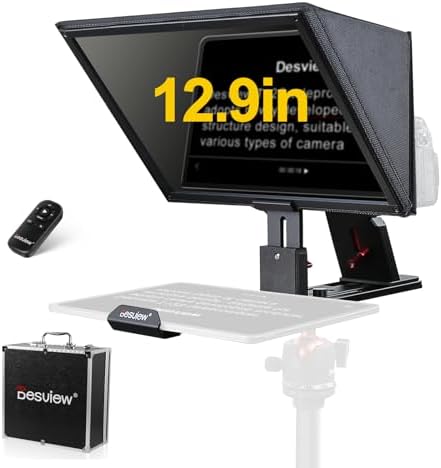
The Desview T12S pairs a camera-compatible teleprompter with support for tablets up to 12.9 inches. That larger device capacity makes it a practical option if you prefer reading a full script on a tablet instead of scrolling through text on a phone. It is designed to work with DSLR and mirrorless cameras as well as camcorders.
The product description highlights coated beam-splitter glass intended to provide a clear reflection with minimal ghosting. Its metal-alloy body is aimed at creators who want a more substantial rig for studio work or location shoots. A Bluetooth remote and free Desview app provide controls for editing scripts, changing text size, and adjusting scroll speed.
The larger tablet support and camera compatibility make this a more production-oriented option than the phone-only TC12P or TCQI. The trade-off is that a camera-and-tablet rig is likely to take up more space than a compact phone setup. The included carry case is a useful addition for transporting the unit, though the product listing does not specify a weight.
Pros:
- Supports tablets up to 12.9 inches
- Compatible with DSLR, mirrorless, and camcorder setups
- Metal body and fitted carry case suit studio or travel use
- Remote and app offer script and scrolling controls
Cons:
- A larger tablet and camera rig may be less convenient for mobile filming
- More than needed if you record only with a smartphone
Verdict: Pick the Desview T12S if you use a camera and want the option to display your script on a large tablet.
3. LENSGO TCQI 10P: Best Compact Pick for Smartphone Creators

The LENSGO TCQI 10P is a phone-focused teleprompter with a 10-inch anti-glare display, beam-splitter glass, and a lens hood designed to block ambient light. It comes with a handheld tripod, so the kit is aimed at creators who want a compact setup for home recording or outdoor phone videos.
The included Bluetooth remote and companion app can control text size, color, playback, and scrolling speed. The phone mounts magnetically; for Android phones that do not support magnetic attachment, the product instructions call for using the included magnetic ring. You will also need to choose a suitable lens hood and position your phone so the camera lens remains unobstructed.
Compared with the TC12P, this model has a smaller display and a handheld tripod rather than an emphasis on a wide reading panel. Its phone-only approach keeps the setup straightforward, but it is not the best match if you want to mount a DSLR or use a large tablet. The listing provided for this model marks it as unavailable, so check the product page for current purchase status before choosing it.
Pros:
- 10-inch anti-glare display with a lens hood for light control
- Includes a handheld tripod for phone recording
- Remote and app support playback and text adjustments
- Designed for home and outdoor smartphone videos
Cons:
- Built for smartphone use rather than camera or large-tablet setups
- Android users may need to attach the included magnetic ring
Verdict: Consider the TCQI 10P for compact phone recording if it is available and you are comfortable with its magnetic mounting setup.
4. VEVOR 10-Inch Desktop Prompter: Best for Flexible Camera and Webcam Setups

The VEVOR is designed to work with smartphones and tablets up to 10 inches, along with DSLR cameras, webcams, and smartphones used as cameras. The listing specifies an 8.8-inch spectroscope and a reading distance of up to 6.5 feet. It also lists wide-angle lenses over 24 mm as compatible, so check your lens and framing before setting up.
The kit includes lens adapter rings in several sizes, a dual-use phone and tablet clamp, a phone clamp, a sunshade, and other accessories. It has standard 1/4-inch screw holes for tripod mounting, and its lightweight ABS body is described as easy to mount and remove. A Bluetooth remote can pause playback, turn pages, and change scrolling speed through the teleprompter app.
This is a versatile choice if you want more mounting options and a broad accessory set without committing to a large tablet-only model. Its screen is smaller than the Desview T12S and TC12P, and the product description specifies a 10-inch maximum device size. The included adapter rings help with lens fit, but you should still confirm that your camera and lens work with the hood and framing.
Pros:
- Supports phone or tablet prompting with camera, webcam, or smartphone recording
- Includes multiple lens adapter rings and mounting accessories
- Standard 1/4-inch screw holes fit a range of tripods
- Remote controls playback, page turning, and scroll speed
Cons:
- Device support is limited to smartphones and tablets up to 10 inches
- Compatibility calls for wide-angle lenses over 24 mm
Verdict: Choose the VEVOR if you want a flexible desktop prompter with multiple lens adapters and support for different recording devices.
5. LENSGO TC7II: Best Folding Prompter for Camera Creators

The LENSGO TC7II is a compact 10-inch prompter designed to pair with smartphones and DSLR or SLR cameras. It uses beam-splitter glass with a coating intended to reflect script text while allowing light through to the camera. The product description also lists tablet support, with a maximum tablet screen size of 10 inches and stated device measurements to check before buying.
Its folding design is intended to make setup and transport simpler, and the unit includes dual cold-shoe mounts for attaching accessories such as a light or microphone. A 1/4-inch screw hole allows mounting on a tripod or light stand. The TCQI app and included remote provide controls for text size, playback speed, fonts, and background colors.
Compared with the VEVOR, the TC7II puts more emphasis on folding convenience and accessory mounting, while the VEVOR includes a wider range of lens adapter rings. The TC7II may suit a regular camera-based YouTube setup, but you should confirm your camera and tablet dimensions before ordering. Its 10-inch display is more compact than the tablet-sized Desview T12S.
Pros:
- Works with smartphones and DSLR or SLR cameras
- Folding design is intended for convenient transport
- Dual cold-shoe mounts support lights or microphones
- App and remote offer several script display controls
Cons:
- Display is smaller than the Desview T12S and TC12P
- Tablet fit depends on the listed size limits
Verdict: The TC7II is a sensible pick if you use a DSLR or SLR and want a compact folding prompter with accessory mounts.
How to Choose a Teleprompter for YouTube
Match the prompter to your camera
Start with the device you use to record. Phone-only models such as the LENSGO TC12P and TCQI 10P are aimed at smartphone creators. If you record with a DSLR, mirrorless camera, or camcorder, look at models that specifically support camera mounting, such as the Desview T12S, VEVOR, or LENSGO TC7II. For any camera-mounted setup, confirm that the lens and adapter fit before buying.
Choose a screen size that fits your script
A larger screen can make longer scripts easier to read, while a compact panel may be simpler to position and carry. The Desview T12S supports tablets up to 12.9 inches, and the TC12P has a wide 14.5-inch glass panel while supporting devices up to 7.3 inches. The VEVOR and TC7II use smaller setups, with device limits you should check against your phone or tablet.
Think about where you record
A desktop or studio setup can accommodate a larger camera-and-tablet rig. For mobile videos, consider how quickly the prompter can be assembled, whether it fits your tripod, and how easily you can pack it. The TC12P is designed for on-the-go smartphone shooting, while the TCQI 10P includes a handheld tripod. The Desview T12S includes a fitted carry case for travel and location work.
Check lens clearance and framing
The prompter glass and hood must sit in front of your camera without blocking the lens or making the shot too tight. Check the product’s lens adapter sizes and compatibility notes, then compare them with your lens. The VEVOR listing calls for wide-angle lenses over 24 mm and includes several adapter rings. For phone setups, make sure the phone’s camera can sit in the correct position behind the glass.
Consider glare and light control
Reflections need to remain readable without disrupting the recorded image. Beam-splitter glass is used to show the script in front of the camera, while coatings, hoods, and foam seals can help manage glare or stray light. The TC12P lists coated glass and foam light seals; the TCQI 10P includes a lens hood; and the Desview T12S highlights anti-reflective glass. Your room lighting and shooting position still matter.
Look at controls and app support
Remote controls can let you pause, resume, or adjust scrolling without reaching for your recording device. Check which app the prompter uses and whether it supports your phone’s operating system. The models here list app and Bluetooth remote controls, but their features differ. If you rely on specific text formatting, test the app workflow with a short script before recording a full video.
Frequently Asked Questions
Do I need a teleprompter for YouTube videos?
No. A teleprompter is useful if you want to follow a script while keeping your gaze near the camera, but it is not required. It can be especially helpful for tutorials, introductions, educational videos, or longer scripted segments.
Can I use a phone as both the camera and the teleprompter?
These products are designed around different setups, and some are specifically described as phone-shooting models. Check each product’s mounting instructions and device compatibility. A phone used for prompting may need to be separate from the device recording the video.
Will a teleprompter work with any camera lens?
Not necessarily. Lens diameter, adapter fit, and the camera’s field of view can affect whether the setup works. The VEVOR listing specifies wide-angle lenses over 24 mm, and other models may require a compatible adapter or suitable camera position. Check the manufacturer’s compatibility details for your exact lens.
Is a bigger teleprompter screen always better?
Not always. A larger display can make longer scripts easier to read, but it can also make the whole rig larger. Choose a screen that fits your reading distance, device, camera, and available recording space.
Can I use these teleprompters for vertical videos?
The LENSGO TC12P is specifically described as supporting horizontal and vertical shooting. For the other models, confirm how the phone or camera can be positioned before planning a vertical-video setup.
Do teleprompters include the phone or tablet?
The product descriptions list device holders and compatibility, but do not state that a phone or tablet is included. Check the product listing to confirm what comes in the package before ordering.
Final Recommendation
For smartphone creators who want a wide reading area and a setup designed for walk-and-talk filming, the LENSGO TC12P is the clearest fit. Camera-based creators who need support for a large tablet should consider the Desview T12S, while the VEVOR offers a flexible accessory set for creators switching between cameras, webcams, and phones. Before choosing, confirm your device dimensions, lens fit, and preferred recording style.
