
A handicap door opener button can make an automatic entrance easier to use, but the right choice depends on your door operator, wiring, mounting space, and whether you want a press-to-open or touchless control. These five options include wired switches, a wireless-and-wired two-button set, and a wave sensor. Before choosing, confirm that the button’s connection and electrical requirements match your door system.
Table of Contents
Quick Comparison
| Product | Control type | Notable features | Best fit |
|---|---|---|---|
| Olideauto Wireless/Wired Push Button, 2-Pack | Wired or wireless | Two buttons; listed Wi-Fi, app, Alexa, and Google Assistant functions | Installations where flexible control options are useful |
| Olideauto Narrow Wired Push Button | Wired press button | Narrow stainless steel design | Doorways with limited mounting space |
| MS Sedco Handicap Door Access Switch | Wired press button | Square, powder-coated stainless steel switch; weather protection listed | Buyers seeking a straightforward square switch |
| Olideauto Touchless Wave Sensor Button | Touchless wave sensor | Stainless steel panel; IP65 rating listed | Entrances where users should not need to touch a button |
| MS Sedco Handicap Door Access Switch, CP/TX W/59-HSS | Push button | MS Sedco model designation provided | Shoppers matching a specific MS Sedco part designation |
Our Picks: Best Handicap Door Opener Button reviews
Olideauto Wireless/Wired Push Button: A Flexible Two-Button Set

This Olideauto set includes two square stainless steel buttons and supports both wired and wireless operation. The product description also lists 2.4G wireless communication and optional Wi-Fi functions, including compatibility with Alexa, Google Assistant, and a phone app. Those options may be useful when an installation needs more than a basic wall switch, but confirm how the controls connect to your specific door operator before ordering.
The description says the buttons can work with automatic doors, electric locks, and access control. It also lists an optional buzzer and a four-point trigger design. That gives the set a broader feature range than the simpler wired switches here. The trade-off is that more connection options can mean more setup and compatibility checks; wireless or smart-home functions should not be assumed to work with every operator.
Pros:
- Includes two push buttons.
- Offers wired and wireless operating modes.
- Lists app and voice-assistant functions.
- Designed to work with automatic doors, electric locks, and access control.
Cons:
- Compatibility and setup requirements may take more checking than a basic wired switch.
- The listing does not provide enough detail here to confirm fit with every door operator.
Verdict: Choose this set if you want two buttons and the option of wired, wireless, or listed smart-home control, provided you verify compatibility with your system first.
Olideauto Narrow Wired Button: A Space-Saving Wall Switch

This single Olideauto button is a wired stainless steel switch with a narrow shape intended for locations where a wider control may be difficult to fit. Its slim profile can help keep a crowded wall or narrow door frame from feeling cluttered. The listing describes the housing as durable, sealed, dust-resistant, and easy to clean.
The button is listed for use with automatic sliding and swing doors, as well as sliding and swing gate openers. That range makes it a versatile-looking option, but the product description does not replace checking the switch’s electrical connection against your operator. It is a simpler choice than the two-button Olideauto set: there is no wireless or smart-home function listed.
Pros:
- Narrow profile for installations with limited space.
- Stainless steel housing is described as easy to clean.
- Listed for indoor and outdoor use.
- Works with several types of automatic door and gate openers, according to the product description.
Cons:
- Wired operation requires a suitable connection to the opener.
- Offers fewer control options than the Olideauto wireless-and-wired set.
Verdict: This is a practical candidate when you need a narrow wired button and have confirmed that its wiring works with your automatic door system.
MS Sedco Square Access Switch: A Basic Press-to-Open Option
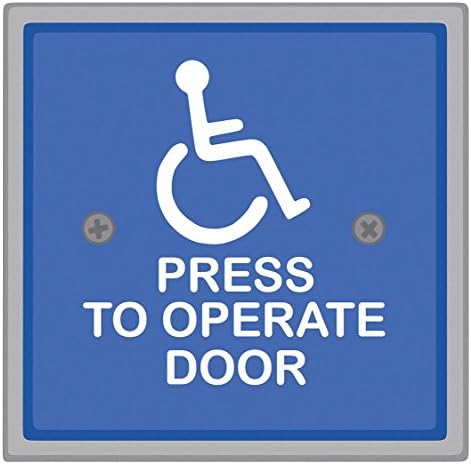
The MS Sedco switch is a square push-button access control with a stainless steel body and powder-coated finish. The supplied product information also identifies weather protection. Its straightforward design may suit buyers who want a conventional press-to-open control without the wireless or touchless features found on other options in this list.
The available specifications are brief, so details such as dimensions, wiring requirements, and the level of weather protection are not clear from the supplied information. Check the product listing and your door operator’s instructions for those details before choosing a mounting location. Compared with the narrow Olideauto switch, this one is described as square rather than slim; compared with the wave sensor, it requires a press.
Pros:
- Square push-button format.
- Stainless steel construction with a powder-coated finish.
- Weather protection is listed.
Cons:
- The supplied specifications do not state dimensions or wiring details.
- It is a press button, not a touchless control.
Verdict: Consider this MS Sedco switch if you want a conventional square access button, but confirm its dimensions and electrical fit before purchase.
Olideauto Touchless Wave Sensor: A No-Touch Alternative

Instead of pressing a button, this Olideauto control opens the door when someone waves a hand near the sensor. It has a square stainless steel panel and is described as a wired unit for residential or commercial automatic door openers. The listing gives a sensing distance of up to 11.81 inches, so placement and the approach path matter when deciding where to install it.
The product description lists an IP65 rating and use with automatic swing doors, sliding doors, and corresponding gates. A touchless control can be a useful choice when you want to avoid a shared contact surface. It is less suitable if you specifically need a physical press button, and you should confirm the sensor’s wiring and installation requirements with the door operator manufacturer or installer.
Pros:
- Allows users to activate the door with a hand wave rather than a touch.
- Stainless steel panel is described as durable and easy to clean.
- IP65 rating is listed.
- Works with several automatic door and gate types, according to the description.
Cons:
- Not a physical push button, so it may not suit every user or installation.
- Sensor placement and wiring need to be planned for the specific doorway.
Verdict: Pick this option if touchless activation matters more than having a button to press and your operator supports the wired sensor.
MS Sedco CP/TX W/59-HSS: A Part-Specific Push Button

This MS Sedco product is identified as a handicap door access switch push button, with the model designation CP/TX W/59-HSS. The supplied details do not list its dimensions, materials, finish, weather protection, or wiring specifications. That makes it harder to compare with the more fully described switches in this selection.
This option makes the most sense when you are matching a known MS Sedco part or have installation information that confirms it is the correct switch for your system. If you are choosing a button from scratch, compare the listing’s full specifications with the Olideauto narrow switch or the better-documented square MS Sedco model before ordering.
Pros:
- Identified as a handicap door access switch push button.
- Includes a specific MS Sedco model designation to help with part matching.
- May suit buyers who already know this is the part their system requires.
Cons:
- The supplied product details do not explain its material, dimensions, or finish.
- Wiring and weather-protection details are not provided here.
Verdict: Choose this model only if its part designation matches your requirements or you can confirm its specifications with the seller or installer.
How to Choose a Handicap Door Opener Button
Match the Button to Your Door Operator
Start with the operator’s manual or ask the installer which switches it supports. A button that works with one automatic door system may not connect correctly to another. Check the required wiring and electrical specifications before ordering, especially for wireless controls, access-control equipment, or a touchless sensor. If those details are unclear, ask a qualified door technician rather than guessing.
Choose Between Wired, Wireless, and Touchless Controls
A wired push button is a direct, familiar way to activate a compatible opener, but it needs a suitable wired connection. A wireless button can reduce the need to run a control wire, though its receiver and setup still need to match the door system. A wave sensor avoids contact with a button, but depends on correct sensor placement and compatible wiring. Pick the control type that fits both your entrance and the people who use it.
Measure the Mounting Area
Measure the wall or frame where the control will go, including the space needed for the unit and its wiring. A narrow button may fit better beside a door or in a crowded area, while a square panel may need more room. Check the listed dimensions and mounting instructions before purchase; product titles alone may not provide enough detail.
Consider the Location and Exposure
For an outdoor or exposed location, look for clear information about weather protection and the product’s intended environment. The Olideauto touchless sensor lists an IP65 rating, and the MS Sedco square switch description mentions weather protection. Do not assume that every switch is suitable for every outdoor installation; verify the exact rating and installation guidance for your location.
Think About Cleaning and Everyday Use
A stainless steel surface may be practical in a busy doorway because the Olideauto listings describe their panels or housing as easy to clean. A touchless sensor can reduce contact with the control, while a press button provides a clear physical action. Consider how people approach the entrance, whether the control is easy to reach, and whether the selected activation style suits the users.
Verify Features and Part Numbers Before Ordering
Compare the full product specifications, not just the product name. This matters especially for the MS Sedco CP/TX W/59-HSS, whose supplied description has limited technical detail. For a replacement, match the model or part designation to your existing system. For a new installation, confirm dimensions, wiring, and compatibility before making a decision. Product availability can also change, so check the listing for current ordering details.
Frequently Asked Questions
Can any handicap door button work with any automatic opener?
No. The button must be compatible with the door operator’s wiring and electrical requirements. Check the operator’s documentation or consult the installer before choosing a replacement or new control.
What is the difference between a wired and wireless door button?
A wired button connects to the door system through wiring. A wireless button communicates with a compatible receiver instead. The wireless option can offer more placement flexibility, but the receiver and control still need to work with your opener.
Is a wave sensor the same as a push button?
No. A wave sensor activates when someone moves a hand near it, while a push button requires physical contact. The Olideauto wave sensor is a touchless alternative, not a standard press switch.
Can these switches be used outdoors?
Some product descriptions mention outdoor use or weather protection, but the level of protection differs. The Olideauto touchless sensor lists an IP65 rating. Check the exact listing and installation guidance for any switch you plan to use outside.
Does a stainless steel button automatically meet accessibility requirements?
No. Material alone does not establish that a control or complete doorway meets accessibility requirements. Placement, operation, and the door system all matter. Check applicable local requirements and consult a qualified professional for an accessibility assessment.
Which option is best for a narrow wall or door frame?
The Olideauto narrow wired push button is specifically described as a slim option for limited installation space. Still, confirm its dimensions against the available mounting area before ordering.
Final Recommendation
For a flexible setup with two controls and wired or wireless options, the Olideauto two-button set has the broadest feature list in this group. For a basic wired button in a tight space, consider the Olideauto narrow model. If touchless activation is your priority, the Olideauto wave sensor is the distinct alternative. Whichever option you choose, verify the dimensions, wiring, and compatibility with your door operator before purchase.
