
A video doorbell can help you see who is at the door without adding a required monthly bill. The key is checking what “no subscription” includes: some models offer local storage, while others also advertise limited free cloud storage. You’ll also want to consider battery life, Wi-Fi range, night vision, and whether you need an indoor screen or chime.
These five options offer essential features without a required subscription, but they differ in storage, viewing setup, and installation needs. Compare those details before choosing the best fit for your home.
Table of Contents
Quick Comparison
| Video Doorbell | Video and View | Storage Without a Subscription | Standout Feature |
|---|---|---|---|
| BOIFUN Wireless Video Doorbell | 2K; 166° view | microSD card up to 128GB; card not included | HDR night vision and tamper alert |
| SwitchBot 2K Doorbell Camera with Monitor | 2K; 165° view | Included 4GB card; supports microSD cards up to 512GB | 4.3-inch indoor monitor |
| SwitchBot Video Doorbell Camera with Monitor | 2K; 165° view | Included 4GB card; supports microSD cards up to 512GB | Monitor with quick-response controls |
| KAMEP 180° Wireless Doorbell Camera | 2K; 180° view | microSD card up to 128GB; card not included; listing also advertises basic cloud storage | Head-to-toe view and voice changer |
| KAMEP Wireless Doorbell Camera with Chime | 2K; 166° view | microSD card up to 128GB; card not included; listing also advertises basic cloud storage | Included indoor chime |
Our Picks: Best Video Doorbells Without A Subscription reviews
1. BOIFUN Wireless Video Doorbell: Best for Local Storage and HDR Night Vision

The BOIFUN is a battery-powered doorbell camera built around core features you can use without a required subscription. It offers 2K video, a 166-degree field of view, motion alerts, human detection, two-way audio, and video playback through the BoifunCam app.
For recording, you can add a microSD card of up to 128GB. The card is not included, so factor that into your setup if you want local playback without relying on an optional cloud plan. The listing says advanced services, including cloud storage and enhanced event classification, may require an optional plan; check the included free features against your needs before buying.
Its HDR night vision uses invisible 940 nm infrared and is rated for visibility up to 10 meters. The built-in battery is non-removable, and the stated battery life of up to 60 days is based on laboratory conditions with a specific level of daily motion activity. Frequent alerts or a busy entrance can mean more charging.
This is a good fit if you want a relatively simple app-based setup and plan to use a memory card. It works only with 2.4GHz Wi-Fi, so it is not the best match for a home that relies on 5GHz Wi-Fi at the door.
Pros:
- 2K video with a 166-degree view
- Local storage support for microSD cards up to 128GB
- Human detection, two-way audio, and video playback are listed as subscription-free essentials
- Invisible infrared night vision and a tamper alert
Cons:
- microSD card is not included
- Works with 2.4GHz Wi-Fi only, and the battery is non-removable
Verdict: Choose the BOIFUN if you want a wide-view, app-controlled doorbell and are comfortable supplying your own microSD card.
2. SwitchBot 2K Doorbell Camera with Monitor: Best for an Indoor Screen
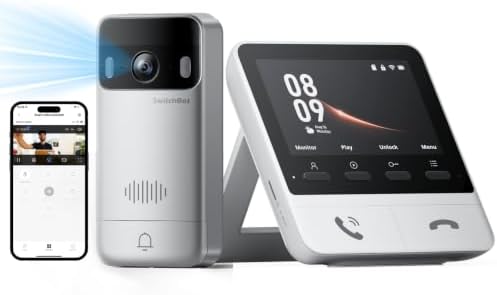
This SwitchBot system pairs a battery-powered outdoor doorbell with a 4.3-inch indoor color monitor. You can see and speak with visitors from the monitor rather than opening the app first, which can be helpful if you want a quick way to answer the door at home.
The camera records in 2K and has a 165-degree view with a 16:9 aspect ratio. Color night vision is listed as a feature. The system includes a 4GB SD card and supports microSD cards up to 512GB, giving you a local-storage route without a required subscription. Optional cloud storage is also available, and the listing mentions a free trial for new customers.
Placement matters. The monitor needs a power connection, and SwitchBot recommends keeping it within five meters of the outdoor unit for faster connectivity. Thick walls, metal doors, and network conditions can affect the connection, so this setup is most appealing for smaller homes, apartments, or entrances where the monitor can stay nearby.
The monitor can connect to a compatible SwitchBot Smart Lock for unlocking from the screen, and Alexa is supported. These features may be useful, but the lock connection depends on having a compatible lock. Additional monitors and a solar panel are separate or bundle-dependent options, so check what is included with the configuration you choose.
Pros:
- Includes a 4.3-inch indoor monitor and 4GB SD card
- 2K video, 165-degree view, and color night vision
- Supports microSD cards up to 512GB for expanded local storage
- Can work with a compatible SwitchBot Smart Lock and Alexa
Cons:
- The monitor needs its own power connection
- Recommended monitor-to-doorbell distance is short, and walls or interference may affect performance
Verdict: Pick this SwitchBot if a dedicated indoor screen matters more to you than having a monitor-free, app-only setup.
3. SwitchBot Video Doorbell Camera with Monitor: Best for Quick Responses at Home

This second SwitchBot option also combines a wireless doorbell camera with a 4.3-inch indoor screen. Its main draw is the monitor’s set of controls: you can answer or end calls, view live or recorded images, and use a quick-response button. A compatible SwitchBot Smart Lock is required for the one-button release function.
The outdoor camera offers 2K video, a 165-degree view, and color night vision. A 5,000mAh battery powers the doorbell, while the monitor includes a Wi-Fi repeater for a 2.4GHz connection. The product information says the doorbell and monitor should be kept within five meters for a smooth connection, so plan where the screen will sit before installing the outdoor unit.
Local recording is supported by an included 4GB SD card, with support for cards up to 512GB. That makes it a practical option if you want recorded clips without a monthly storage plan. The listing also offers optional cloud storage with a trial period for new customers; a trial is not the same as ongoing free cloud service.
The listing says the system can work without internet, which may be useful in some situations, but it does not detail every feature available offline. If you need remote viewing and app alerts while away, confirm the connection requirements before relying on them. Like the other SwitchBot monitor model, this one is best when the indoor screen can stay close to the doorbell.
Pros:
- Includes a 4.3-inch monitor and 4GB SD card
- Supports local storage expansion up to 512GB
- Quick-response controls can make it easier to handle deliveries
- 2K video, wide viewing angle, and color night vision
Cons:
- The monitor requires a power cable and close placement to the doorbell
- One-button unlocking requires a compatible SwitchBot Smart Lock
Verdict: This model suits households that want recorded local video and a convenient indoor control screen, provided the monitor can be placed near the entrance.
4. KAMEP 180° Wireless Doorbell Camera: Best for a Head-to-Toe View

The KAMEP doorbell camera is designed to capture visitors and packages in a single wide frame. Its listed 180-degree view is the widest in this group, and the camera records in 2K. That combination may suit entrances where a standard view makes it hard to see both a visitor and a parcel on the ground.
For nighttime use, it has infrared night vision rated up to 33 feet. The app offers human detection, adjustable motion zones and sensitivity, two-way audio, and preset replies. A voice changer is also listed as a privacy feature for conversations with people at the door.
The storage choices need a closer look. The listing advertises a basic free cloud option with a six-second, seven-day loop and support for a TF card up to 128GB, but the card is not included. Since the cloud description is limited, check how clip length, retention, and playback work for your needs before choosing it as your only storage method. The camera uses 2.4GHz Wi-Fi only, and the product information recommends installing it within 10 meters of the router.
It is battery-powered, and the listing estimates two to three months per charge, while also noting that use affects battery life. The stated IP66 weather rating and adhesive or screw-mounted options give it flexibility for different entrances. Still, the wide field of view and feature-rich app may be more than you need if you only want a basic doorbell alert.
Pros:
- 180-degree view intended to show visitors and packages together
- 2K video and infrared night vision rated up to 33 feet
- Offers local microSD storage and a basic cloud option according to the listing
- Includes motion zones, preset replies, and a voice changer
Cons:
- microSD card is not included, and the free cloud description has limits
- Requires 2.4GHz Wi-Fi and a suitable signal near the door
Verdict: Consider this KAMEP if a very wide view is your priority and you are willing to check the storage terms and Wi-Fi fit before setup.
5. KAMEP Wireless Doorbell Camera with Chime: Best for Hearing Alerts Indoors

This KAMEP model pairs a battery-powered 2K doorbell camera with an included indoor chime. The chime is a useful distinction if you want to hear a doorbell alert inside without depending only on a phone notification. Its 166-degree field of view is wide, though not as wide as the other KAMEP model in this list.
The product information lists night vision up to 33 feet, human detection, two-way talk, and a voice changer. It also describes the camera as IP66 weatherproof and includes a tamper alert. Those features give it a broad set of front-door functions, but it uses 2.4GHz Wi-Fi only, so check that your router can provide a reliable signal at the mounting spot.
You can save clips to a TF card of up to 128GB, but the card is not included. The listing also advertises free basic cloud storage with seven-day loop clips and optional premium plans. If you want to avoid cloud fees, use local storage and confirm the app’s recording and playback behavior before installation.
The rechargeable battery is rated for up to 60 days under stated laboratory conditions: 30 motion-triggered recordings of 10 seconds each per day. Actual battery life can vary with activity, settings, and surroundings. This is a sensible choice for a rental or a home where wired installation is not practical, as long as you are comfortable charging the unit and adding your own storage card.
Pros:
- Includes an indoor chime
- 2K video with a 166-degree view and night vision
- Supports local microSD storage and advertises basic cloud clips
- Human detection, two-way talk, and tamper alert are listed features
Cons:
- Storage card is not included
- Works with 2.4GHz Wi-Fi only, and battery life depends on use
Verdict: Choose this model if an included indoor chime matters and you want a battery-powered doorbell with local-storage support.
How to Choose a Video Doorbell Without a Subscription
Check what “no subscription required” actually covers
A doorbell may let you use live view, alerts, two-way audio, or local recording without a paid plan, while reserving cloud storage or advanced event features for an optional service. Read the storage details carefully. A free cloud loop may retain only certain clips for a limited time, and a free trial may later become a paid option. If you want ongoing access without monthly fees, look for a clear local-storage option.
Choose between local storage and cloud storage
Local recording usually means installing a compatible microSD or TF card, and several models in this list do not include one. Check the maximum card size and whether playback is available in the app. An included card, such as the 4GB card with the SwitchBot options, lets you get started sooner but may offer less room than a larger supported card. Cloud storage can be easier to access remotely, but check its free limits and optional plan terms.
Match the camera’s view to your entrance
A wider field of view can help you see more of the porch, including packages near the door, but the viewing angle is only one part of the picture. These models range from 165 to 180 degrees. Consider where the camera will sit and whether its view can capture the areas you care about. A head-to-toe view may be especially useful if deliveries are often left close to the door.
Consider night vision and video detail
All five products list 2K video, but their night-vision features differ. BOIFUN lists HDR night vision with invisible infrared, while the SwitchBot models list color night vision. The KAMEP options specify infrared night vision and a stated range. Think about how dark your entrance gets and whether you prefer discreet infrared or color night viewing. A clear view at night also depends on placement and the lighting around your door.
Check Wi-Fi requirements and placement
Each model’s supplied information points to 2.4GHz Wi-Fi support, so confirm that your network and signal at the front door are compatible. The SwitchBot monitor models have an added placement concern: the monitor needs power and is recommended to stay within five meters of the outdoor doorbell. Walls, metal doors, and other network conditions may affect the connection. Plan the monitor’s location before deciding on one of those systems.
Think about batteries, charging, and installation
Battery-powered models avoid wiring, which can be useful in a rental or where existing doorbell wiring is not available. Battery-life figures are estimates under stated conditions, not guarantees for every home. A busy walkway, frequent motion alerts, or sensitive settings can affect how often you need to recharge. Also check how the doorbell mounts and whether the kit includes the accessories you need for your door or frame.
Decide whether you need a monitor or chime
An indoor monitor gives you a screen and a way to answer from inside the home, while a chime makes an audible alert easier to hear away from your phone. The SwitchBot models include an indoor monitor; the KAMEP model with chime includes an indoor chime. BOIFUN focuses on app-based use in the supplied details. Choose the format that fits how you want to respond to visitors.
Frequently Asked Questions
Can I use these video doorbells without paying a monthly fee?
Each product is presented as usable without a required subscription for at least some core features or storage. However, optional cloud plans or advanced services may be available, and free cloud storage can have limits. Check the product’s current app and storage terms before buying.
Do these doorbells save video without a subscription?
Yes, the listed models offer local-storage support. The BOIFUN and both KAMEP models require you to supply a compatible card, while the SwitchBot models include a 4GB SD card. Check the supported card type and capacity for the model you choose.
Do any of these models work with 5GHz Wi-Fi?
The supplied product information specifies 2.4GHz Wi-Fi for the BOIFUN and both KAMEP doorbells. The SwitchBot model descriptions also refer to a 2.4GHz connection. These products should not be treated as 5GHz-only devices; confirm your network setup before installation.
Which option includes an indoor screen?
Both SwitchBot models include a 4.3-inch indoor monitor. The monitor needs a power connection, and the product information recommends keeping it close to the outdoor doorbell for faster connectivity.
Which option includes an indoor chime?
The KAMEP Wireless Doorbell Camera with Chime includes an indoor chime. The supplied details for the other products do not list an included chime, so check the package contents if an audible indoor alert is important to you.
How long does the battery last?
Battery life depends on motion activity, settings, signal conditions, and the environment. The BOIFUN listing states up to 60 days under specific laboratory conditions. The KAMEP models also give estimates, but actual use can differ. Treat these figures as estimates rather than a guaranteed charging schedule.
Which doorbell has the widest view?
The KAMEP 180° Wireless Doorbell Camera has the widest stated field of view in this selection. The BOIFUN and the other KAMEP model list 166 degrees, while the SwitchBot models list 165 degrees.
Final Recommendation
For a simple app-based setup with local storage support, the BOIFUN is a strong place to start if you do not mind buying a microSD card separately. Choose a SwitchBot model if you prefer an indoor screen and included memory card, but plan for its power and placement requirements. If an indoor chime or a particularly wide view is your priority, compare the two KAMEP options and check their storage limits, Wi-Fi needs, and package contents before deciding.
