
The best 3D printing post-processing tools help you remove supports, clean edges, smooth rough spots, and keep your printer ready for the next job. The right kit depends on the work you do most: some focus on print finishing, while others add nozzle-cleaning tools, measuring tools, or accessories for broader maintenance. Here are five kits compared by their included tools and the tasks they are designed to handle.
Table of Contents
Quick Comparison
| Product | Standout tools | Best suited for |
|---|---|---|
| Intarsio 34-Piece 3D Printer Tools Kit | Scrapers, files, nozzle needles, brushes, and blades | General finishing and routine nozzle care |
| SARABURU 47-Piece Deburring Tool Kit | Deburring tool, sandpapers, diamond files, and pliers | Smoothing and support cleanup |
| ukiism 30-Piece Precision Finishing Set | Needle files, cleaning needles, scrapers, and detail brushes | Small details and delicate prints |
| YEETIN 45-Piece 3D Printer Tool Kit | Digital caliper, deburring tool, cutters, and removal spatulas | Finishing plus measuring and printer upkeep |
| KAMTOP 46-Piece 3D Printer Tool Kit | Hand drill, deburring tool, files, sanding sponges, and finger guards | Hands-on finishing and opening small holes |
Our Picks: Best 3D Printing Post Processing Tools reviews
Intarsio 34-Piece Kit: A Versatile Set for Finishing and Nozzle Care

The Intarsio kit combines tools for print cleanup with supplies for basic printer maintenance. Its selection includes two scrapers, files, a craft knife and blades, tweezers, a wire cutter, cleaning brushes, and five nozzle-cleaning needles in different sizes. It also includes two MK8 brass nozzles, listed as 0.2 mm and 0.4 mm.
The two scraper styles serve different jobs: the larger steel scraper is intended for removing medium and large prints, while the smaller scraper and thin blades offer more control on small parts. The five files come in different shapes, which can help when smoothing edges or reaching curved and narrow areas. A storage bag with tool holders is included to keep the assortment together.
This is a practical choice if you want one kit for everyday cleanup and nozzle care. Its main trade-off is that it does not list sandpaper or sanding sponges, so it is less complete for smoothing broad surfaces than the SARABURU or KAMTOP kits. The listed nozzle compatibility is also specific, so check your printer’s nozzle type before relying on the replacement nozzles.
Pros:
- Includes both print-removal scrapers and fine blades.
- Has several file shapes for shaping and deburring.
- Includes five cleaning needle sizes and two replacement nozzles.
- Comes with a tool-organizing storage bag.
Cons:
- No sanding paper or sanding sponges are listed.
- Replacement nozzle fit should be checked against your printer.
Verdict: Choose the Intarsio kit if you want a balanced set for print removal, hand finishing, and nozzle cleaning, rather than a kit centered on sanding.
SARABURU 47-Piece Kit: A Strong Pick for Smoothing and Deburring

The SARABURU set puts extra emphasis on surface cleanup. It includes a deburring tool with four blades, a scraper with ten blades, flush cutters, needle-nose pliers, five diamond files, and sandpaper in three grits. A sanding sponge adds a flexible option for curved shapes, while the files are listed in several profiles for detail work.
The rotating head on the deburring tool is designed to help you work from different angles around an edge. For a typical finishing workflow, you can use the cutters or pliers to remove supports, the deburring tool to tidy edges, and the papers and files to smooth remaining marks. Brushes and straight and curved tweezers round out the set for dust and small-part handling. The tools are stored in a clear case.
This kit is a good match if surface finishing is a priority, especially when you want both sanding supplies and files in the same package. It is less focused on printer maintenance: the supplied description does not list nozzle-cleaning needles or replacement nozzles. The scraper is described as plastic, so it is aimed at print removal without scratching the build plate rather than heavy-duty scraping.
Pros:
- Includes sandpaper in three grits and a sanding sponge.
- Combines a deburring tool, scraper, cutters, and pliers.
- Five diamond files offer several shapes for detailed work.
- Clear case keeps the assortment together and portable.
Cons:
- No nozzle-cleaning needles or replacement nozzles are listed.
- The plastic scraper may not suit jobs that need a heavier-duty blade.
Verdict: Pick the SARABURU kit if sanding and deburring are central to your workflow and you do not need a dedicated set of nozzle-cleaning tools.
ukiism 30-Piece Set: Precision Tools for Small Parts and Fine Details

The ukiism set is built around precise cleanup rather than a large collection of general-purpose accessories. It includes a precision cutter, a trimming tool with spare blades, five needle files, ten cleaning needles in two sizes, straight and curved tweezers, detail brushes, grinding rods, and both plastic and metal scrapers.
Those tools are useful when you need to reach small openings, remove support marks, or tidy a delicate model without taking off too much material. Having two scraper types gives you an option for sensitive surfaces and another for stronger residue. The brushes are intended for detail cleaning and printer maintenance, though the listing does not specify the brush materials or sizes.
Compared with the wider finishing kits, this set has a more focused precision-tool selection. It may suit miniature makers and people who often work on small parts, but it does not list sandpaper, a caliper, or pliers. If you need those for your process, you may need to add them separately.
Pros:
- Includes straight and curved tweezers for different angles.
- Has two scraper types for different surfaces and residue.
- Ten cleaning needles are included in two listed sizes.
- Needle files and a precision cutter suit detail-oriented work.
Cons:
- No sandpaper or sanding sponges are listed.
- Does not list a caliper or pliers.
Verdict: Choose the ukiism set for fine cleanup and small-model work; look elsewhere if you want sanding supplies or measuring tools in the same kit.
YEETIN 45-Piece Kit: Finishing Tools Plus a Digital Caliper

The YEETIN kit covers several stages of a print project, from measurement to cleanup. Along with a deburring tool and blades, it includes a digital caliper, art knife and blades, long-nose pliers, flush cutters, wire brushes, a nozzle-cleaning kit, a tube cutter, two removal spatulas, a needle file, a cutting mat, and a glue stick. A storage pouch is included.
The digital caliper sets this kit apart from the other options here. It can be useful when you need to check a part’s dimensions or compare a print with a design, while the deburring tool, cutters, and spatulas address common finishing and removal tasks. The nozzle-cleaning kit and wire brushes also give it more printer-care coverage than the SARABURU and KAMTOP sets.
The broad selection makes this a flexible option for a shared workspace or a maker building a general tool collection. However, a large assortment is not automatically the best fit for every task: this kit lists only one needle file and does not include a dedicated collection of sandpaper or sanding sponges. The supplied description also does not state the caliper’s measurement range or display features.
Pros:
- Includes a digital caliper for checking dimensions.
- Combines print-removal tools with nozzle-cleaning supplies.
- Has both flush cutters and long-nose pliers for support cleanup.
- Includes a cutting mat and storage pouch.
Cons:
- Only one needle file is listed.
- No sandpaper or sanding sponges are listed.
Verdict: The YEETIN kit is a strong fit if you want measurement and basic printer-care tools alongside print-finishing essentials.
KAMTOP 46-Piece Kit: A Broad Set for Trimming, Drilling, and Smoothing
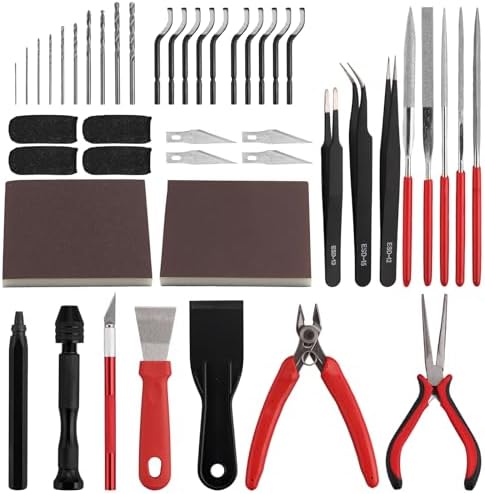
The KAMTOP kit includes tools for a fairly complete hand-finishing sequence. Its 46 pieces include a deburring tool with ten blades, a precision knife with spare blades, plastic and metal scrapers, three tweezers, five mini files, sanding sponges, a hand drill with bits, nozzle pliers, and finger guards. The listing also describes a visual guide for helping users understand each tool’s purpose.
The hand drill is a notable addition if you need to open or adjust small holes in a printed part. For other cleanup, the knife and pliers can help trim supports, while the deburring tool, files, and sanding sponges offer different ways to refine edges and surfaces. The four finger guards are intended to help protect fingertips during close work with sharp tools.
This kit is a good fit for makers who want a broad finishing assortment, particularly if drilling and sanding are part of their workflow. It does not list nozzle-cleaning needles, a caliper, or dedicated printer-cleaning brushes, so it is not as complete for printer maintenance as the Intarsio or YEETIN kits. The listing describes it as suitable for home, STEM, and maker-space use, not heavy industrial maintenance.
Pros:
- Includes a hand drill and multiple bits for small-hole work.
- Combines sanding sponges, mini files, and a deburring tool.
- Four cut-resistant finger guards are included.
- Visual guidance may help beginners identify each tool’s use.
Cons:
- No nozzle-cleaning needles or dedicated cleaning brushes are listed.
- No measuring tool is included.
Verdict: Choose the KAMTOP kit if you want drilling, sanding, and support-trimming tools together; choose another option if nozzle care or measurement is a priority.
How to Choose 3D Printing Post-Processing Tools
Start with the cleanup tasks you do most
Think about where your prints need the most work. If you mainly remove supports and tidy edges, prioritize cutters, pliers, scrapers, and a deburring tool. If you often smooth visible surfaces, look for sandpaper or sanding sponges along with files. For small models, precision cutters, tweezers, and fine files can offer more control than a large general-purpose tool.
Match the scraper to your build surface and print
A scraper can help lift a print from the build plate, but the blade type matters. A plastic scraper is intended for more delicate removal, while a metal scraper can provide more leverage for stubborn residue. Use care with either type: work gradually and follow your printer maker’s guidance to avoid damaging the build surface or the print.
Look at file and sanding options
Files are useful for narrow areas and small edges, while sandpaper and sanding sponges can cover broader or curved surfaces. Different file shapes help you reach different contours. If surface smoothing is a regular part of your process, a kit with several grits or flexible sanding materials may be more useful than one with many cutting tools but no abrasives.
Consider printer maintenance separately from model finishing
Some kits include cleaning needles, brushes, or replacement nozzles; others focus mainly on finished prints. If you want to clear nozzle buildup or clean around printer components, check that the kit includes the maintenance tools you need. Verify nozzle type and size compatibility before using any replacement part.
Check for tools that match your level of precision
A digital caliper can help you check part dimensions, while tweezers and small files can help with delicate detail work. A hand drill may be useful for opening small holes, but it is not necessary for every print. Choose tools based on your projects rather than the piece count alone.
Think about safe handling and storage
Post-processing kits often include sharp blades and pointed tools. A case or pouch can help keep them organized, and finger guards may add protection during close trimming work. Store blades safely and use a cutting mat when appropriate. Keep sharp tools away from children and follow the tool maker’s safety instructions.
Frequently Asked Questions
What tools are most useful for 3D print post-processing?
Commonly useful tools include scrapers for removing prints, cutters or pliers for trimming supports, files or a deburring tool for edges, and sanding materials for surface smoothing. Tweezers can help handle small parts, while cleaning needles and brushes are useful for printer maintenance.
Do I need a separate kit for nozzle cleaning?
Not always. Some kits in this guide include nozzle-cleaning needles or a nozzle-cleaning kit, while others focus on finishing printed parts. If nozzle care matters to you, confirm that the kit lists the cleaning tools and sizes you need.
Can I use a metal scraper on any build plate?
Do not assume a metal scraper is safe for every build surface. Scraping too aggressively can damage a plate or a print. Check your printer’s instructions and use a plastic scraper or another recommended removal method when the surface is delicate.
Which tools help smooth rough print edges?
A deburring tool or file can help remove small bumps and sharp edges. Sandpaper and sanding sponges are better options for smoothing larger areas. Start with light pressure and test on a less visible area when possible, since removing too much material can change a part’s shape.
Are these kits suitable for resin prints?
The SARABURU listing specifically mentions finishing resin and other materials. The other kits are described for 3D printing or general hobby finishing, but the supplied product details do not give the same specific resin-use statement. Check tool compatibility and follow the resin printer maker’s handling and cleanup guidance.
Should I choose the kit with the most pieces?
Not necessarily. A larger piece count does not guarantee that the kit has the tools you will use. Compare the contents against your workflow: sanding supplies, measuring tools, nozzle needles, drill bits, and scrapers serve different purposes.
Final Recommendation
For a balanced mix of print cleanup and nozzle care, the Intarsio kit is a sensible starting point. Choose SARABURU if sanding and deburring are your main priorities, ukiism for fine-detail work, YEETIN for a kit that also includes a digital caliper, or KAMTOP for a broad finishing set with a hand drill and finger guards. The best choice is the one that matches the tasks you actually do and the tools you do not already own.
