
A wall-mounted TV looks much neater when its power cord and signal cables aren’t dangling below the screen. The right cable-management kit can hide low-voltage wires and provide a cleaner route for power, but the best fit depends on your wall depth, outlet location, devices, and how much cutting you’re comfortable with. These five options include recessed kits with different outlet counts, cord lengths, and installation requirements.
Table of Contents
Quick Comparison
| Product | Power outlets | Extension cord | Notable detail |
|---|---|---|---|
| Mount-It! In-Wall TV Cable Concealer Kit | Triple outlet | 9 ft | ETL in-wall certified; 2.4-inch minimum cavity depth |
| Naerza In-Wall Cable Management Kit | Power modules included | 6 ft | Includes a 3-inch hole saw adapter |
| Plug’n In-Wall Cable Management Kit | 4 | 9.8 ft | Brush pass-through and metal drywall clamps |
| ECHOGEAR TV Cord Hider | 2 | 6 ft | Brush pass-through for low-voltage cables |
| Celendor In-Wall Cable Management Kit | 2 | 9.8 ft | 45-degree flat plug; 3.4-inch minimum cavity depth |
Our Picks: Best Cable Management For Wall Mounted Tv reviews
1. Mount-It! Kit: A Versatile Pick With Three Outlets

The Mount-It! kit combines recessed power with a pass-through space for HDMI, Ethernet, and other low-voltage cables. Its triple outlet can be useful if your TV area includes several small devices, while the 9-foot extension cord offers some flexibility when the existing outlet isn’t close to the screen.
The kit includes two wall plates, a drywall saw, a cutting template, and instructions. It is a plug-in system rather than a hard-wired outlet installation. The manufacturer states that it is ETL in-wall certified, an important detail to verify on the product and its included instructions before installation.
Plan the wall opening carefully: the larger plate needs a cutout between studs and at least 2.4 inches of cavity depth. This is the shallowest minimum listed among these picks, but you should still check for studs, obstructions, and the actual available space before cutting. The saw and template help with the process, though installation still involves making drywall openings.
Pros:
- Three outlets for powering multiple devices
- Includes a 9-foot extension cord, saw, and cutting template
- Pass-through space accommodates multiple low-voltage cables
- Listed as ETL in-wall certified by the manufacturer
Cons:
- Requires a cutout between studs and at least 2.4 inches of cavity depth
- Not a no-cut solution; installation requires measuring and cutting drywall
Verdict: Choose the Mount-It! if you want three recessed outlets, a relatively shallow stated cavity requirement, and an all-in-one kit with basic cutting tools.
2. Naerza Kit: A Hole-Saw Setup for a Fast Install

The Naerza kit uses upper and lower power modules with openings for low-voltage cables. Its package includes a 3-inch hole saw adapter and drill bit, a 6-foot bendable cable, a 6-foot extension power cord, and instructions. The hole-saw approach differs from kits that rely on a hand saw and template, so it may suit you if you already have a compatible drill and prefer that cutting method.
The manufacturer says the openings can pass multiple HDMI, network, and audio cables, and that the modules support flexible vertical spacing. It also describes the components as safety-tested and made with fire-resistant materials. The supplied information does not name a specific certification, so check the product labeling and documentation if a particular certification is important to you.
Before buying, check the stated fit requirements: at least 3 inches of cavity depth and a TV plug no wider than 1.125 inches. The installation calls for two 3-inch holes, so it’s important to confirm the location is clear and the spacing works for your TV and devices before drilling.
Pros:
- Includes a hole saw adapter and drill bit
- Separate modules allow flexibility in vertical placement
- Includes a bendable cable and 6-foot extension cord
- Designed to pass multiple low-voltage cables
Cons:
- Requires at least 3 inches of wall cavity depth
- Two 3-inch holes and a compatible drill are needed for the described installation
Verdict: The Naerza is a practical option if its depth and plug-width limits fit your wall and you want a kit supplied with a hole-saw attachment.
3. Plug’n Kit: Four Outlets and an Extra-Long Cord
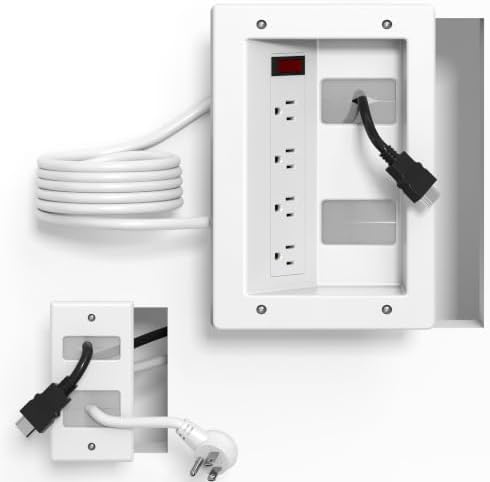
This kit stands out for its four AC outlets and 9.8-foot extension cord. That combination may help if you want to power a TV, streaming device, soundbar, or other equipment from the recessed module, or if your existing outlet is farther away than a shorter cord can comfortably reach.
A brush pass-through panel provides a route for HDMI, Ethernet, and audio-video cables. The package also includes a drywall saw, positioning template, and cable ties. The product description lists metal side buckles to secure the plates to drywall and says the kit is ETL certified for in-wall use. Confirm the certification and installation details on the product before putting it into service.
The longer cord adds placement flexibility, but it doesn’t remove the need to check the route and measure before cutting. The supplied product information does not state a minimum cavity depth, so consult the manufacturer’s instructions to confirm your wall is suitable. Four outlets are useful only if your devices’ combined power needs are within the product’s limits; check its labeling for applicable electrical ratings.
Pros:
- Four AC outlets for multiple devices
- 9.8-foot extension cord for more flexible placement
- Brush panel accommodates several low-voltage cables
- Includes a saw, template, and cable ties
Cons:
- Wall cavity requirements are not specified in the supplied product details
- More outlets make it especially important to check the electrical rating and intended load
Verdict: Pick the Plug’n kit if you need four outlets and a longer cord, and can confirm the wall depth and electrical specifications before installation.
4. ECHOGEAR Kit: A Straightforward Two-Outlet Option

The ECHOGEAR kit is a relatively simple setup for a TV and one additional device. It has two recessed outlets and a brush pass-through for up to three low-voltage cables, such as HDMI, Ethernet, and audio wires. A 6-foot extension cord connects the kit to power, and the package includes a wall template and drywall saw.
The listed module dimensions are 6.25 inches long, 8 inches high, and 3.95 inches deep. That depth is worth checking against your wall cavity before you choose a location. The product description also calls out space around the upper outlets for unusual or bulky plugs, which can matter when a streaming device or adapter has a larger power brick.
This model has fewer outlets and a shorter cord than the Mount-It!, Plug’n, and Celendor options. That may be enough for a TV and a streaming device, but it leaves less room for additional powered gear. The supplied description says the kit requires no wiring, but does not state a specific certification, so check the product documentation and local requirements before installing it.
Pros:
- Two outlets suit a TV and one additional device
- Brush pass-through holds up to three low-voltage cables
- Includes a 6-foot extension cord, template, and drywall saw
- Outlet space is designed to accommodate awkward plugs
Cons:
- Only two power outlets and a 6-foot cord
- Listed module depth is 3.95 inches, so the wall cavity needs careful checking
Verdict: The ECHOGEAR is a sensible fit for a basic TV-and-streaming-device setup when two outlets and a 6-foot cord are enough.
5. Celendor Kit: A Long Cord and Low-Profile Plug

The Celendor kit pairs two recessed AC outlets with a brush wall plate for low-voltage cables. Its 9.8-foot power cord is longer than the cords included with the ECHOGEAR and Naerza kits, which can help when the existing outlet is farther from the TV location.
One notable feature is its 45-degree flat plug, which the product description says is 0.28 inches thick. A slim plug can be useful when a wall outlet sits behind furniture or close to a surface, though the exact fit depends on your outlet, wall, and surrounding space. The kit is described as having UL-certified components and ETL-certified wiring, as well as tamper-resistant outlets and safety shutters.
Installation requires two wall openings, and the manufacturer specifies a minimum cavity depth of 3.4 inches. That is deeper than the stated requirement for the Mount-It! kit, so don’t assume it will fit a shallow wall. The product description also lists a maximum output of 125V/15A and 1875W; check that rating against the devices you intend to power.
Pros:
- 9.8-foot cord offers flexible placement
- Flat 45-degree plug is designed to sit close to the wall
- Includes two outlets and a brush wall plate
- Product description lists UL-certified components and ETL-certified wiring
Cons:
- Requires at least 3.4 inches of wall cavity depth
- Two wall openings are needed for the described installation
Verdict: Consider the Celendor if you need a long cord and low-profile plug, and your wall meets its 3.4-inch depth requirement.
How to Choose Cable Management for a Wall-Mounted TV
Decide whether you want an in-wall kit or an on-wall cover
These picks are recessed kits that require openings in drywall. They can conceal cables inside the wall, but installation involves measuring and cutting. If you don’t want to cut into the wall, look for a surface-mounted cable raceway instead. A raceway keeps wires covered on the outside of the wall and may be easier to remove or reposition, though it remains visible.
Check wall depth and look for obstructions
Compare the kit’s minimum cavity depth with the space available behind your drywall. The listed requirements vary: Mount-It! specifies at least 2.4 inches, Naerza at least 3 inches, and Celendor at least 3.4 inches. ECHOGEAR lists a module depth of 3.95 inches. Plug’n’s supplied product details do not specify a minimum. Before cutting, follow the product instructions and make sure the planned opening won’t conflict with studs, wiring, plumbing, or other obstacles.
Count the devices that need power
Think about what will be plugged in near the TV. A screen and one streaming device may only need two outlets, while a soundbar or other equipment can make extra outlets useful. The options here range from two outlets to four, but more outlets do not replace checking the kit’s electrical rating. Review the product label and instructions, and make sure the combined power needs of your devices are appropriate.
Measure the route from the kit to the existing outlet
The extension cords in these kits range from 6 to 9.8 feet. Measure the path the cord will follow, not just the straight-line distance between the recessed module and the outlet. A longer cord may offer more placement flexibility, but it won’t solve every layout problem. Confirm the included cord and plug configuration work with your intended setup.
Plan for signal cables and future changes
List the cables you need to route, such as HDMI, Ethernet, or audio wires. Brush plates and pass-through openings make it possible to move low-voltage cables through the wall, but the available space differs among products. Consider whether you might add a device later, and make sure the cable route allows you to connect or replace wires without straining them.
Understand the safety information
Power and signal cables have different requirements. Choose a kit intended for its stated in-wall use, read the supplied instructions, and verify the product’s certification and ratings rather than relying on a broad claim alone. Don’t route an ordinary power cord through a wall unless the system is specifically designed and listed for that use. If your wall, wiring, or local requirements are unclear, get qualified help before cutting or installing the kit.
Choose an installation method you can manage
Some kits include a hand saw and template; Naerza includes a 3-inch hole saw adapter and drill bit. Either approach requires accurate measurement and a suitable wall location. Check what tools you already have and read the installation steps before buying. A kit marketed as a DIY option still calls for careful work, and the wall surface may need repair if an opening is misplaced.
Frequently Asked Questions
Can I hide both power and HDMI cables behind the wall?
These products are designed to provide recessed power along with a route for low-voltage cables such as HDMI. Follow the exact product instructions and use only the power components intended for in-wall installation. Don’t run an ordinary power cord inside a wall.
Do I need an electrician to install one of these kits?
The products are described as plug-in or DIY systems, and the ECHOGEAR description says no wiring is required. However, installation involves cutting openings and following safety instructions. If you’re unsure about the wall, electrical setup, or local requirements, consult a qualified professional.
How much wall cavity depth do I need?
It depends on the kit. Mount-It! specifies at least 2.4 inches, Naerza at least 3 inches, and Celendor at least 3.4 inches. ECHOGEAR lists a module depth of 3.95 inches. Check the installation guide for the specific kit you choose; Plug’n’s supplied details do not give a minimum depth.
Which option has the most outlets?
The Plug’n kit has four AC outlets. Mount-It! lists three outlets, while ECHOGEAR and Celendor each have two. The supplied Naerza description refers to power modules but does not state an outlet count.
Which kit has the longest extension cord?
The Plug’n and Celendor kits each list a 9.8-foot cord. Mount-It! includes a 9-foot cord, while Naerza and ECHOGEAR list 6-foot cords. Measure your setup before choosing, since the cord’s usable route may differ from the direct distance.
Can I install a recessed kit in a rental?
Some kits are described as renter-friendly, but cutting drywall can still affect your rental agreement or require repairs when you move. Check with your landlord before making openings. If you need a removable option, consider an external cable cover instead.
Will a recessed kit fit behind every TV?
No. Wall depth, studs, obstructions, plug size, outlet location, and the space behind the television all affect fit. Check the kit’s measurements and requirements, then confirm the proposed opening and cable path before cutting.
Final Recommendation
For a well-rounded recessed setup, the Mount-It! stands out with three outlets, a 9-foot cord, included cutting tools, and a stated 2.4-inch minimum cavity depth. Choose the Plug’n kit if four outlets and a 9.8-foot cord matter more, or the Celendor if its low-profile plug suits your outlet location and your wall meets the deeper cavity requirement. If you want to avoid cutting drywall, an on-wall cable raceway may be a better match than any of these in-wall kits.
