
A door lock with both a keypad and fingerprint reader gives you more than one way to get inside without carrying a key. The best fit depends on how you plan to manage access, whether you need app controls, and whether your door matches the lock’s installation requirements. These five options range from simple fingerprint-and-code knobs to models with app access, key fobs, and optional remote features.
| Product | Entry methods | Notable feature | Best suited to |
|---|---|---|---|
| Evanshow 4-in-1 Fingerprint Smart Door Knob | Fingerprint, app, code, key | Local biometric storage claimed by the listing | Households wanting several access options |
| Evanshow 5-in-1 Fingerprint Door Knob | Fingerprint, password, key, IC card, app | Stores up to 100 fingerprints and 50 passwords | Families or hosts managing different users |
| Yamiry Keypad Fingerprint Door Knob | Fingerprint, password, app, key fob, key | Bluetooth app control; optional Wi-Fi gateway | Shoppers who want multiple unlock methods |
| Yamiry 6-in-1 Smart Door Handle Lock | Fingerprint, app, passcode, key fob, key, voice | Remote and voice features require a separate gateway | Landlords and households needing access management |
| AIMNAPS Fingerprint Door Knob | Fingerprint, code, key | Auto-lock; emergency USB power port | People who want straightforward keyless entry |
Table of Contents
Our Picks: Best Door Lock With Code And Fingerprint reviews
Evanshow 4-in-1 Smart Door Knob: A Flexible Everyday Choice

This Evanshow knob offers four ways to unlock: fingerprint, keypad code, app, or one of the included mechanical keys. That range is useful if different people in your household prefer different access methods, or if you want a physical backup for times when a finger scan or electronic feature is inconvenient.
The listing says the lock can store up to 100 fingerprints, codes, or cards, and that fingerprint data is kept in an encrypted chip rather than in the cloud. It also describes a fingerprint scan time of about half a second, silent mode, and an auto-lock feature that engages five seconds after closing. The knob is designed for wooden doors between 1.18 and 1.97 inches thick, with reversible installation for left- or right-swinging doors.
One practical advantage is the combination of a key backup and a USB-C emergency power option. The listing says installation requires no drilling or wiring and includes tools and video instructions. Still, check your door’s thickness and existing setup before ordering, and confirm which app functions are available in your region. The product description does not specify whether remote app control requires an additional device.
Pros:
- Four entry methods, including mechanical keys
- Listing claims local storage for biometric data
- Auto-lock and silent mode are included
- Designed for common wooden-door thicknesses and either swing direction
Cons:
- The app’s connectivity requirements are not clearly detailed in the supplied information
- Compatibility is specified for wooden doors, so other door materials need checking
Verdict: Choose this Evanshow model if you want fingerprint and code access alongside app control and a traditional key backup.
Evanshow 5-in-1 Lock: More Ways to Share Access
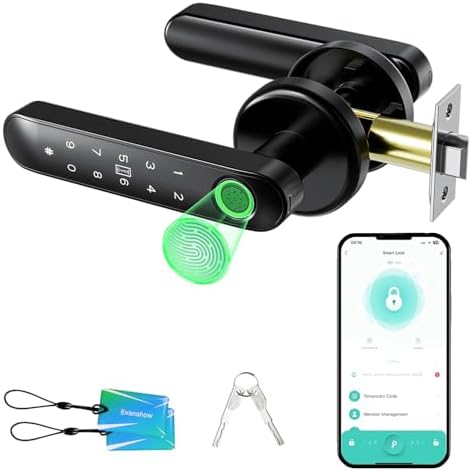
This Evanshow fingerprint knob adds an IC card to the usual fingerprint, password, key, and app options. The listing specifies capacity for up to 100 fingerprints and 50 passwords, which may help when several household members or regular visitors need separate credentials.
Its app is described as supporting permanent and temporary access, entry logs, and silent mode. Those features may suit a household that changes who needs access over time, or a host who wants to issue a temporary code. Wi-Fi control and voice control require a separately sold gateway, however, so the lock should not be treated as a complete remote-access system on its own.
Pay close attention to the setup instructions. The product information says an administrator fingerprint must be registered before first use; until then, any fingerprint can unlock the door. It also has a USB port for temporary emergency power from an external power bank, but that port does not recharge the lock’s batteries. The knob is designed for wooden doors 1.18 to 1.97 inches thick and is described as installable without drilling or wiring.
Pros:
- Five unlocking options, including an IC card
- Separate stated capacities for fingerprints and passwords
- App features include temporary access and entry logs
- Emergency USB power can help if the batteries run out
Cons:
- Remote Wi-Fi and voice functions require a separate gateway
- Administrator setup is essential before the lock is used
Verdict: This is a strong option for households that will use several credential types, provided you are comfortable setting up the admin fingerprint and buying a gateway if you need remote features.
Yamiry Keypad Fingerprint Knob: A Five-Method Entry System

This Yamiry model combines fingerprint and password entry with a Bluetooth app, key fob, and mechanical key. Its aluminum construction is described as having high hardness and corrosion resistance. That is a specific material detail not given for several other locks here, although the supplied information does not establish how the lock performs under particular weather or exposure conditions.
The app connects over Bluetooth, and the lock can store up to 50 passwords, fingerprints, and key fobs, according to the listing. A separate Wi-Fi gateway is needed for remote control. The lock also offers several ways to secure the door, including auto-lock, app control, and a long press of the check button.
The manufacturer describes installation with a screwdriver and says the lock works with most American standard doors. Because “most” does not mean every door, confirm the required measurements and latch arrangement before buying. If you need to unlock the door while away from home, remember that Bluetooth alone is not the same as remote access; the additional gateway is required for that feature.
Pros:
- Five unlocking options, including a key fob and mechanical key
- Aluminum construction
- Auto-lock and more than one manual locking option
- Remote control is available with a separate Wi-Fi gateway
Cons:
- Remote access requires an extra gateway
- Door compatibility should be checked rather than assumed
Verdict: Consider this Yamiry if you want a range of entry methods and Bluetooth app control, and do not mind adding a gateway for remote access.
Yamiry 6-in-1 Smart Handle: Built for Flexible Access Management

This Yamiry handle lock offers six listed access methods: fingerprint, Bluetooth app, passcode, key fob, mechanical key, and voice unlock. The description also mentions remote control and Alexa voice features, but both require a separately sold Wi-Fi gateway. Without that extra device, plan around the local access options and Bluetooth app features.
The app is described as supporting permanent and temporary access, one-time passcodes, and unlock records. That access management may be useful for a rental property or a home where guests need temporary entry. The handle is designed to fit most standard American wooden front doors, install with a screwdriver, and work on either left- or right-handed doors. The description says no extra drilling is needed, but checking your door before purchase is still important.
This model stands out for access management rather than for a detailed stated credential capacity; the supplied product information does not give a maximum number of fingerprints or codes. Its broad feature list also means you should weigh the gateway cost and setup against the features you will actually use.
Pros:
- Six listed ways to unlock, including a mechanical key
- App supports temporary access and one-time passcodes
- Designed for left- or right-handed doors
- May suit landlords and hosts managing guest access
Cons:
- Remote and voice control require a separate Wi-Fi gateway
- The supplied information does not state a credential-storage limit
Verdict: Pick this Yamiry for its access-management features if you need guest codes or app records, and factor in the separate gateway for remote or voice control.
AIMNAPS Fingerprint Door Knob: A Simpler Keypad-and-Biometric Pick

AIMNAPS keeps the access choices focused: use a fingerprint, enter a code, or use a key. It does not list app control or key fobs, making it a more straightforward fit for someone who wants keyless entry without managing a connected lock system.
The listing describes fingerprint recognition in less than a second and an auto-lock function that engages when the door closes. It is designed for doors between 1.18 and 1.97 inches thick, with no drilling or wiring required. One important setup instruction is to register an administrator fingerprint right away. Until that is done, the product information warns that any fingerprint can unlock the door.
The USB port is for emergency power from an external power bank if the batteries run out. It cannot recharge the internal batteries, so it should be treated as a temporary way to regain access, not as a charging port. Compared with the app-enabled choices, this lock gives up remote management and extra credentials in exchange for a simpler feature set.
Pros:
- Fingerprint, code, and key entry
- Auto-lock function is included
- Emergency USB power option
- Designed for common door thicknesses without drilling or wiring
Cons:
- No app control or key fob is listed
- Administrator fingerprint must be registered before normal use
Verdict: Choose the AIMNAPS knob if you want a basic fingerprint-and-code lock with a physical key backup and do not need app-based access management.
How to Choose a Door Lock With Code and Fingerprint
Check Your Door Before Choosing a Lock
Start with the door itself. Compare its thickness, material, and swing direction with the lock’s listed requirements. Some options here specify wooden doors between 1.18 and 1.97 inches thick, while others describe compatibility with most standard American doors. Those claims are not interchangeable, so check the exact product details and your existing hardware before ordering.
Decide Which Entry Methods You Will Actually Use
Fingerprint and keypad access are the main features to compare, but extra options can matter. A mechanical key can provide a familiar backup, while a key fob or IC card may be convenient for people who prefer not to enter a code. If you only need a fingerprint, code, and key, a simpler model may be easier to manage than a lock with app and voice features.
Understand App, Bluetooth, and Wi-Fi Requirements
App control does not always mean you can control the lock from anywhere. Bluetooth lets a phone connect locally, while remote access may require a separately sold Wi-Fi gateway. Check whether the gateway is included and which features depend on it. This is especially important if you expect to issue codes or check entry information while away from home.
Review User Capacity and Access Controls
If several people need access, look for a stated limit on fingerprints, passwords, cards, or key fobs. The Evanshow 5-in-1 listing gives separate limits for fingerprints and passwords, while other products provide less detail about their capacity. Consider whether you need temporary or one-time codes, entry logs, or app-based user management before paying for features you may not use.
Complete Administrator Setup Before Relying on the Lock
Some biometric locks require an administrator fingerprint to be registered before use. The Evanshow 5-in-1 and AIMNAPS descriptions specifically warn that the lock may accept any fingerprint until this step is complete. Follow the setup instructions immediately after installation, then test each intended entry method while the door is open.
Plan for Batteries and Emergency Access
Check the product instructions for battery requirements and low-power warnings. An emergency USB port can help provide temporary power from an external power bank, but the AIMNAPS and Evanshow 5-in-1 descriptions say their ports do not recharge the internal batteries. A mechanical key is another useful fallback when a lock offers one.
Choose Auto-Lock Settings That Match Your Routine
Auto-lock can reduce the chance of leaving a door unlocked, but timing and behavior vary by model. One Evanshow listing specifies a five-second delay after closing; other descriptions simply state that auto-lock is available. Confirm how the function works and whether it can be adjusted to suit your household before relying on it.
Frequently Asked Questions
Can a fingerprint door lock also use a keypad code?
Yes. All five options in this guide list both fingerprint and code or password entry. The other available methods differ by model, so check the comparison table if you also want a key, app, card, or key fob.
Do these locks let me unlock the door remotely?
Some offer remote control, but it may require a separate Wi-Fi gateway. The Yamiry models and the Evanshow 5-in-1 description specify gateway requirements for remote or voice features. Check the exact product details before assuming the lock can be controlled over the internet.
Can I install one of these locks without a professional?
The product descriptions generally present these as DIY installations, often using a screwdriver and without extra drilling or wiring. Fit still depends on your door. Confirm the door thickness, material, and hardware compatibility before starting.
What happens if the batteries run out?
Some models include mechanical keys, and some provide a USB port for emergency power from an external power bank. The USB port is not necessarily a battery charger; the AIMNAPS and Evanshow 5-in-1 listings say their ports are for emergency access only.
Should I set up an administrator fingerprint before using the lock?
Yes, when the manufacturer requires it. The Evanshow 5-in-1 and AIMNAPS descriptions warn that the lock may accept any fingerprint until an administrator fingerprint is registered. Follow the included setup steps and test the lock before closing the door.
Are these locks all deadbolts?
No. The products listed here are described mainly as door knobs or handle locks. Product titles and descriptions can refer to front-door or deadbolt use, but verify the exact hardware included and whether it suits your existing door before buying.
Final Recommendation
For a balance of fingerprint, code, app, and key access, the Evanshow 4-in-1 is a versatile starting point, especially if its stated local biometric storage appeals to you. Choose the Evanshow 5-in-1 if you need more defined fingerprint and password capacity, but remember to register its administrator fingerprint and budget for a gateway if you want remote control. The Yamiry options suit shoppers who value app-based access management, while AIMNAPS is the simpler choice for fingerprint, code, and key entry without listed app features. In every case, verify your door’s fit and complete the security setup before relying on the lock.
