
Choosing an office air monitor starts with deciding what you need to track. A CO₂ reading can help flag when a room may need more ventilation, while particle and gas sensors can provide a broader view of indoor air. The picks below range from simple, cable-free CO₂ monitors to a multi-sensor device with a screen, so you can match the monitor to your workspace and the information you want at a glance.
Keep in mind that an air quality monitor measures conditions; it does not clean the air or replace proper ventilation. For a shared office, consider who needs to see the readings, whether you want alerts or app history, and whether the device needs to monitor particles as well as gases.
Table of Contents
Quick Comparison
| Monitor | What it measures | Best for | Power and display |
|---|---|---|---|
| Aranet4 Indoor Air Quality Monitor | CO₂, temperature, humidity, pressure | Simple, cable-free CO₂ monitoring | Battery-powered; e-ink display and app |
| Airthings Wave Enhance | CO₂, VOCs, humidity, temperature, pressure, noise, light | Offices that benefit from broader room-condition tracking | Battery-powered; color indicator and app |
| AirGradient ONE | PM2.5, CO₂, TVOCs, NOx, temperature, humidity | Detailed, multi-pollutant monitoring | USB-powered; OLED display, LED bar, and app |
| Birdie 2.0 | CO₂ | Simple visual ventilation reminders | Visual indicator; no phone notifications required |
| AIRNERGY Portable CO₂ Monitor | CO₂, temperature, humidity | CO₂ alerts and app-based history | Display, app, and backup battery |
Our Picks: Best Indoor Air Quality Monitors For Offices reviews
Aranet4: A focused, cable-free CO₂ monitor for shared rooms

The Aranet4 keeps its focus on CO₂, a useful indicator of ventilation in a room where people gather. It also measures temperature, relative humidity, and atmospheric pressure. Its NDIR sensor is designed for CO₂ measurement, and the large on-device reading makes it practical to check without opening an app.
The cable-free e-ink display is a good fit for desks, meeting rooms, or shared office areas where a power cord would get in the way. Color coding and an optional buzzer can help make a high CO₂ reading easier to notice. The companion app displays readings and up to 90 days of historical data, which can help you spot recurring patterns in a workspace.
This is a straightforward choice if ventilation is your main concern. It does not measure fine particles or VOCs, so it cannot provide the broader pollutant picture of the AirGradient ONE or Airthings Wave Enhance. The stated battery life is up to four years, but actual life can depend on use and settings.
Pros:
- Measures CO₂ with an NDIR sensor
- Large, color-coded e-ink display with optional buzzer
- Battery-powered design avoids a desk cable
- App includes historical graphs
Cons:
- Does not measure PM2.5 or VOCs
- App is needed to view historical trends
Verdict: Choose the Aranet4 if you want a simple, readable CO₂ monitor for office ventilation and do not need particle or VOC readings.
Airthings Wave Enhance: Multi-sensor tracking with app alerts

The Wave Enhance covers more than ventilation alone. Its sensors track CO₂, VOCs, humidity, temperature, and air pressure, while it also monitors noise and light. For an office where comfort and room conditions matter alongside ventilation, that wider set of readings can be useful.
The unit is battery-powered and designed for cable-free placement. A touch sensor provides a color-coded indicator, while the Airthings app is where you manage notifications, see current readings, and follow trends over time. This setup suits someone who wants a quick visual cue in the room and more detail on a phone.
One important limitation is that the listed sensors do not include PM2.5 measurement. If fine-particle readings are a priority, the AirGradient ONE is the better match. The Wave Enhance’s full readings and trend analysis depend on using the app, so it may not be ideal if you want every measurement displayed directly on the device.
Pros:
- Tracks several gases and room conditions, plus noise and light
- Battery-powered for flexible placement
- App supports notifications and trend analysis
- Color-coded indicator offers a quick visual check
Cons:
- Does not list PM2.5 monitoring
- Complete readings are accessed in the app
Verdict: Pick the Wave Enhance if you want app-based tracking across several indoor conditions and do not need a particle sensor.
AirGradient ONE: Broad pollutant coverage and visible readings
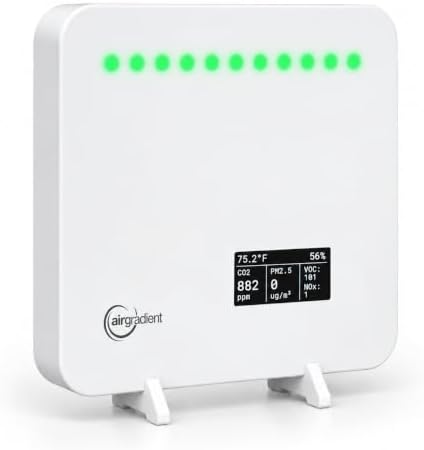
The AirGradient ONE is the broadest monitor in this group. It measures PM2.5 fine particles, CO₂, TVOCs, NOx, temperature, and relative humidity. That range can help an office team look beyond ventilation and track changes in particles and gases as well as basic room conditions.
Unlike the battery-powered picks, this monitor uses a USB power connection and includes a cable and adapter. It displays current readings on a small OLED screen, with an LED bar for a quick visual overview. It can sit on a flat surface or be mounted on a wall, giving you options for a shared workspace.
The product information also describes subscription-free dashboard access, a mobile app, API access, and integrations for users who want local control or more technical flexibility. That makes it a strong fit for offices that want to inspect trends or connect readings to a broader smart-building setup. Its wider sensor coverage and software options may be more than a small office needs if the only goal is to know when to ventilate.
Pros:
- Measures PM2.5, CO₂, TVOCs, and NOx, along with temperature and humidity
- On-device OLED display and color LED bar
- Subscription-free dashboard, app, and API access are listed
- Can sit on a surface or mount to a wall
Cons:
- Requires USB power rather than running on batteries
- Broader features may be unnecessary for basic CO₂ monitoring
Verdict: Choose the AirGradient ONE if your office needs a detailed view of particles and gases, plus visible readings and flexible data access.
Birdie 2.0: A low-tech visual cue to ventilate

Birdie 2.0 takes a different approach from monitors built around screens and app dashboards. It uses a CO₂ sensor and a visible, bird-inspired design to signal when the air needs attention. According to its product description, the device shuts down when air quality is poor and comes back to life after you ventilate the room.
That simple signal may work well in a meeting room or small office where people want a reminder without checking a phone or interpreting a number. It can also blend into a room more like decor than a typical instrument. The trade-off is that Birdie is focused on a single signal: it does not list temperature, humidity, VOC, or particle measurements.
Because the product is designed to communicate through its visual behavior rather than a full display, it is less suited to anyone who needs exact readings or historical data. For those needs, the Aranet4 offers a numeric CO₂ display and app history, while AirGradient ONE tracks more pollutant types.
Pros:
- CO₂-focused reminder in a distinctive visual design
- Does not require phone notifications for its main signal
- Designed for use in homes, offices, and classrooms
Cons:
- Does not list a numeric display or app-based history
- Does not measure particles or other listed gases
Verdict: Choose Birdie 2.0 if you want a simple visual prompt to ventilate and do not need detailed readings or data history.
AIRNERGY Portable CO₂ Monitor: Custom alerts and extended app history

The AIRNERGY monitor tracks CO₂, temperature, and humidity, with a stated NDIR sensor accuracy of ±50 ppm, 1 ppm resolution, and a one-second refresh rate. For a small office or personal workspace, the combination of a screen and app alerts makes it easier to keep an eye on changes without relying on a visual-only signal.
You can set a CO₂ limit in the app and choose among beep, screen-flash, or app notifications. The app is described as storing up to 360 days of history, which is the longest stated history among these picks. A 1500mAh backup battery is included for operation when unplugged, and the device can be placed on a desk or wall-mounted.
This is a practical option if you want customizable alerts and longer-term app history in a compact unit. It does not list PM2.5 or VOC monitoring, so it is not a substitute for a multi-pollutant monitor. The product description also does not specify a battery runtime, so plan around the backup battery as a convenience rather than assuming extended unplugged operation.
Pros:
- NDIR CO₂ sensor with stated accuracy and fast refresh rate
- Multiple alert options and a user-set CO₂ limit
- App history is listed for up to 360 days
- Can sit on a desk or be wall-mounted
Cons:
- Does not list PM2.5 or VOC readings
- Backup battery runtime is not specified in the product details
Verdict: Pick the AIRNERGY if customizable CO₂ alerts and long app history matter more to you than monitoring a wider range of pollutants.
How to Choose an Indoor Air Quality Monitor for an Office
Decide which air conditions you need to track
CO₂ monitoring is a useful starting point if your main goal is to notice when a room may need more ventilation. It is not a complete measure of indoor air quality. If you also want information about fine particles or airborne gases, look for a monitor that specifically lists PM2.5, VOC, or NOx sensors. Check the sensor list carefully: a device with several room-condition readings may still not measure particles.
Choose between a quick display and detailed app data
A display or color indicator makes readings easier to check in a shared space, while an app can provide alerts and historical trends. Think about who will use the information. A team that needs a quick reminder during the day may prefer a clear on-device signal. Someone tracking patterns over time may value app graphs, notifications, or data access options.
Consider power and placement
Battery-powered models are easier to place without adding a cable to a desk or meeting room. A USB-powered monitor may suit a fixed location where continuous power is convenient. Before choosing, decide whether the monitor will sit on a desk or be mounted, and check which placement options the product supports.
Think about alerts in a shared office
Beep alerts can be easy to notice but disruptive during calls or focused work. A visual indicator or phone notification may be a better fit for a quiet office. If you choose a device with sound alerts, check whether they are optional and whether alert limits can be adjusted.
Match data features to your needs
Historical graphs can help you notice whether readings regularly change during busy meetings or at certain times of day. If your office uses smart-home or building tools, check for stated integrations and data access before buying. A monitor with extensive software options can be useful for technical users, but it may add little value if you only need a basic ventilation cue.
Understand what a monitor can and cannot do
An air monitor reports readings; it does not improve air by itself. A CO₂ increase can suggest that ventilation needs attention, but it does not identify every possible indoor pollutant. Use readings as one source of information, and consider the office’s ventilation and filtration needs separately.
Frequently Asked Questions
Which air quality monitor is best for a shared office?
For a simple shared-room CO₂ check, the Aranet4 offers a large display and optional buzzer without a power cable. If you need readings for particles and several gases, the AirGradient ONE has the broadest listed sensor range in this group.
Is a CO₂ monitor enough to assess office air quality?
Not by itself. CO₂ can help you track ventilation conditions, but it does not measure every pollutant. For a broader picture, consider whether you also need PM2.5 or gas readings such as VOCs and NOx.
Do these monitors clean or filter office air?
No. These devices measure conditions and provide information or alerts. They do not remove pollutants or bring fresh air into a room.
Which monitor tracks PM2.5?
The AirGradient ONE specifically lists PM2.5 measurement. The other products in this selection focus on CO₂ and other listed room conditions or gases.
Which options can work without a power cable?
The Aranet4 and Airthings Wave Enhance are described as battery-powered. The AIRNERGY includes a backup battery, while the AirGradient ONE uses USB power. Check each product’s instructions for power needs and battery operation details.
Can I rely on a visual indicator without checking an app?
That depends on the product. The Aranet4 has a color-coded display, the Airthings Wave Enhance has a color-coded touch indicator, and Birdie is designed as a visual ventilation cue. For detailed readings or historical trends, app access or a numeric display is more useful.
What is the best pick if I want long-term CO₂ trends?
The AIRNERGY product information lists app history of up to 360 days, while the Aranet4 lists up to 90 days. If you want a wider set of readings and data tools, the AirGradient ONE also offers dashboard and app access.
Conclusion
For most offices focused on ventilation, the Aranet4 is a strong, straightforward pick thanks to its clear CO₂ display, cable-free design, and app history. Choose the AirGradient ONE if you need PM2.5 and broader gas monitoring, or the AIRNERGY if customizable CO₂ alerts and extended app history are your priorities. For a simple visual reminder, Birdie 2.0 offers a different approach, while the Airthings Wave Enhance adds noise and light tracking alongside several air and comfort readings.
