
Choosing a new front door lock means balancing everyday convenience with a setup that fits your door. The options below range from app-connected keypad and fingerprint locks to traditional keyed handlesets. Compare how each one works, what its installation requires, and which features matter most for your home.
Table of Contents
Quick Comparison: Best New Front Door Locks
| Product | Lock type | Notable features | Best for |
|---|---|---|---|
| Philips WiFi Keypad Deadbolt with Handle | Smart deadbolt and handle set | Built-in Wi-Fi, app access, fingerprint reader, passcodes | Remote access without a separate hub |
| Veise VE06-H Smart Front Door Lock Handle Set | Smart lock and handle set | App, codes, fobs, key, thumb turn | Households that want several entry methods |
| Philips Upgraded Wi-Fi Smart Front Door Lock Set | Smart deadbolt and handle set | Built-in Wi-Fi, fingerprint access, app alerts | Keyless access with remote monitoring |
| Kwikset San Clemente Handle and Deadbolt Set | Keyed handleset and deadbolt | SmartKey re-keying, adjustable latch | A traditional lock with a re-keying option |
| Kwikset Montara Handle and Deadbolt Set | Keyed handleset and deadbolt | SmartKey re-keying, adjustable latch, interior knob | A classic handleset look and keyed entry |
Our Picks: Best New Front Door Lock reviews
1. Philips WiFi Keypad Deadbolt with Handle: Best for Hub-Free Remote Access

This Philips set combines a deadbolt with a matching handle and offers several ways to enter: app control, passcodes, fingerprints, and a physical key. Its built-in Wi-Fi connects directly to a 2.4GHz network, so you don’t need to buy a separate hub for remote app access.
The app can manage users and codes, show lock status, and display access history. Passcodes can be set up as permanent, one-time, periodic, or recurring, which can be useful when you need to give a visitor access without handing over a key. The fingerprint reader is listed as unlocking in 0.3 seconds, and voice control works with Alexa and Google Assistant.
Auto-lock is adjustable from zero to 180 seconds, but it is off by default and must be enabled in the app. The listed battery life is up to six months, though actual use can vary. Batteries are not included, and the product information calls for standard 1.5V alkaline batteries. The lock should also be within 33 feet of the router, with fewer obstacles between them for a stronger connection.
This is a strong fit if you want a full handle-and-deadbolt set with remote access and multiple keyless entry methods. Before buying, check that the set’s dimensions and installation requirements match your existing door; the supplied details do not list all fit measurements.
Pros:
- Built-in Wi-Fi enables app access without an extra hub.
- Offers fingerprint, passcode, app, and physical-key entry.
- Supports several passcode schedules and access history.
- Includes a matching handle set and adjustable auto-lock.
Cons:
- Requires a suitable 2.4GHz Wi-Fi connection within the stated range.
- Batteries are not included, and auto-lock needs to be turned on manually.
Verdict: Choose this Philips set if hub-free remote access and fingerprint entry are priorities, and confirm door fit and Wi-Fi reach before ordering.
2. Veise VE06-H Smart Front Door Lock: Best for Multiple Entry Methods
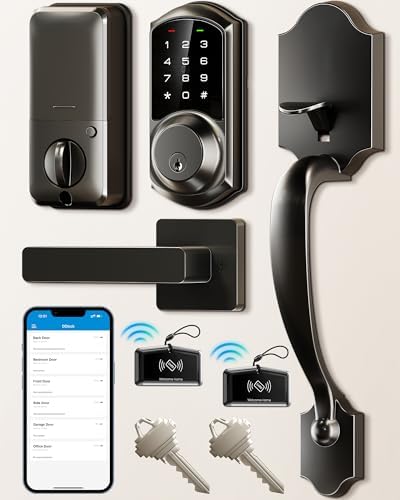
The Veise VE06-H is a smart lock and handle set with five listed ways to unlock: app, code, fob, mechanical key, or interior thumb turn. That range can suit a household where not everyone wants to use a phone or remember a keypad code.
Through the app, you can manage users, review access records, and create digital keys or codes. The lock supports more than 250 user codes, including one-time, permanent, scheduled, and recurring options. It also has auto-lock, one-touch locking, privacy mode, passage mode, and a low-battery alert.
There are a few important setup details. The lock fits doors from 1⅜ to 2 inches thick, but requires three pre-drilled holes with spacing that meets its requirements. Measure the backset and cutouts before ordering. Alexa and Google Home integration requires the separately sold Veise G2 gateway, so this model is not the best choice if you expect voice control or remote smart-home features to work without additional hardware.
The supplied product information marks this model unavailable. Check the product listing before planning a purchase. If it is available, it may be worth considering for its varied entry methods and code controls, provided your door is compatible.
Pros:
- Five listed entry options, including fobs and a mechanical key.
- Supports a wide range of code schedules and user access.
- Includes privacy, passage, one-touch locking, and auto-lock modes.
- Lists US phone support and a limited warranty with registration details.
Cons:
- Requires three correctly spaced pre-drilled door holes.
- Voice-assistant integration requires a separate gateway.
Verdict: Consider the Veise if its multiple entry methods suit your household and your door meets its hole and size requirements; confirm availability first.
3. Philips Upgraded Wi-Fi Smart Lock Set: Best for Fingerprint Entry and Alerts

This Philips smart set pairs a deadbolt with a matching handle and provides built-in 2.4GHz Wi-Fi for app access without an additional hub. Its five listed entry methods are fingerprint, app, passcode, backup key, and voice control through Alexa or Google Assistant.
The fingerprint sensor is specified to unlock in 0.3 seconds. The app can show lock status, send an alert when the door is unlocked, and identify which user unlocked it. You can also create up to 100 unique codes with time limits, which gives you a way to provide temporary access to a guest or service provider.
Auto-lock can be set between 10 and 180 seconds. The product information lists door thickness from 1⅜ to 2 inches and cross-bore sizes of 1½ or 2⅛ inches. It also describes an adjustable latch and installation for standard left- or right-handed US doors. Check your measurements against the listing and instructions before purchase, particularly if your door has an unusual cutout.
Compared with the first Philips option, this model highlights unlock alerts and user identification, while the other model offers a zero-to-180-second auto-lock range and explicitly lists recurring and periodic passcodes. Choose based on which access controls matter more to you, rather than assuming the two models have identical features.
Pros:
- Built-in Wi-Fi supports remote access without a separate hub.
- Combines fingerprint, app, passcode, backup-key, and voice entry.
- Can send unlock alerts and identify the user in the app.
- Lists fit dimensions for common door thicknesses and cross-bores.
Cons:
- Requires a compatible 2.4GHz Wi-Fi connection for remote app features.
- Door cutouts and thickness still need to match the stated requirements.
Verdict: This Philips set is a good match if you want fingerprint entry plus app alerts, as long as your door measurements fit its specifications.
4. Kwikset San Clemente Handleset: Best for Traditional Keyed Entry

The Kwikset San Clemente is a conventional keyed handleset, not a smart lock. It includes an exterior keyed deadbolt, an interior locking turn piece, a grip, and an interior lever. If you prefer a physical key and do not need an app, keypad, or remote access, its straightforward design may be a better fit than a connected lock.
Its SmartKey Security feature lets you re-key the lock yourself, according to the product information. That can be useful when you want to change the key without replacing the whole handleset. The latch adjusts between 2⅜ and 2¾ inches, and the set is listed for standard 1¾-inch-thick doors. It also requires a drilled hole for the bottom connection point.
Installation is described as a DIY job using a screwdriver, but confirm that your door has the required two bore holes and bottom connection point. Unlike the smart models in this guide, this set does not provide phone control, passcodes, fingerprint access, or remote status checks.
Pros:
- Traditional keyed deadbolt and handleset design.
- SmartKey feature allows re-keying without replacing the lock.
- Adjustable latch fits either of two common backset measurements.
- Listed with a lifetime mechanical and finish warranty.
Cons:
- No app, keypad, fingerprint, or remote-access features.
- Requires a compatible door thickness and bottom connection hole.
Verdict: Choose the San Clemente if you want a traditional keyed handleset with a re-keying option and your door matches its installation requirements.
5. Kwikset Montara Handleset: Best for a Classic Handle-and-Knob Look

The Kwikset Montara pairs an exterior grip and keyed deadbolt with an interior locking turn piece and knob. Like the San Clemente, it is a mechanical option for shoppers who want a standard key-operated lock instead of app-based features. The main listed difference is the interior knob in place of the San Clemente’s lever.
SmartKey Security allows you to re-key the lock yourself, and the latch adjusts to a 2⅜- or 2¾-inch backset. The product information lists compatibility with standard doors that are 1¾ inches thick. A bottom connection hole is also required, so check the existing door preparation before you order.
This set is intended for straightforward installation with a screwdriver, but “standard” does not mean universal. If your door has different thickness, hole placement, or latch measurements, confirm fit before starting the job. It also lacks the app and keyless options available with the Philips and Veise models.
Pros:
- Includes a keyed deadbolt, exterior grip, and interior knob.
- SmartKey feature allows the lock to be re-keyed.
- Adjustable latch accommodates two listed backset sizes.
- Listed with a lifetime mechanical and finish warranty.
Cons:
- No smart-home, keypad, or fingerprint features.
- Requires the correct door thickness and bottom connection hole.
Verdict: The Montara is a practical pick if you prefer a keyed handleset with an interior knob and your door matches the listed dimensions.
How to Choose a New Front Door Lock
Decide Between Smart and Mechanical Entry
A smart lock can offer app access, passcodes, fingerprints, access alerts, or voice control, depending on the model. These features can be convenient if you share access with family or visitors. A traditional keyed handleset is simpler and avoids relying on Wi-Fi or app settings, but it does not offer remote access or keyless entry. Start with the way you want to use the door each day.
Check Your Door Measurements and Existing Holes
Before buying, measure your door thickness, backset, bore holes, and any extra mounting holes. The Veise set, for example, calls for three pre-drilled holes and a door thickness between 1⅜ and 2 inches. The Kwikset options list 1¾-inch doors and require a bottom connection point. The Philips upgraded set lists its door thickness and cross-bore requirements. Compare your measurements with the full product instructions, not just the general product title.
Understand Wi-Fi and Hub Requirements
Some connected locks need a separate gateway or hub for certain smart-home features. The two Philips models listed here connect directly to 2.4GHz Wi-Fi without an extra hub. The Veise model requires its separately sold G2 gateway for Alexa and Google Home integration. Also consider your router’s location: the first Philips lock specifies a 33-foot range and recommends reducing obstacles between the lock and router.
Choose the Access Methods You Will Actually Use
Keypads can help when you do not want to carry a key, while fingerprint entry can make one-handed access easier. Fobs may suit people who do not want to use an app, and a physical key provides a familiar backup. Check which methods are included with the model you are considering; features vary even between smart locks from the same brand.
Think About Guest Access and Code Management
If you often give access to visitors, look at whether codes can be temporary, recurring, or scheduled. App-based access management can help you create and remove permissions without sharing a permanent household code. For a simpler setup, a mechanical lock may be enough, but you may need to manage spare keys instead.
Review Power Needs and Auto-Lock Settings
Smart locks depend on batteries, so check whether they are included, what type the manufacturer specifies, and how the low-battery warning works. Auto-lock can help if you tend to leave the door unlocked, but confirm whether it is enabled by default and what timing options the lock provides. The first Philips model, for example, requires you to turn auto-lock on in the app.
Match the Handle Style and Interior Hardware
A handleset changes both the outside and inside appearance of your entry door. Compare whether the interior uses a lever or knob and check that the lock and handle layout suits your door. If replacing an existing set, confirm the finish, hole layout, and included pieces before ordering.
Frequently Asked Questions
What is the best new front door lock for remote access?
Both Philips smart lock sets have built-in Wi-Fi and app-based remote access without a separate hub. The first Philips model emphasizes code management and access history, while the upgraded model lists unlock alerts and user identification. Check each product’s network and door-fit requirements before choosing.
Do smart front door locks need Wi-Fi?
Not every feature necessarily requires Wi-Fi, but remote control and app status checks depend on a network connection for the connected Philips models. The Veise set’s listed Alexa and Google Home integration requires its separate G2 gateway. Traditional Kwikset locks in this guide are mechanical and do not use Wi-Fi.
Can I install a new front door lock myself?
The Kwikset sets are described as DIY installations using a screwdriver. Smart-lock installation depends on your door preparation and the model’s measurements. Check door thickness, backset, bore size, and hole spacing before starting, and follow the manufacturer’s instructions.
Are all keypad locks compatible with every door?
No. Door thickness, hole size, backset, and hole spacing can vary. The Veise set requires three pre-drilled holes, while the Philips upgraded lock lists specific door thickness and cross-bore sizes. Measure your door and compare it with the full fit details for the exact model.
Do these smart locks include batteries?
The first Philips model’s product information says batteries are not included and recommends standard 1.5V alkaline batteries. The supplied details do not specify battery inclusion for every other smart model, so check the product listing and instructions before purchase.
What is the difference between the Kwikset San Clemente and Montara?
Both are keyed handlesets with a deadbolt, SmartKey re-keying, and an adjustable latch. The San Clemente includes an interior lever, while the Montara includes an interior knob. Choose the one that better matches your preferred interior hardware and door style.
Final Recommendation
For a connected lock with remote access and no separate hub, the Philips WiFi Keypad Deadbolt with Handle offers a useful mix of app control, fingerprint entry, and flexible passcodes. If you prefer a traditional lock, the Kwikset San Clemente and Montara provide keyed entry with a re-keying feature; the choice between them comes down largely to the interior lever or knob. Whichever style you choose, verify your door measurements and installation requirements before ordering.
