
Living in an apartment does not mean you have to give up on home security—or damage your walls to set it up. The best security cameras for apartments without drilling use window stickers, magnetic mounts, or other renter-friendly placements. The right choice depends on what you want to watch: activity outside a window, a room inside your apartment, or an entryway where a battery-powered camera may be easier to position.
Below, you’ll find four options with different strengths, from a window camera with a built-in screen to portable indoor and outdoor models. Check the power needs, Wi-Fi band, storage options, and mounting method before choosing one.
Table of Contents
Quick Comparison
| Camera | Best For | Power | Notable Features |
|---|---|---|---|
| SOLIOM 2K Window Camera | Monitoring outdoors through a window | Plug-in | Built-in LCD, 24/7 recording, 2K video |
| Adorbee Battery-Powered Window Camera | Cord-free window monitoring | Rechargeable battery | Up to 45 days per charge under stated test conditions |
| youkey Magnetic Indoor Camera | Moving a camera between indoor spaces | Rechargeable battery | Built-in 8GB storage, 2K video, two-way talk |
| ZUMIMALL Wireless Security Camera | Flexible indoor or outdoor placement | Battery-powered | Magnetic mount, 2K video, 130-degree view |
Our Picks: Best Security Cameras For Apartments Without Drilling reviews
1. SOLIOM 2K Window Camera: Best for Viewing Outside from Indoors

The SOLIOM is designed to look through a window from inside your apartment. That makes it a practical fit if you want to monitor a walkway, parking area, driveway, or entrance but cannot mount a camera outside. Its installation is described as drill-free, with no outdoor wiring required.
A built-in LCD touchscreen lets you check the live view and camera status without opening an app. The display is also designed to wake when the camera detects human motion, which can be handy if you want a quick look at activity outside. The camera records in 2K and includes anti-glare color night vision intended for use through glass.
One important trade-off is power: this model plugs in and supports continuous 24/7 recording, so you’ll need an outlet and a suitable way to manage the cord. It offers AI human detection, app alerts, family sharing, and storage through a memory card of up to 128GB (not included) or cloud storage. Compared with the battery-powered window option below, it is better suited to someone who values continuous recording and a built-in screen over a fully cordless setup.
Pros:
- Designed to monitor outdoor areas from inside without drilling outdoors
- Built-in screen provides a quick view without relying on your phone
- 2K video and anti-glare color night vision are designed for viewing through glass
- Supports continuous recording and local or cloud storage options
Cons:
- Requires a power outlet, so placement depends on cord access
- Memory card is not included
Verdict: Choose the SOLIOM if you want a window-facing camera with a built-in display and continuous recording, and you have a nearby outlet.
2. Adorbee Battery-Powered Window Camera: Best for Cord-Free Window Placement

This Adorbee camera is made for indoor window placement, allowing it to watch an outdoor area without an exterior mount or power cord. It attaches to glass with a magnetic sticker described as removable, washable, and reusable. That approach may suit renters who want to avoid drilling and need to take the camera down when they move.
The rechargeable 4,000mAh battery is rated for up to 45 days per charge with 50 motion events per day under lab conditions. Actual battery life can vary with activity and temperature, so treat that figure as an estimate rather than a guarantee. The camera uses 2.4GHz Wi-Fi only, records in 4MP 2.5K, and has anti-glare color night vision designed to reduce reflections through glass.
AI human detection and a six-second pre-record feature are intended to help capture activity around motion events. The camera also provides low-battery alerts and charges over USB-C. Its cordless design makes placement simpler than the plug-in SOLIOM, but it relies on motion-based operation rather than the listed 24/7 recording of that model. The supplied product details also mention local SD card support up to 256GB.
Pros:
- Battery-powered design avoids a power cord near the window
- Reusable magnetic sticker is intended to come off without residue
- 2.5K video, color night vision, and pre-record capture
- Low-battery alerts and USB-C charging
Cons:
- Works with 2.4GHz Wi-Fi only
- Battery life depends on activity and conditions
Verdict: The Adorbee is a good fit if you want a cordless camera aimed through a window and prefer a removable, reusable mount.
3. youkey Magnetic Indoor Camera: Best for Flexible Room-to-Room Monitoring

The youkey is a battery-powered camera with a magnetic base, so you can place it on a compatible surface or move it between rooms without leaving screw holes. The product also includes a wall-mount bracket for a higher or wider view, but that option may require a different installation method. For a no-drill setup, the magnetic placement is the key feature.
It records in 2K and includes night vision, a microphone, and a speaker for two-way talk. The built-in 8GB storage keeps footage locally, and the product description says AI detection, alerts, and playback are available without a subscription. Its 6,400mAh battery uses motion-triggered wake-up; the listed battery performance is described as lasting months, but real use will depend on activity and settings.
This is primarily an indoor choice for monitoring a room, hallway, or other interior space—not a camera designed specifically to look through a window. It also lists IP65 weather protection and covered-patio use, but apartment shoppers should check the mounting and placement rules for their building before using it outdoors. Compared with the window cameras, it offers more flexible room placement and built-in storage, but it does not provide a built-in viewing screen.
Pros:
- Magnetic base supports tool-free placement and easy repositioning
- Built-in 8GB storage and subscription-free playback are listed
- 2K video, two-way talk, and night vision
- App privacy control lets you turn the camera off when needed
Cons:
- Built-in storage is limited to 8GB
- The included wall bracket may not suit a no-drill installation
Verdict: Pick the youkey if you want a portable indoor camera with magnetic placement and built-in storage rather than a dedicated window-monitoring setup.
4. ZUMIMALL Wireless Security Camera: Best for Magnetic Indoor or Outdoor Placement
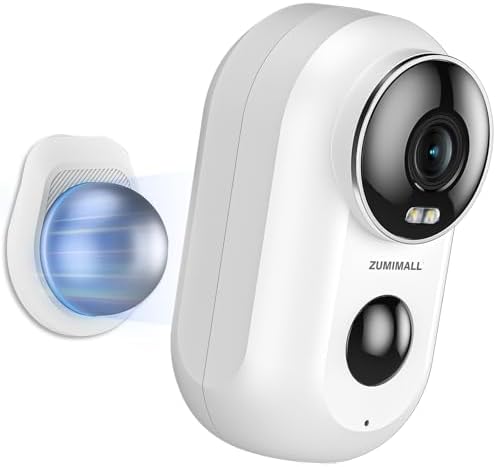
The ZUMIMALL camera is a battery-powered model with a magnetic mount for drill-free placement. It is described for both indoor and outdoor use, with an IP66 weather-resistant rating. For an apartment, the magnetic mount may make it useful near a suitable metal surface or in a spot where a removable mount can be secured. Its included bracket can also be fixed with screws, so check which setup you plan to use.
The camera offers 2K video with a 130-degree viewing angle, color night vision, a spotlight, two-way talk, and an instant siren. It connects to 2.4GHz Wi-Fi and does not support 5GHz networks. For storage, the product includes a seven-day cloud loop and supports a memory card up to 128GB, which is sold separately. AI detection can identify people, pets, vehicles, and packages, and the camera allows custom detection areas.
This model stands out if you want a broader view and outdoor-rated construction, while the youkey is more focused on moving a camera around indoors. The ZUMIMALL’s app and cloud features may be useful for shared monitoring, but its Wi-Fi band limit is worth checking before purchase. Battery-powered cameras also need periodic recharging, so consider how easy it will be to reach the camera once mounted.
Pros:
- Magnetic mount allows placement without drilling
- 2K video with a 130-degree viewing angle
- IP66 weather resistance for suitable outdoor locations
- Includes cloud storage and supports local memory-card storage
Cons:
- Works with 2.4GHz Wi-Fi only
- Memory card is not included, and the screw-mounted bracket requires drilling
Verdict: Choose the ZUMIMALL if you want a magnetic, weather-resistant camera with a wide view and can use a 2.4GHz Wi-Fi network.
How to Choose a Security Camera for an Apartment Without Drilling
Decide what you need to monitor
Start with the area you want to see. A window camera is designed to monitor an outdoor area from inside, which can help when you cannot attach equipment to the exterior of your building. A standard indoor camera is better for watching a room or hallway. If you need a view of a shared corridor or outdoor space, check your building’s rules and consider the privacy of neighbors before positioning a camera.
Check the mount and the surface
“No drill” can mean different things. A camera may use a reusable sticker on glass, a magnetic base, or a mount that can also be screwed into a wall. Confirm which mounting method is included and whether it suits your window frame, metal surface, or chosen location. Adhesives and magnets may not work equally well on every surface, so follow the product instructions and avoid placing a camera where it could fall.
Choose between plug-in and battery power
A plug-in model can be useful when you want continuous recording, as with the SOLIOM, but it needs an outlet within reach. A battery camera gives you more placement freedom, though you will need to recharge it. Battery life varies with motion, settings, and conditions, so consider how easy it will be to remove the camera for charging.
Check your Wi-Fi band
Some cameras in this group work only with 2.4GHz Wi-Fi. Before buying, check your router settings and make sure you can connect the camera to a compatible network. This matters especially if your router uses separate network names for 2.4GHz and 5GHz or if you are unsure which band your phone is using during setup.
Think about glass reflections and night viewing
A camera aimed through a window can pick up reflections from indoor lights, especially at night. Window-focused models in this guide describe anti-glare features intended to reduce that problem. Placement still matters: aim the lens toward the area you want to monitor, and consider how lights inside your apartment might affect the view after dark.
Compare recording and storage options
Storage affects how you access footage and whether you need to buy an extra memory card or use a cloud plan. These cameras offer different arrangements, including built-in storage, optional memory cards, cloud storage, and continuous or motion-triggered recording. Read the storage details carefully so the camera’s recording style matches what you want to save.
Consider privacy controls and shared access
A camera inside your home may capture private moments, so look for controls that let you pause or turn it off when you are home. If other household members need access, check whether the app supports sharing. For window or entry monitoring, aim the camera only at the area you need rather than into another apartment or a neighbor’s private space.
Frequently Asked Questions
Can I install a security camera in an apartment without drilling?
Yes. The cameras here use options such as a magnetic mount or a removable window sticker, so you can set them up without drilling. Check the exact mount included with the model, since some also offer a screw-mounted bracket.
Are window cameras suitable for monitoring an apartment entrance?
They can be, if your window has a clear view of the entrance or walkway. A camera must be positioned inside and aimed through the glass, so check the line of sight and how reflections affect the image. Building rules may also limit what you can record.
Do cameras that look through glass work at night?
They can provide night views, but indoor reflections may affect the image. The SOLIOM and Adorbee models describe anti-glare color night vision for use through glass. Placement and nearby indoor lighting can still make a difference.
Do these cameras need 5GHz Wi-Fi?
No. The Adorbee and ZUMIMALL product details specify 2.4GHz Wi-Fi only. Check the Wi-Fi requirements for any camera you choose and confirm your router can provide a compatible connection.
Which camera supports continuous recording?
The SOLIOM is the model in this group that specifically lists 24/7 recording. It is plug-in, so plan for a nearby power outlet. The battery-powered models are better suited to flexible placement and motion-based monitoring.
Do I need to buy a memory card?
It depends on the camera and your preferred storage method. The SOLIOM and ZUMIMALL support memory cards that are not included. The youkey lists built-in 8GB storage, while the Adorbee product details describe local SD card support. Check the current product listing for the exact storage requirements.
Which type is best for renters?
A camera with a removable sticker or magnetic mount is often the easiest to reposition or take with you. The Adorbee is designed to attach to window glass with a reusable sticker, while the youkey and ZUMIMALL use magnetic mounts. Always confirm that the chosen surface and mounting method are suitable for your apartment.
Final Recommendation
For a renter who wants to watch an outdoor area through a window, the Adorbee offers a cordless setup, while the SOLIOM is the stronger fit if you want a built-in screen and 24/7 recording with access to an outlet. For monitoring rooms inside your apartment, consider the portable youkey. If you need a magnetic camera with outdoor-rated construction and a wider view, the ZUMIMALL is the most versatile option in this group. Match the camera to your mounting surface, Wi-Fi, power access, and building rules before you buy.
