
Smart window and door sensors can alert you when an entry point opens, remind you that a door was left ajar, or trigger a smart-home routine. The right choice depends on more than the sensor itself: some kits need a brand-specific hub, while others connect through Wi-Fi or a compatible Zigbee hub. Here are five options, with the key setup requirements and trade-offs to consider before you buy.
Table of Contents
Quick Comparison
| Product | Setup | Best for | Key consideration |
|---|---|---|---|
| Tapo Door Sensor Starter Kit | Included Tapo hub; 2.4 GHz Wi-Fi | A Matter-oriented starter kit | Sensors require the included hub |
| YoLink Door and Window Sensor Kit | Included YoLink hub | Long battery life and left-open alerts | Uses the YoLink ecosystem |
| Aqara Door and Window Sensor 3-Pack | Aqara hub sold separately | Aqara automations and compact sensors | Not compatible with hubs from other brands |
| Gaoducash Wi-Fi Door Window Sensor | Wi-Fi; no hub required | Simple app alerts and voice control | Uses Tuya Smart or Smart Life |
| GRSICO Zigbee Door Sensor 4-Pack | Compatible Zigbee hub required | Homes with an existing Zigbee setup | Check compatibility with your specific hub |
Our Picks: Best Smart Window And Door Sensors reviews
1. Tapo Door Sensor Starter Kit: Best All-in-One Starting Point

This kit includes three Tapo T110 contact sensors and a Tapo H100 hub with a chime, so you have the main pieces needed to get started. The sensors use a low-power wireless protocol to communicate with the hub, while the hub connects to a 2.4 GHz Wi-Fi network. The sensors will not operate without the Tapo hub.
Through the Tapo app, you can receive alerts when a door or window opens or closes, check status remotely, and review activity history. The hub can sound a customizable alarm, and the sensors can also be used for cabinets, refrigerators, or other items that open and close. Tapo describes integrations with major smart-home platforms through Matter, but the included hub remains part of the sensor setup.
The kit stands out for combining a hub, three sensors, a chime, and options for connecting sensors with Tapo cameras or smart lights. Adhesive mounting makes installation approachable, and the listed battery life is up to two years. The main trade-off is that this is a hub-based system rather than a set of standalone Wi-Fi sensors.
Pros:
- Includes a hub and three contact sensors
- Customizable alarm and app activity history
- Supports Matter-based smart-home integration
- Adhesive mounting and listed battery life of up to two years
Cons:
- The sensors require the included Tapo hub
- The hub requires a 2.4 GHz Wi-Fi connection
Verdict: Choose the Tapo kit if you want several sensors, a hub, and a chime in one package, especially if you also use Tapo devices or want Matter compatibility in your setup.
2. YoLink Door and Window Sensor Kit: Best for Long Battery Life
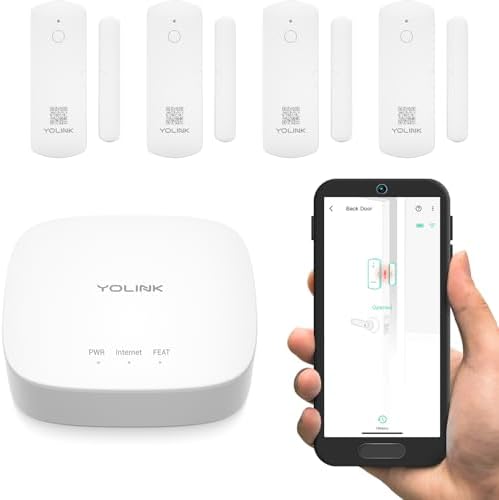
The YoLink kit comes with one hub and four door sensors, with batteries included and preinstalled. Its sensors use LoRa, a long-range wireless technology, rather than connecting directly over Wi-Fi. The hub is needed for full functionality, and the system can support more devices from the YoLink product line as your setup grows.
A useful feature is the left-open reminder: you can set a time limit and get an alert if a door or window stays open too long. The sensors can also monitor refrigerators, freezers, cabinets, and other openings. YoLink describes several notification options and says self-monitoring does not require a monthly fee.
The listed battery life is up to five years, which may mean fewer battery changes than with the other options here. The product also supports device-to-device pairing for certain actions, including pairing sensors with a siren. However, this is an ecosystem-based kit, so it is worth checking that the YoLink hub and its notification options fit the smart-home system you already use.
Pros:
- Includes four sensors and a hub
- Listed battery life of up to five years
- Can send alerts when a door is left open too long
- Supports expansion with other YoLink devices
Cons:
- Requires the YoLink hub for full functionality
- Uses the YoLink system rather than connecting directly to Wi-Fi
Verdict: The YoLink kit is a strong fit if you want four sensors, a long stated battery life, and a practical reminder for doors or windows that remain open.
3. Aqara Door and Window Sensor 3-Pack: Best for an Aqara Smart Home

This three-pack of compact contact sensors is designed to work with an Aqara hub, which is sold separately. Aqara says its sensors can trigger phone alerts and the hub’s local alarm, as well as control other Aqara devices based on whether a door or window is open or closed.
The sensors can be placed on doors, windows, drawers, or cabinets with a suitable flat surface. Aqara specifies that the gap between the sensor and magnet should be no more than 0.86 inch. That spacing requirement matters: measure the frame and moving part before mounting, particularly on windows with unusual trim or a wide gap.
Aqara lists Apple HomeKit and Alexa compatibility for voice control, but the sensor is not compatible with SmartThings according to the supplied product information. It also requires an Aqara hub, not a hub from another brand. This makes it a more focused choice than the Tapo or YoLink starter kits, but a sensible option if you already have the right Aqara equipment.
Pros:
- Three compact sensors for doors, windows, and cabinets
- Can trigger Aqara automations and the hub’s local alarm
- Listed support for Apple HomeKit and Alexa
- Specified maximum sensor-to-magnet gap helps with placement planning
Cons:
- Requires a separately purchased Aqara hub
- Not compatible with hubs from other brands or SmartThings, according to the supplied information
Verdict: Pick the Aqara three-pack if you already use a compatible Aqara hub and want small sensors for entry points or indoor cabinets; look elsewhere if you need a complete starter kit.
4. Gaoducash Wi-Fi Door Window Sensor: Best for a No-Hub Setup

Unlike the hub-based kits, this Gaoducash contact sensor connects through Wi-Fi and does not require a separate hub. It works with the Tuya Smart or Smart Life app, where you can receive open-and-close alerts, check status and battery level, and view alarm history. The product also lists Alexa and Google Assistant voice control.
The sensor can be used on doors, windows, garage doors, cabinets, or a mailbox, and its adhesive mounting is intended for a tool-free installation. It also supports app or voice-assistant routines, such as turning on a compatible smart light when a door opens. The package includes two AA batteries, with an estimated monitoring life of about one year according to the product description.
This is the simplest option here if you want to avoid buying a hub. The trade-off is that it depends on Wi-Fi and the Tuya or Smart Life app, rather than joining a low-power hub-based sensor network. Before buying, make sure you are comfortable using that app ecosystem and have Wi-Fi coverage where you plan to place the sensor.
Pros:
- No separate hub required
- Works with Tuya Smart or Smart Life
- Lists Alexa and Google Assistant support
- Includes batteries and adhesive mounting
Cons:
- Uses Wi-Fi and a specific app ecosystem
- Listed battery life is about one year
Verdict: Consider this sensor if you want app alerts without a separate hub and already use Tuya Smart or Smart Life, while keeping in mind its Wi-Fi and battery requirements.
5. GRSICO Zigbee Door Sensor 4-Pack: Best for Existing Zigbee Hubs

This four-pack is intended for homes with a compatible Zigbee hub already in place. The product lists compatibility with SmartThings, Alexa devices with a built-in Zigbee hub, Home Assistant, Hubitat, Aeotec, and Homey. Because Zigbee compatibility can depend on the specific hub and setup, confirm that your exact hub supports this sensor before ordering.
The compact sensors are designed for doors, windows, children’s rooms, cabinets, and other places where you want to monitor opening and closing. The listing describes adhesive backing for quick placement and screw-mounting as another installation approach. That gives you options, but it is worth checking your mounting surface and preferred installation method before you start.
Compared with the Tapo and YoLink kits, this option provides four sensors without an included hub. That can be convenient if you already have a compatible Zigbee network, but it is less straightforward for someone building a smart-home system from scratch. The product information does not specify a battery-life estimate or include a standalone hub.
Pros:
- Four sensors in one pack
- Compact design for doors, windows, and cabinets
- Lists compatibility with several Zigbee platforms
- Describes adhesive and screw-mount installation approaches
Cons:
- Requires a compatible Zigbee hub
- Battery-life details are not specified in the supplied information
Verdict: Choose the GRSICO pack if you already have a supported Zigbee hub and want several sensors; confirm hub compatibility first, since no hub is included.
How to Choose a Smart Window and Door Sensor
Check whether you need a hub
Start by checking the connection type. The Tapo and YoLink kits include their own hubs, while Aqara requires a compatible hub sold separately. The GRSICO sensors need a Zigbee hub, and the Gaoducash sensor connects over Wi-Fi without one. If you already own a smart-home hub, verify that it supports the exact sensor model rather than relying on the general protocol name alone.
Match the sensor to your smart-home platform
Compatibility affects what you can do with a sensor after installation. Check which app you will use, whether you can receive alerts on your phone, and whether the sensor can control your existing lights, cameras, or other devices. Matter, Alexa, Google Assistant, Apple HomeKit, SmartThings, and Zigbee are not interchangeable labels; confirm the specific product’s stated support for the platform you use.
Think about the alerts and automations you need
Basic open-and-close notifications may be enough for a front door or window. For a freezer, patio door, or storage area, a left-open reminder can be more useful. If you want an audible alert, check whether the product includes a chime or alarm, or whether you need to add one. For lighting or camera routines, confirm that the sensor and the device you want to control can work together.
Consider battery life and power needs
Battery estimates vary across these products, and they are not always stated in the same way. The Tapo sensor lists up to two years, the YoLink sensor up to five years, and the Gaoducash sensor about one year. Aqara and GRSICO do not provide a battery-life estimate in the supplied product information. Also check the battery type and whether batteries are included.
Measure the mounting area
Contact sensors work by keeping the sensor and magnet close together when a door or window is closed. Check that the two pieces can line up on your frame and moving surface, and pay attention to any maximum gap listed by the manufacturer. A flat, clean mounting area can help adhesive-backed sensors sit securely. For the Aqara model, the stated maximum gap is 0.86 inch.
Plan for signal coverage
A sensor is only useful if it can communicate with its hub or network from its installed location. Think about the distance between the sensor, hub, and router, as well as walls and other obstacles. If you are covering a large home or a detached space, check the system’s coverage guidance and consider whether additional hubs or network equipment may be needed.
Choose the right number of sensors
Count the entry points and other items you want to monitor before choosing a pack. A three- or four-sensor kit can cover several doors, windows, or cabinets, while a single Wi-Fi sensor may suit one specific spot. Remember to include non-entry uses, such as a refrigerator, medicine cabinet, or mailbox, if those are important to you.
Frequently Asked Questions
Do smart door and window sensors need a hub?
Not always. The Gaoducash sensor connects through Wi-Fi without a separate hub. Tapo and YoLink require their hubs, Aqara requires a compatible Aqara hub, and the GRSICO sensors need a compatible Zigbee hub.
Can these sensors tell you if a door is left open?
They can report whether a door or window is open, and the YoLink kit specifically offers a left-open reminder that you can set for a chosen time limit. Other sensors may support related automations through their app or smart-home platform, so check the individual product’s functions.
Can I use a window sensor on a cabinet or refrigerator?
Yes. Contact sensors can also be used on suitable cabinets, drawers, refrigerators, freezers, and other items that open and close. Make sure the two sensor pieces can align properly on the surfaces.
Are Zigbee sensors compatible with every Zigbee hub?
No. A sensor’s use of Zigbee does not guarantee that it works with every Zigbee hub or platform. Check the manufacturer’s compatibility list for the exact sensor and hub combination before buying.
Can these sensors trigger lights or cameras?
Some can. The Tapo product information describes linking sensors with Tapo cameras and smart lights, while other products may support routines through their listed apps or compatible platforms. Confirm that both the sensor and the device you want to control support the same automation system.
Are smart contact sensors a complete home security system?
No. They can notify you when a monitored door or window opens, but a contact sensor is only one part of home security. Consider your needs for alarms, cameras, monitoring, and backup power or connectivity separately.
Final Recommendation
For most shoppers who want a ready-to-start kit, the Tapo Door Sensor Starter Kit combines three sensors with a hub and chime. Choose YoLink if long stated battery life and left-open alerts matter most, Aqara if you already use its hub, or Gaoducash if you want a Wi-Fi sensor without a separate hub. If you already have a Zigbee system, the GRSICO four-pack may be a practical expansion, provided your hub is compatible.
