
Choosing the best 70-inch TV wall mount starts with more than matching the screen size. Check your TV’s weight and VESA pattern, then decide whether you want a slim fixed position or the flexibility to tilt, swivel, and extend the screen. These five options include full-motion mounts, corner-friendly designs, and no-stud models, so you can compare the trade-offs before you buy.
Table of Contents
Quick Comparison: Best 70-Inch TV Wall Mounts
| Product | TV Size Range | Weight Limit | Mount Style | Notable Feature |
|---|---|---|---|---|
| USX STAR Full Motion TV Wall Mount | 37–90 inches | 132 lb | Full motion | Extends up to 16.61 inches |
| Mount-It! Full Motion TV Wall Mount | 32–70 inches | 100 lb | Full motion | Extends up to 24 inches |
| Auoace No-Stud TV Wall Mount | 32–70 inches | 130 lb | Low-profile, tilting | No-drill installation design |
| VIVO Corner TV Wall Mount | 32–70 inches | 99 lb | Full motion, corner-friendly | Up to 180° swivel |
| Aquzee No-Stud TV Wall Mount | 32–70 inches | 130 lb | Low-profile, tilting | Sits 1.18 inches from the wall |
Our Picks: Best 70 In Tv Wall Mount reviews
1. USX STAR Full Motion Mount: A Versatile Pick for Larger TVs

The USX STAR is a full-motion mount designed for TVs from 37 to 90 inches, making a 70-inch screen comfortably within its stated range. It supports TVs up to 132 pounds and lists compatibility with VESA patterns from 200 × 100 mm through 600 × 400 mm. Check your TV’s manual or measure the mounting holes to confirm the pattern before ordering.
Its dual-arm design pulls the TV 2.52 inches from the wall when retracted and extends up to 16.61 inches. You can tilt the screen from +5° to -15°, swivel it up to 45° in either direction depending on screen size, and make a small leveling adjustment after installation. That range can help when seating is off-center or you need to angle the screen away from glare.
The mount is listed for wood studs spaced 8, 12, or 16 inches apart, as well as solid brick or concrete walls. The package includes a drilling template, bubble level, instructions, and labeled hardware. Concrete anchors are available by request, so confirm what is included and what your wall type requires before starting. Compared with the other picks, this one offers a broad TV-size range and a strong stated capacity, but it does not extend as far as the Mount-It! model.
Pros:
- Fits TVs from 37 to 90 inches and supports up to 132 pounds
- Offers tilt, swivel, extension, and post-install leveling adjustment
- Compatible with several wood-stud spacings and solid masonry walls
- Includes a template, bubble level, and labeled hardware
Cons:
- Maximum swivel angle depends on the TV’s screen size
- Concrete anchors are provided by request, according to the product details
Verdict: Choose the USX STAR if you want a full-motion mount with a high stated weight capacity and broad size compatibility, provided its VESA pattern and wall requirements match your setup.
2. Mount-It! Full Motion Mount: Long Reach for Flexible Viewing

This Mount-It! bracket is rated for TVs from 32 to 70 inches and up to 100 pounds. Its listed VESA patterns range from 100 × 100 mm to 600 × 400 mm, giving it broad mounting-pattern coverage. The product description also notes that some larger screens may fit if they meet the weight and VESA requirements, but a 70-inch TV is the top of its stated standard size range.
The main draw is its arm, which extends from 2 to 24 inches from the wall. That extra reach can be useful if you want to angle the screen toward a seating area or are planning a corner installation. The mount is built from steel and is described as tilting, swiveling, extending, and compressing, though the supplied details do not specify exact tilt or swivel angles.
Installation materials include instructions, a bubble level, and a hardware pack. Compared with the USX STAR, the Mount-It! has a lower weight limit but a longer maximum extension. It is a practical option when reach matters more than having the highest capacity. As with any mount, confirm the TV’s actual weight, VESA pattern, and the wall structure before installation.
Pros:
- Extends up to 24 inches from the wall
- Supports TVs up to 70 inches and 100 pounds
- Lists VESA compatibility up to 600 × 400 mm
- Includes a bubble level, instructions, and hardware
Cons:
- Has a lower stated weight limit than the USX STAR and no-stud picks
- The product details do not give exact tilt or swivel angles
Verdict: The Mount-It! is a good fit if you need a long-extending arm for a 70-inch TV and your screen falls within its 100-pound limit and listed VESA patterns.
3. Auoace No-Stud Mount: A Low-Profile Option for Drywall

The Auoace is a no-drill mount for flat and curved TVs from 32 to 70 inches. It supports up to 130 pounds and VESA patterns from 200 × 100 mm through 400 × 400 mm. Its slim profile places the TV about 1.2 inches from the wall, while the 5° tilt adjustment offers a small amount of angle control.
The product uses a wider support area, side retaining plates, and an automatic locking mechanism. Its installation is described as using nails and a hammer rather than drilling or locating studs. That can appeal to renters or anyone seeking a less involved setup, but the mount is specifically designed for drywall. Follow the supplied instructions and confirm that your wall and TV meet the product’s stated requirements; do not assume a drywall mount is suitable for other wall materials.
Unlike the full-motion options here, this bracket does not extend or swivel, so it works best when you already know where the TV should sit. Its 130-pound limit is substantial on paper, but matching the wall, TV weight, and VESA pattern remains essential. Compared with the Aquzee, it has a similarly slim, no-stud design and weight limit, while its stated tilt is 5°.
Pros:
- Designed for TVs up to 70 inches and 130 pounds
- Low-profile position about 1.2 inches from the wall
- Includes a 5° tilt adjustment
- No-drill installation design for drywall
Cons:
- Does not offer extension or swivel movement
- VESA compatibility tops out at 400 × 400 mm
Verdict: Consider the Auoace if you want a slim, drywall-focused mount for a compatible 70-inch TV and do not need full-motion adjustment.
4. VIVO Corner Mount: Full Motion for Angled Wall Layouts

The VIVO is a steel dual-arm mount designed for corner placement and other setups where you want to move the TV toward different viewing positions. The supplied description lists compatibility with 32- to 70-inch flat and curved TVs, a maximum weight of 99 pounds, and VESA patterns from 75 × 75 mm through 600 × 400 mm.
Its separate wall plates are designed to accommodate angled corner walls. The arms allow up to 180° of swivel, along with +5° to -15° of tilt. Those adjustments make it more adaptable than a fixed or low-profile mount, though the room layout and TV dimensions will affect how much movement is useful in practice.
The product includes detachable VESA plates, hardware, and instructions. Its weight limit is the lowest among the five picks, so check your TV’s weight carefully, including any accessories that may be attached to the screen. Compared with the Mount-It!, it is more specifically suited to corner placement and lists a wider swivel angle, while the Mount-It! offers greater extension distance.
Pros:
- Designed for corner installations with separating wall plates
- Offers up to 180° of swivel and +5° to -15° of tilt
- Supports a wide range of listed VESA patterns
- Includes detachable VESA plates, hardware, and instructions
Cons:
- Maximum supported weight is 99 pounds
- Its corner-oriented design may be more than you need for a flat-wall setup
Verdict: The VIVO is a strong candidate for a 70-inch TV that needs to sit near a corner, as long as the TV is within its 99-pound limit and matches its VESA range.
5. Aquzee No-Stud Mount: Slim and Simple for Compatible Drywall Setups
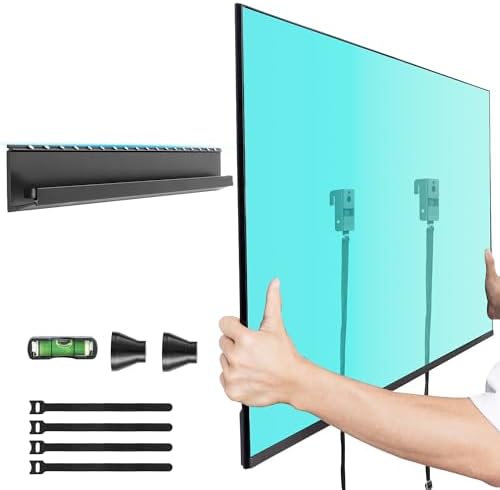
The Aquzee is a low-profile, no-stud wall mount listed for 32- to 70-inch TVs. It supports up to 130 pounds and VESA patterns from 100 × 100 mm to 400 × 400 mm. The TV sits about 1.18 inches from the wall, and the mount offers up to 5° of tilt.
Its design includes a widened back, an anti-drop feature, an auto-lock mechanism, and a quick-release mechanism. The package is described as including an installation guide, bubble level, hardware, and Velcro cable straps. The product is intended for drywall, with no drilling, screws, or studs required according to its description. Check the installation instructions closely and confirm that your drywall and TV meet the stated requirements.
This is a fixed-style choice with limited tilt rather than a full-motion bracket. That simpler range may suit a bedroom or living room where you want the screen close to the wall and do not need to move it side to side. Compared with the Auoace, it sits slightly closer to the wall and lists broader VESA compatibility at the small-pattern end, but both share a 130-pound capacity and no-stud approach.
Pros:
- Supports TVs up to 70 inches and 130 pounds
- Low-profile design sits 1.18 inches from the wall
- Lists VESA patterns from 100 × 100 mm to 400 × 400 mm
- Includes a bubble level and cable-management straps
Cons:
- Does not swivel or extend
- Designed for drywall rather than a broad range of wall types
Verdict: The Aquzee is worth considering if a slim drywall installation is your priority and your TV fits its size, weight, and VESA limits.
How to Choose a Wall Mount for a 70-Inch TV
Confirm the TV’s weight and screen-size range
A mount’s stated screen-size range is only one part of the fit. Check the weight of your TV without its stand and make sure it is below the mount’s weight limit. The five options here range from 99 to 132 pounds of stated capacity. Do not treat a higher limit as a substitute for checking the TV’s other mounting requirements.
Match the VESA pattern
VESA refers to the spacing between the mounting holes on the back of your TV, measured horizontally and vertically in millimeters. For example, 400 × 400 mm is a different pattern from 600 × 400 mm. Compare your TV’s manual or measurements with the mount’s listed VESA patterns before purchasing. A mount that supports a 70-inch screen may still be incompatible with your specific TV.
Choose full motion or a low-profile position
A full-motion mount can extend, swivel, and tilt, which helps if you watch from different seats or need to angle the TV. The USX STAR, Mount-It!, and VIVO offer this kind of movement. No-stud models such as the Auoace and Aquzee sit close to the wall and provide limited tilt, but they do not extend or swivel. Choose based on how often you expect to adjust the screen.
Check your wall type and attachment points
Mounts differ in the walls and attachment methods they support. The USX STAR lists installation on wood studs and solid brick or concrete, while the Auoace and Aquzee are described as drywall-focused no-stud designs. The VIVO and Mount-It! product details supplied here do not specify every wall type or spacing requirement. Read the full installation instructions and use hardware suited to your wall. If you are unsure about the wall structure or installation, consult a qualified installer.
Measure the desired extension and viewing angle
Measure the space between the wall and nearby furniture, and consider where your seats are located. The Mount-It! extends up to 24 inches, while the USX STAR extends up to 16.61 inches. The VIVO lists up to 180° of swivel, though the screen and room layout affect usable movement. A fixed or low-profile mount may be a better fit when the TV can stay in one position.
Plan the installation and cable access
Look for practical installation items such as a template, bubble level, labeled hardware, and clear instructions. Think about whether you will need to reach the cables behind the TV after mounting; a movable arm can make access easier than a slim fixed position. Before drilling or attaching the mount, verify the final screen height, nearby outlets, and cable lengths.
Frequently Asked Questions
Will a 70-inch TV fit any mount labeled for 70 inches?
No. You also need to check the TV’s weight, VESA pattern, and the wall requirements for the mount. The size range alone does not confirm compatibility.
How do I find my TV’s VESA pattern?
Check the TV manual or product specifications for the mounting-hole pattern. You can also measure the horizontal and vertical distance between the centers of the mounting holes in millimeters.
Is a full-motion mount better than a low-profile mount?
It depends on your room. A full-motion mount is useful when you need to swivel or extend the TV for different seats. A low-profile mount keeps the screen closer to the wall but offers less adjustment.
Can I install a no-stud TV mount on any wall?
No. The Auoace and Aquzee are described as drywall-focused mounts. Follow each product’s instructions and confirm that your wall type and condition meet its requirements. Do not use a drywall-specific mount on another wall surface unless the manufacturer says it is suitable.
Can a 70-inch TV go on a mount with a 100-pound limit?
It can only do so if the TV’s weight is within that limit and its VESA pattern and installation requirements also match. The Mount-It! and VIVO list 100-pound and 99-pound limits, respectively, so check your TV’s exact weight before choosing either one.
Which mount is best for a corner installation?
The VIVO is specifically described as a corner mount and has separating wall plates for angled corner walls. The Mount-It! has an extending arm that the product description also identifies as useful for corner installations. Compare their weight limits, VESA patterns, and how the arms fit your room.
Final Recommendation
For the broadest combination of TV-size compatibility and stated weight capacity, the USX STAR is the most versatile pick in this group, assuming its VESA pattern and wall requirements suit your setup. Choose the Mount-It! if long extension is your priority, the VIVO for a corner-oriented layout, or the Auoace and Aquzee if you want a slim drywall-focused mount with limited tilt. Before buying, verify your TV’s weight and VESA pattern and make sure the mount is appropriate for your wall.
