A TV mount with an extra-long extension arm can bring your screen into view from a corner, an adjoining seating area, or another spot that a fixed mount cannot reach. The right choice depends on more than reach: check your TV’s size, weight, VESA pattern, and the wall structure where you plan to install it. These five mounts offer different combinations of extension, compatibility, and adjustment range.
Table of Contents
Quick Comparison
| Product | Maximum extension | TV size range | Weight capacity | Standout feature |
|---|---|---|---|---|
| BONTEC Corner TV Wall Mount | 40.9 in. | 32–75 in. | 132 lb | Long reach with level adjustment |
| Perlegear Long Arm TV Wall Mount | 37.4 in. | 32–65 in. | 110 lb | Single-stud mounting design |
| HCMOUNTING Extra Long Arm TV Wall Mount | 43 in. | 42–80 in. | 110 lb | Longest reach in this lineup |
| ELIVED Long Arm TV Mount | 29.5 in. | 14–42 in. | 44 lb | Compact option for TVs and monitors |
| XINLEI Long Arm TV Wall Mount | 39.37 in. | 32–84 in. | 132 lb | Broad TV size range and high capacity |
Our Picks: Best Tv Wall Mount With Extra Long Extension Arm reviews
1. BONTEC Corner TV Wall Mount: Long Reach and High Capacity

The BONTEC is a full-motion mount for 32- to 75-inch TVs, with an arm that extends up to 40.9 inches and retracts to 2.6 inches from the wall. That reach can help when you want to pull a TV out from a corner or turn it toward different seating areas.
Its cold-rolled steel construction is rated to support TVs up to 132 pounds. It fits VESA patterns from 200 × 100 mm to 600 × 400 mm and can be installed on 16-inch wood studs, concrete, or brick. The mount offers 180-degree swivel, tilt adjustment of eight degrees up or down, and three degrees of leveling after installation.
Compared with the other options here, the BONTEC balances a long extension with a high stated capacity. The HCMOUNTING reaches farther, while the XINLEI fits a wider stated TV size range. Before buying, make sure your TV’s actual VESA pattern and weight are within the mount’s limits. It is not intended for drywall-only installation.
Pros:
- Extends up to 40.9 inches and retracts close to the wall
- Supports TVs up to 132 pounds
- Offers swivel, tilt, and post-installation leveling adjustment
- Fits a broad range of VESA patterns
Cons:
- Does not support TVs larger than 75 inches
- Requires a suitable wood-stud, concrete, or brick installation surface
Verdict: Choose the BONTEC if you want a long-reach corner mount for a large, heavier TV and its size and VESA limits fit your setup.
2. Perlegear Long Arm TV Wall Mount: Flexible Single-Stud Placement

The Perlegear is designed for 32- to 65-inch TVs and extends 37.4 inches from the wall. It retracts to 2.6 inches, giving you room to reposition the screen while keeping it close to the wall when you are done.
Its single-stud design can offer more flexibility in where you position the mount than a wider wall plate, which may be useful in some corner layouts. The mount supports up to 110 pounds and fits VESA patterns from 100 × 100 mm to 400 × 400 mm. It swivels up to 90 degrees in either direction, tilts from five degrees up to 15 degrees down, and allows three degrees of leveling adjustment after installation.
This model is a practical fit if you want long reach but do not need the larger TV size range of the HCMOUNTING or XINLEI. It can mount to a single wood stud or solid concrete, but not to drywall alone. Check the specific TV and wall requirements before installation, especially if you plan to use the full extension.
Pros:
- 37.4-inch extension with a low-profile retracted position
- Single-stud design allows flexible placement
- Includes swivel, tilt, and leveling adjustments
- Rated to support up to 110 pounds
Cons:
- Maximum TV size is 65 inches
- VESA compatibility tops out at 400 × 400 mm
Verdict: The Perlegear is a good option for a compatible mid-size TV when flexible single-stud placement matters more than maximum screen size or the longest possible arm.
3. HCMOUNTING Extra Long Arm: Maximum Reach for Larger TVs

With an extension of up to 43 inches, the HCMOUNTING offers the longest reach among these picks. It is made for 42- to 80-inch flat or curved TVs, so it may suit a larger screen that needs to swing well out from a wall or corner. It retracts to about 2.75 inches from the wall.
The mount supports up to 110 pounds and fits VESA patterns from 200 × 200 mm to 600 × 400 mm. Its adjustment range includes up to 90 degrees of swivel, ten degrees of tilt up or down, and three degrees of leveling after installation. The listed installation surfaces are 16- to 18-inch wood studs, concrete, or brick—not drywall alone.
The added reach is useful when the TV needs to face more than one part of a room, but it also makes correct installation especially important. Confirm the TV’s weight and mounting pattern, and follow the included mounting guidance. Compared with the BONTEC and XINLEI, this model has a lower stated weight capacity, despite its longer arm.
Pros:
- 43-inch extension is the longest in this comparison
- Fits TVs up to 80 inches and VESA patterns up to 600 × 400 mm
- Supports flat and curved TVs within its stated limits
- Includes swivel, tilt, and leveling adjustment
Cons:
- 110-pound capacity is lower than the BONTEC and XINLEI limits
- Not suitable for drywall-only installation
Verdict: Pick the HCMOUNTING if maximum extension is your priority and your TV weighs no more than 110 pounds.
4. ELIVED Long Arm Mount: Compact Choice for Smaller TVs and Monitors
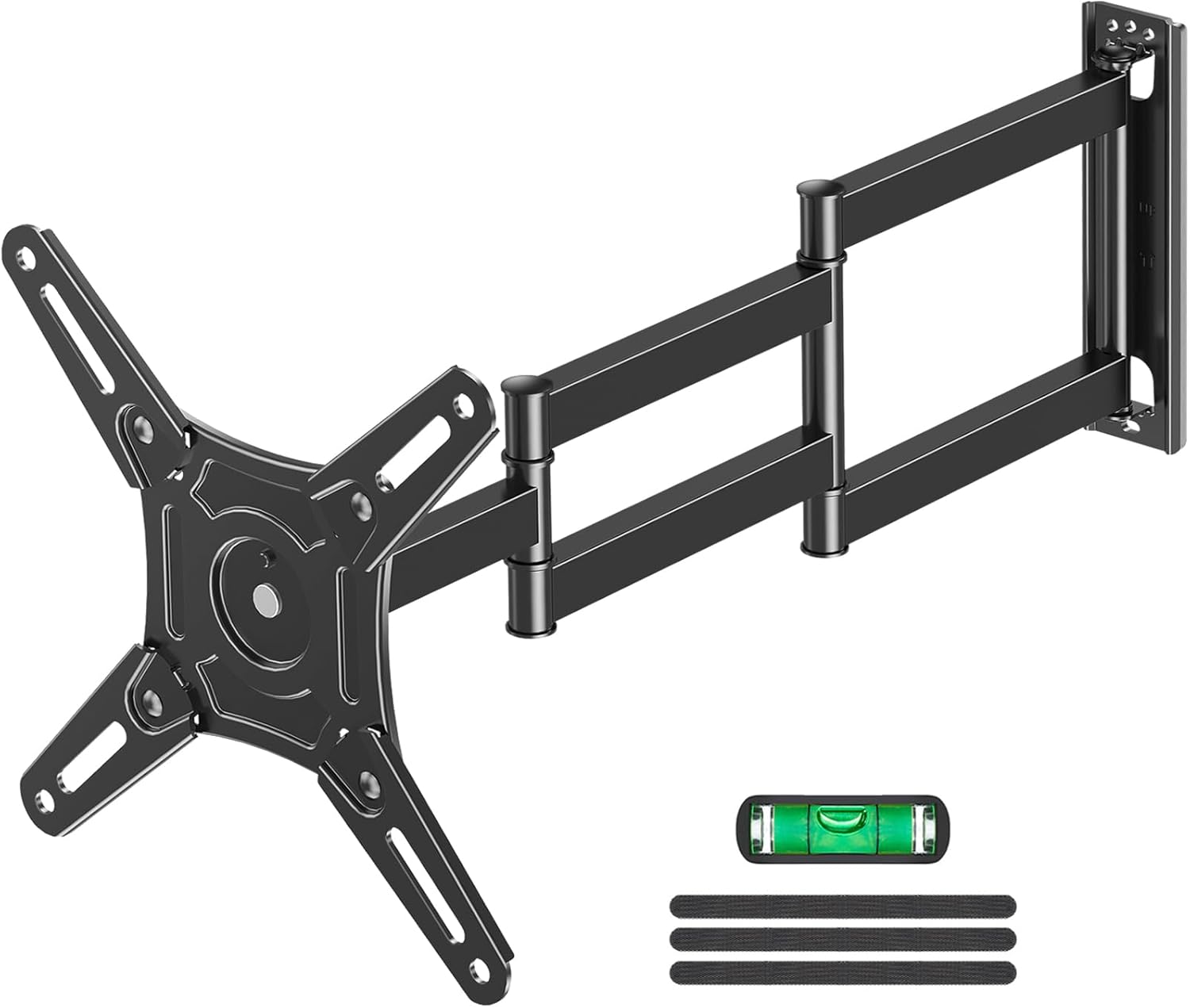
The ELIVED is the compact option in this group. Its arm extends 29.5 inches and retracts to 2.7 inches, and it is designed for 14- to 42-inch TVs or monitors. Its 44-pound weight limit and VESA range of 75 × 75 mm to 200 × 200 mm make it better suited to smaller displays than the larger-screen mounts above.
The mount offers up to 90 degrees of swivel, tilt from five degrees up to ten degrees down, and a rotation feature for switching between landscape and portrait orientation. That mix of movement may be useful at a desk or in a small room where the screen needs to serve different viewing positions. It must be secured to an appropriate wall surface rather than drywall alone.
Some owners find the movement easy to adjust and the setup straightforward. The generous movement can also make it harder to keep a display perfectly straight until you settle on its position. Compared with the other picks, this one trades extension length and load capacity for a smaller-display fit and monitor-friendly adjustments.
Pros:
- Works with compatible TVs and monitors from 14 to 42 inches
- Can switch the display between landscape and portrait positions
- Extends 29.5 inches and retracts close to the wall
- Includes swivel and tilt adjustments
Cons:
- 44-pound capacity is the lowest among these picks
- Shorter extension and smaller VESA range than the other mounts
Verdict: Choose the ELIVED for a smaller TV or monitor when portrait rotation and flexible positioning matter more than supporting a large screen.
5. XINLEI Long Arm TV Wall Mount: Broad Compatibility and Strong Capacity

The XINLEI is designed for a wide range of TV sizes, from 32 to 84 inches, and extends up to 39.37 inches. It retracts to about three inches from the wall. Its stated VESA range is 200 × 100 mm to 600 × 400 mm, giving it room to fit many larger-screen mounting patterns.
The mount is rated for up to 132 pounds and is designed for installation on wood studs up to 16 inches apart, concrete, or brick. It swivels up to 90 degrees in either direction and tilts five degrees up or ten degrees down. Its three-section arm is intended to provide room-to-room positioning flexibility, though you should still check the space around the TV and arm before installing.
Owners often value the sturdy feel and straightforward setup, and the included hardware is intended to support installation. Still, the 132-pound limit does not replace the need to verify your wall, TV, and fasteners are compatible. Compared with the HCMOUNTING, the XINLEI reaches a little less far but offers a higher stated capacity and a larger maximum TV size.
Pros:
- Fits TVs from 32 to 84 inches
- Supports up to 132 pounds
- Offers nearly 40 inches of extension and up to 90 degrees of swivel
- Includes tilt adjustment and mounting hardware
Cons:
- Does not extend as far as the HCMOUNTING
- Cannot be installed on drywall alone
Verdict: The XINLEI is a strong choice if you need broad TV-size compatibility, a high stated weight limit, and nearly 40 inches of reach.
How to Choose a TV Wall Mount With an Extra-Long Extension Arm
Check TV size, weight, and VESA pattern
Start with the specifications on your TV, not just its screen size. The mount must support the TV’s weight and fit its VESA pattern—the spacing between the mounting holes on the back. A TV that falls within a mount’s screen-size range may still be incompatible if its weight or VESA pattern is outside the listed limits.
Choose enough extension for your room
Measure how far the screen needs to move from the wall to reach your preferred viewing position. A longer arm can help bring a TV out from a corner or turn it toward another seating area, but the longest option is not always necessary. Also check the mount’s retracted depth if you want the TV to sit close to the wall when it is not in use.
Compare swivel, tilt, and leveling adjustments
Swivel helps direct the screen toward different seats, while tilt can help change the viewing angle and reduce glare. Some mounts also allow small leveling adjustments after installation. Compare each model’s stated range with your room layout, and remember that the TV’s size and nearby walls may limit how far it can actually move.
Plan for a safe wall installation
These mounts are not meant to be installed on drywall alone. Depending on the model, suitable surfaces include wood studs, concrete, or brick. Check the instructions for the exact wall requirements and hardware, locate the correct mounting points, and do not assume that hardware for one wall type will work for another. If you are unsure about the wall or installation, get help from a qualified installer.
Consider how the mount will move when extended
A long arm creates more distance between the TV and the wall, so the mount’s reach and load limit should both factor into your decision. Think about nearby furniture, doorways, and walls that could block movement. Leave enough clearance for the TV to swivel without hitting surrounding objects or putting strain on connected cables.
Match the mount to the room and display
A large living-room TV may call for a higher weight capacity and a wider VESA range, while a smaller desk monitor may benefit from portrait rotation or a more compact mount. The ELIVED is aimed at smaller displays; the other four models accommodate larger TVs, with differences in reach and capacity. Choose based on your actual display and viewing needs rather than a feature you may not use.
Frequently Asked Questions
What does an extra-long TV mount arm help you do?
It lets you pull the TV farther from the wall and reposition it toward different viewing areas. That can be useful for corner placement or rooms where seating is not directly in front of the screen.
Can I install one of these mounts on drywall alone?
No. The supplied product information states that these mounts should not be installed on drywall alone. Check the specific model’s instructions for suitable wall materials and mounting requirements.
How do I know if a mount fits my TV?
Compare the TV’s screen size, weight, and VESA pattern with the mount’s stated compatibility. All three must fall within the mount’s limits; screen size alone is not enough to confirm a fit.
Is a longer extension arm always better?
Not necessarily. More reach can help with corner placement or multiple seating areas, but you may not need the extra distance. Consider the available space, how you plan to position the TV, and the mount’s weight capacity.
Which mount in this list extends the farthest?
The HCMOUNTING model has the longest stated extension at 43 inches. It supports TVs from 42 to 80 inches and has a listed weight capacity of 110 pounds.
Which option is best for a computer monitor?
The ELIVED is the most monitor-focused choice in this group. It supports compatible displays from 14 to 42 inches, has a 44-pound capacity, and includes a rotation feature for landscape or portrait positioning.
Final Recommendation
For a long-reach mount with a high stated capacity, the BONTEC is a well-balanced pick for compatible TVs up to 75 inches. Choose the HCMOUNTING if you need the most extension, or the XINLEI if you want support for a wider range of larger TVs. For a smaller TV or monitor, the ELIVED offers a more suitable size range. Before ordering any model, confirm your TV’s weight and VESA pattern and make sure your wall is suitable for installation.