
Finding the best deal on TV wall mounts means matching the bracket to your TV and wall—not just choosing the lowest-cost option. Check the TV’s VESA pattern and weight, then confirm the mount is designed for your wall type. The picks below include studless drywall mounts and articulating brackets for wood studs, concrete, or brick, with different ranges of screen sizes and movement.
| Mount | TV size range | Movement | Wall type | Notable feature |
|---|---|---|---|---|
| Auoace No Stud TV Wall Mount | 13–55 inches | Low-profile | Drywall; no studs required | Up to 99 lb; VESA 100×100–400×400 mm |
| USX MOUNT Full Motion TV Mount | 26–65 inches | Tilt and swivel | Wood studs or solid concrete | Extends 16.7 inches |
| Pipishell Full Motion TV Wall Mount | 13–43 inches | Tilt, swivel, and rotate | Wood stud, concrete, or brick | Up to 44 lb; VESA 75×75–200×200 mm |
| KAMIWI No Drill TV Wall Mount | 22–55 inches | Low-profile | Drywall; no studs required | Up to 100 lb; about 1.2-inch wall clearance |
| EconoMe Swivel and Tilt TV Mount | 32–65 inches | Tilt, swivel, and leveling adjustment | Not drywall alone | Up to 99 lb; VESA 100×100–400×400 mm |
Table of Contents
Our Picks: Best Deal On Tv Wall Mounts reviews
1. Auoace No Stud TV Wall Mount: A Low-Profile Choice for Drywall

The Auoace is designed for people who want to hang a compatible TV on drywall without locating a stud or drilling conventional mounting holes. Its listed capacity is up to 99 pounds, and it fits VESA patterns from 100×100 mm to 400×400 mm. The product details specify TVs from 13 to 55 inches, so check your TV’s VESA pattern and weight before buying rather than relying on screen size alone.
The bracket is made of cold-formed steel and sits about 1.1 inches from the wall for a tidy, close-to-wall setup. It comes with mounting hardware, a bubble level, and a security cable. This design prioritizes a simple, low-profile installation over the viewing flexibility of an articulating arm.
A studless mount can be useful in a rental or room where you cannot easily reach the framing, but it is not a universal solution for every wall. Follow the supplied instructions carefully, confirm that your wall surface is suitable, and do not exceed the stated weight limit. If you need to pull the TV out or turn it toward another seat, choose a full-motion mount instead.
Pros:
- Designed for drywall installation without locating studs
- Fits a broad VESA range from 100×100 to 400×400 mm
- Steel construction and a stated capacity of up to 99 pounds
- Includes a level, hardware, and security cable
Cons:
- Does not offer the tilt and swivel range of an articulating mount
- Requires careful checks of wall condition, TV weight, and VESA fit
Verdict: Choose the Auoace if you want a close-to-wall mount made specifically for compatible drywall installations without studs.
2. USX MOUNT Full Motion TV Mount: Flexible Viewing for Larger TVs

This USX MOUNT bracket suits TVs from 26 to 65 inches with VESA patterns from 75×75 to 400×400 mm. Its articulating arms extend the screen up to 16.7 inches from the wall and retract to 2.81 inches. That range can help when you want to angle the TV toward different seats or place it near a room corner.
The mount offers +5°/-15° tilt and up to 90° of swivel, though the TV’s size affects how far it can turn. It also has a small post-installation leveling adjustment. The steel bracket comes with a bubble level, cable ties, and a set of standard TV mounting hardware.
Installation suitability is especially important with this model: it is designed for wood studs or solid concrete and must not be attached to drywall alone. The product information does not give a maximum TV weight, so confirm the mount’s current specifications and your TV’s requirements before ordering. Concrete anchors are not included in the listed package; use appropriate hardware for the wall material.
Pros:
- Offers useful tilt and swivel adjustments for changing viewing positions
- Extends up to 16.7 inches and retracts close to the wall
- Fits a wide range of VESA patterns and TV sizes
- Includes a bubble level, cable ties, and TV mounting hardware
Cons:
- Not designed for installation on drywall alone
- Maximum supported TV weight is not specified in the supplied product details
Verdict: The USX MOUNT is a flexible option for a compatible TV when you can mount securely to wood studs or solid concrete.
3. Pipishell Full Motion TV Wall Mount: Compact Fit for Smaller Screens

The Pipishell is a compact articulating bracket for flat or curved TVs and monitors from 13 to 43 inches. It supports up to 44 pounds and uses VESA patterns from 75×75 to 200×200 mm. These limits make it a better match for smaller screens than the larger USX MOUNT and EconoMe options.
Its arm extends up to 14.59 inches and retracts to 2.7 inches. You can tilt the screen +9°/-11°, swivel it up to 90° in either direction depending on screen size, and rotate it 360° between landscape and portrait positions. The mount is listed for single wood studs, concrete, and brick, and includes a removable TV plate intended to make placement easier.
This can be a practical fit for a home office, smaller bedroom, or monitor setup where you want to reposition the screen. The key trade-off is its lower weight and VESA limits: a large TV may exceed one or both even if its screen size appears close to the stated range. Verify the TV’s mounting pattern and weight before choosing it.
Pros:
- Provides tilt, swivel, extension, and portrait-orientation rotation
- Fits smaller TVs and monitors with VESA patterns from 75×75 to 200×200 mm
- Can be installed on a single wood stud, concrete, or brick
- Removable TV plate can simplify positioning during installation
Cons:
- Limited to TVs weighing up to 44 pounds
- VESA range does not fit many larger screens
Verdict: Pick the Pipishell for a lighter, smaller TV or monitor when you want more adjustment than a fixed low-profile bracket provides.
4. KAMIWI No Drill TV Wall Mount: Simple, Close-to-Wall Drywall Setup

KAMIWI’s studless bracket is designed for 22- to 55-inch TVs weighing up to 100 pounds. It fits VESA patterns from 200×100 to 400×400 mm and is intended for drywall installation without finding a stud or using a drill. Its stated wall clearance is about 1.2 inches, giving the screen a close-to-wall appearance.
The mount is made from alloy materials and comes with the hardware and a graphical installation guide. Its stated capacity is slightly higher than the Auoace’s, but the VESA range begins at 200×100 mm, which rules out some smaller mounting patterns. It is also a fixed-style choice for shoppers who do not need to angle or extend the TV.
Although the product description also mentions plaster walls, wall surfaces and conditions can vary. Make sure your wall is suitable for the mounting method and follow the supplied instructions; do not treat the weight limit as a substitute for checking the actual wall. For a TV that needs to swivel between seating areas, a stud-mounted articulating model is a better fit.
Pros:
- Designed for no-drill, no-stud drywall installation
- Supports TVs up to 100 pounds according to the product details
- Low-profile design leaves about 1.2 inches of clearance
- Fits TVs from 22 to 55 inches with compatible VESA patterns
Cons:
- Does not provide the positioning range of a full-motion mount
- Its VESA range does not include patterns smaller than 200×100 mm
Verdict: Consider the KAMIWI if your TV matches its weight and VESA limits and you want a simple, close-to-wall mount for a suitable wall.
5. EconoMe Swivel and Tilt TV Mount: Adjustable Positioning for 32- to 65-Inch TVs
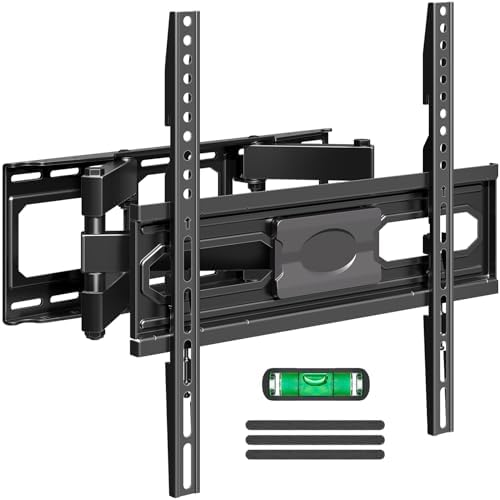
Listed under the MOUNTUP brand, this EconoMe articulating mount is intended for most 32- to 65-inch TVs weighing up to 99 pounds. It fits VESA patterns from 100×100 to 400×400 mm. The mount tilts up 5° and down 10°, swivels up to 45° in either direction, and allows leveling adjustment of +/-3°.
The tilt can help when you need to adjust the screen angle, while the swivel is useful when viewers sit in more than one part of a room. The package includes a paper mounting template and level tool. The mount is not designed for drywall alone, so the wall type and secure installation must be part of your decision.
One detail to plan for is the hardware: M8×45 mm TV screws are not included in the package, though the product description says they can be requested. Check the screw size your TV needs before installation, along with the wall type, weight, and VESA fit. Compared with the USX MOUNT, this option has a stated TV weight limit and a smaller listed swivel range.
Pros:
- Fits TVs from 32 to 65 inches and supports up to 99 pounds
- Offers tilt, swivel, and post-installation leveling adjustment
- Includes a paper mounting template and level tool
- Works with VESA patterns from 100×100 to 400×400 mm
Cons:
- Must not be installed into drywall alone
- M8×45 mm TV screws are not included
Verdict: Choose this mount if you need moderate tilt and swivel for a compatible mid-size or larger TV and can install it into a suitable wall structure.
How to Choose a TV Wall Mount
Match the mount to your TV’s VESA pattern
VESA is the spacing between the four mounting holes on the back of your TV, measured in millimeters. Check your TV’s manual or measure the horizontal and vertical distances between the holes. The mount’s supported VESA range must include that exact pattern. A mount that fits your screen size may still be incompatible with its hole spacing.
Check the TV’s weight and screen size
Use the TV’s weight without its stand when comparing it with a mount’s stated capacity. Stay within both the weight limit and the screen-size range. These are separate compatibility checks: a TV can fall within the listed size range but exceed the weight limit, or fit the weight limit but have an incompatible VESA pattern.
Identify your wall type before choosing a bracket
Wall construction determines which mounts you can use. The Auoace and KAMIWI are designed for studless drywall installation, while the USX MOUNT calls for wood studs or solid concrete. The Pipishell is listed for a single wood stud, concrete, or brick. The EconoMe mount must not be installed into drywall alone. Follow the mount’s instructions and use hardware suited to your wall.
Decide whether you need movement
A low-profile mount keeps the TV close to the wall but offers less freedom to change the viewing angle. A tilting mount can help adjust the screen angle, and a swivel arm can turn the screen toward different seats. Full-motion models also extend away from the wall, which can help with positioning but requires room for the arm and a secure installation.
Review the included hardware and installation details
Check which TV screws, wall hardware, spacers, and tools come in the package. Hardware needs can vary by TV and wall material, and some models may not include every screw size you need. Read the instructions before starting, confirm that the listed installation method matches your wall, and ask the manufacturer about missing or uncertain hardware.
Consider wall clearance and cable access
Fixed mounts sit close to the wall, while articulating models need space to extend and turn. Think about where your cables connect and whether you will need access to the TV’s ports after installation. If the TV is going in a corner or will face more than one seating area, compare the mount’s actual tilt and swivel range rather than relying only on the term “full motion.”
Frequently Asked Questions
Can a TV wall mount be installed without a stud?
Some mounts, including the Auoace and KAMIWI models here, are specifically designed for studless drywall installation. Do not assume every mount can be installed this way. Check the product instructions, wall condition, TV weight, and mounting requirements before you begin.
How do I find my TV’s VESA size?
Look up the VESA pattern in the TV manual or measure the distance between the mounting holes on the back. Record the horizontal and vertical measurements in millimeters, then confirm that both fall within the mount’s supported range.
Are these mounts suitable for any TV within their listed size range?
No. Screen size is only one compatibility factor. Your TV’s weight and VESA pattern must also fit the mount, and the wall type must suit its installation method.
What is the difference between a fixed mount and a full-motion mount?
A fixed or low-profile mount holds the TV close to the wall with little or no adjustment. A full-motion bracket uses an arm to extend and may allow the screen to tilt or swivel. Choose based on your viewing positions and how much room you have around the TV.
Can I install a mount made for studs directly on drywall?
Not unless the product specifically allows it and its instructions explain how. The USX MOUNT and EconoMe details say not to install those models into drywall alone. Use the wall type and mounting hardware specified for the bracket.
Which option is best for a smaller TV or monitor?
The Pipishell is the clearest fit among these choices for smaller screens: it covers 13- to 43-inch TVs and monitors, with a maximum weight of 44 pounds and VESA patterns from 75×75 to 200×200 mm. Confirm your screen’s specific measurements before ordering.
Conclusion
The right choice depends on your wall, TV, and preferred viewing angle. For a compatible studless drywall setup, compare the Auoace’s broader VESA range with the KAMIWI’s stated 100-pound capacity. For a smaller screen that needs adjustment, the Pipishell offers several movement options. The USX MOUNT and EconoMe are better suited to shoppers who can install into the wall types specified for each model and want an articulating bracket. Before buying, verify your TV’s weight and VESA pattern and make sure the mount is approved for your wall.
