
A flexible TV wall mount lets you turn the screen toward different seats, pull it out for a better angle, or push it closer to the wall when you’re done. The right choice depends on more than screen size: check your TV’s weight and VESA pattern, then make sure the mount works with your wall and offers enough reach for your room. These five options range from compact dual-arm mounts to long-reach models made for corner layouts.
Table of Contents
Quick Comparison
| Mount | TV Size | Weight Limit | Notable Movement |
|---|---|---|---|
| USX MOUNT Full Motion TV Wall Mount | 32–70 in. | 99 lb | 13.89-in. extension; swivel and tilt |
| Perlegear Long Arm TV Wall Mount, 37.4-in. Reach | 32–65 in. | 110 lb | 37.4-in. extension; up to 90° swivel |
| Perlegear Long Arm TV Wall Mount, 31.65-in. Reach | 26–70 in. | 100 lb | 31.65-in. extension; up to 90° swivel |
| Mounting Dream Full Motion TV Wall Mount | 32–70 in. | 110 lb | 17.5-in. extension; swivel and tilt |
| MOUNTUP Swivel and Tilt TV Wall Mount | 32–65 in. | 99 lb | Up to 45° swivel; tilt and leveling |
Our Picks: Best Flexible Tv Wall Mount reviews
1. USX MOUNT Full Motion TV Wall Mount: A Versatile Dual-Arm Choice

This dual-arm mount is designed for most 32- to 70-inch TVs weighing up to 99 pounds. It supports VESA patterns from 75 × 75 mm to 400 × 400 mm and is listed for installation on 12- or 16-inch wood studs, concrete, or brick. Check your TV’s mounting pattern and your wall type before choosing it.
The arm extends 13.89 inches and retracts to 2.59 inches from the wall. You can swivel the screen toward your seating position and tilt it down 12 degrees or up 5 degrees to help manage glare. That range is useful for a room where you want some flexibility without the extra reach of a long-arm corner mount.
The steel dual-arm design supports TVs up to 99 pounds. Its stated extension is shorter than the two Perlegear options and the Mounting Dream model, so it may not be the best fit if you need to bring the screen far around a corner. The product information describes a three-step installation and US-based support for questions or missing hardware.
Pros:
- Fits a broad range of TV sizes and VESA patterns.
- Works with listed wood-stud, concrete, and brick wall types.
- Offers both tilt and swivel adjustment.
- Retracts close to the wall when you don’t need the extra reach.
Cons:
- Its 13.89-inch extension is shorter than the long-arm alternatives.
- It does not support TVs heavier than 99 pounds.
Verdict: Choose the USX MOUNT if you want a flexible dual-arm mount with broad compatibility and moderate extension, rather than a very long reach.
2. Perlegear Long Arm TV Wall Mount: The Longest Reach

When a TV needs to reach around a corner or face more than one seating area, extension matters. This Perlegear mount reaches 37.4 inches from the wall, the longest stated reach among these picks, and retracts to 2.6 inches. It fits most 32- to 65-inch TVs, supports up to 110 pounds, and accepts VESA patterns from 100 × 100 mm to 400 × 400 mm.
The mount swivels up to 90 degrees in either direction, tilts 5 degrees up or 15 degrees down, and offers 3 degrees of post-installation leveling. Those adjustments make it easier to aim the screen and correct a small alignment issue after installation. Its long reach is especially useful when the TV must sit near a corner but still face into the room.
The reinforced steel design is rated to support its stated load even when extended. Installation is specified for a single wood stud or solid concrete, but not drywall alone. The added reach gives you more placement options, though it also makes careful installation and checking the mount’s movement path especially important.
Pros:
- Longest stated extension in this group at 37.4 inches.
- Supports TVs up to 110 pounds.
- Offers up to 90-degree swivel, tilt, and post-installation leveling.
- Designed for single-stud or solid-concrete installation.
Cons:
- Not compatible with TVs larger than 65 inches.
- Cannot be installed on drywall alone.
Verdict: This is the strongest fit for a corner or multi-seat layout that needs maximum reach, provided your TV and wall meet its installation requirements.
3. Perlegear Long Arm TV Wall Mount: Flexible Fit for Larger TVs

This single-arm Perlegear mount accommodates a wider TV-size range than the 37.4-inch model: most flat or curved TVs from 26 to 70 inches. It supports up to 100 pounds and VESA patterns from 100 × 100 mm to 400 × 400 mm. That makes it worth considering if you have a larger screen but still need a long arm for a corner or unusual room layout.
The arm extends 31.65 inches and retracts to 2.83 inches. It swivels up to 90 degrees in either direction, tilts 5 degrees up or 15 degrees down, and has 3 degrees of post-installation leveling. Its reach is shorter than the other Perlegear model, but it remains substantially longer than the standard dual-arm options in this list.
The mount is designed for a single wood stud or solid concrete wall, not drywall alone. Its steel construction and reinforced hinge are intended to support the listed weight limit at full extension. Compared with the 37.4-inch option, you trade some reach and a higher weight capacity for compatibility with TVs as large as 70 inches.
Pros:
- Fits TVs from 26 to 70 inches, including flat and curved models.
- Provides 31.65 inches of extension and up to 90-degree swivel.
- Includes tilt and post-installation leveling adjustment.
- Retracts to less than 3 inches from the wall.
Cons:
- Has a lower weight limit than the 37.4-inch Perlegear model.
- Cannot be mounted to drywall alone.
Verdict: Pick this model if you need long reach but want compatibility with a TV as large as 70 inches; choose the other Perlegear mount if maximum extension and load capacity matter more.
4. Mounting Dream Full Motion TV Wall Mount: A Sturdy Mid-Reach Option

This full-motion mount fits most 32- to 70-inch TVs up to 110 pounds, with a maximum VESA pattern of 400 × 400 mm. It is designed for standard 16-inch studs. If your studs are spaced farther apart, check compatibility before buying rather than assuming this model will fit.
Its six articulating arms extend the TV up to 17.5 inches and retract it to 3.4 inches. You can tilt the screen 5 degrees up or 15 degrees down and swivel it toward your seat. A 3-degree post-installation adjustment helps you level the screen after the wall plate is installed.
The multiple-arm structure gives it more stated reach than the USX MOUNT, while falling well short of the long-arm Perlegear models. The package description includes labeled hardware, instructions, and a paper template. The mount is not intended for drywall-only installation, and the listed fit is centered on standard 16-inch wood studs.
Pros:
- Supports TVs up to 110 pounds.
- Offers 17.5 inches of extension with swivel and tilt.
- Includes a paper installation template and post-installation leveling adjustment.
- Fits most TVs up to 70 inches with VESA patterns up to 400 × 400 mm.
Cons:
- Designed for standard 16-inch studs, which may not suit every wall layout.
- Cannot be installed on drywall alone.
Verdict: Consider this mount if you want a 110-pound capacity and moderate extension for a standard-stud installation, but verify your stud spacing first.
5. MOUNTUP Swivel and Tilt TV Wall Mount: A Simple Adjustable Choice
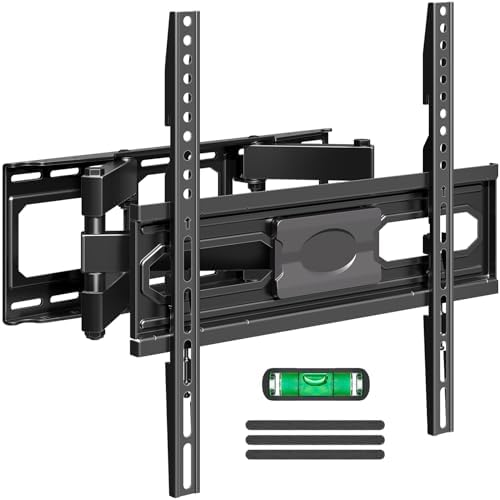
This adjustable mount is listed for most 32- to 65-inch TVs weighing up to 99 pounds, with VESA patterns from 100 × 100 mm to 400 × 400 mm. It swivels up to 45 degrees in either direction, tilts 5 degrees up or 10 degrees down, and offers 3 degrees of leveling adjustment.
Its stated features focus on aiming the screen and reducing glare rather than providing a specific long extension distance. That can make it a practical fit when you want to adjust the viewing angle from nearby seats, but the product information does not give a maximum extension measurement. If you need to pull your TV far from the wall or reach around a corner, compare the Perlegear long-arm options instead.
The product description says not to install the mount on drywall alone. It also notes that M8 × 45 mm TV screws are not included, though they may be available on request. A paper mounting template and level tool are listed as included, but confirm that the required hardware suits your TV before starting installation.
Pros:
- Swivels up to 45 degrees in either direction.
- Includes tilt and leveling adjustment.
- Fits VESA patterns up to 400 × 400 mm and TVs up to 99 pounds.
- Includes a mounting template and level tool.
Cons:
- The supplied information does not state its maximum extension distance.
- M8 × 45 mm TV screws are not included, and drywall alone is not a suitable mounting surface.
Verdict: This is a reasonable option for swivel and tilt adjustment when long reach is not your priority, as long as you confirm the screw and wall requirements in advance.
How to Choose a Flexible TV Wall Mount
Check Your TV’s Size, Weight, and VESA Pattern
Start with the TV’s manual or manufacturer specifications. Confirm its screen size, weight without the stand, and VESA mounting pattern—the distance between the mounting holes on the back of the TV. A mount must support all three requirements. Being within the listed screen-size range alone does not guarantee a fit.
Match the Mount to Your Wall
Check what is behind the wall finish and how the mount is designed to attach. The products here specify wood studs, solid concrete, or brick in different combinations, and several say not to mount on drywall alone. Use the correct fasteners for the wall material, and follow the mount’s instructions. If you are unsure about the wall structure, get qualified help before drilling.
Choose Enough Extension for Your Room
A short extension can be enough to angle a TV toward a nearby chair. A long arm is more useful when the screen needs to reach around a corner or serve seating in different parts of the room. Compare both the maximum reach and the distance the mount retracts: these affect how far the TV can move and how close it sits to the wall when put away.
Compare Swivel, Tilt, and Leveling Range
Swivel helps aim the screen from side to side, while tilt can change its angle up or down to help with glare or viewing position. A post-installation leveling feature can correct a small tilt after mounting. Check the stated ranges against your room, since a mount with more extension does not always offer the exact tilt or swivel adjustment you need.
Leave Room for the TV to Move
Before installation, think about where the TV will travel as you extend, swivel, and tilt it. Consider nearby walls, furniture, windows, and cable connections. A long arm can provide more placement freedom, but you still need a clear path for the screen and enough room to reach its controls and connections.
Plan for Installation and Hardware
Review what comes in the box, including the mounting template, wall fasteners, spacers, and TV screws. Hardware requirements can differ by TV and wall type; the MOUNTUP description, for example, notes that M8 × 45 mm TV screws are not included. Do not substitute fasteners based on appearance alone. If the instructions call for a different anchor or screw, confirm compatibility with the mount maker or an installer.
Frequently Asked Questions
How do I know whether a TV wall mount fits my TV?
Compare your TV’s size, weight, and VESA pattern with the mount’s listed limits. All three must be compatible. Check the TV manual or manufacturer’s product information for its weight and mounting-hole spacing.
Can I install a flexible TV mount on drywall alone?
Do not assume that you can. Several mounts in this guide explicitly say they are not for drywall-only installation. Follow the product instructions for your wall type, use the specified mounting method, and get help if you cannot identify a suitable support point.
Is a longer TV mount arm always better?
No. A longer arm is helpful when you need the TV to reach around a corner or face different seating areas. If you only need a small viewing-angle adjustment, a shorter mount may be simpler for your layout. Also consider how far the mount retracts and whether the extended screen will have a clear path.
What does VESA mean?
VESA refers to the spacing of the mounting holes on the back of a TV, measured horizontally and vertically. A mount lists the VESA patterns it supports. Match those measurements to your TV before ordering.
Can a full-motion mount help reduce screen glare?
Tilt adjustment can change the screen angle, which may help with glare in some rooms. Swivel lets you aim the screen toward a different seat. The amount of adjustment varies by mount, so check the listed tilt and swivel ranges.
What should I do if the included TV screws do not fit?
Do not force a screw into the TV. Check the TV manual for the correct screw size and length, then contact the mount maker or a qualified installer to confirm the right hardware. Some product descriptions note that additional screws or parts may be available by request.
Final Recommendation
For the most reach, the Perlegear 37.4-inch model stands out, with its long extension, 110-pound limit, and corner-friendly swivel range. If you need a long arm that supports a TV up to 70 inches, consider the 31.65-inch Perlegear model instead. For a more moderate setup, the USX MOUNT and Mounting Dream options offer useful full-motion adjustment, while the MOUNTUP is worth considering when swivel and tilt matter more than a stated long extension. Before buying any of them, verify your TV’s VESA pattern and weight, and make sure the mount is suitable for your wall.
